6 TubeBuddy Alternatives for A/B Tests and SEO (2026)
By ThumbnailMaker Team · · 14 min read
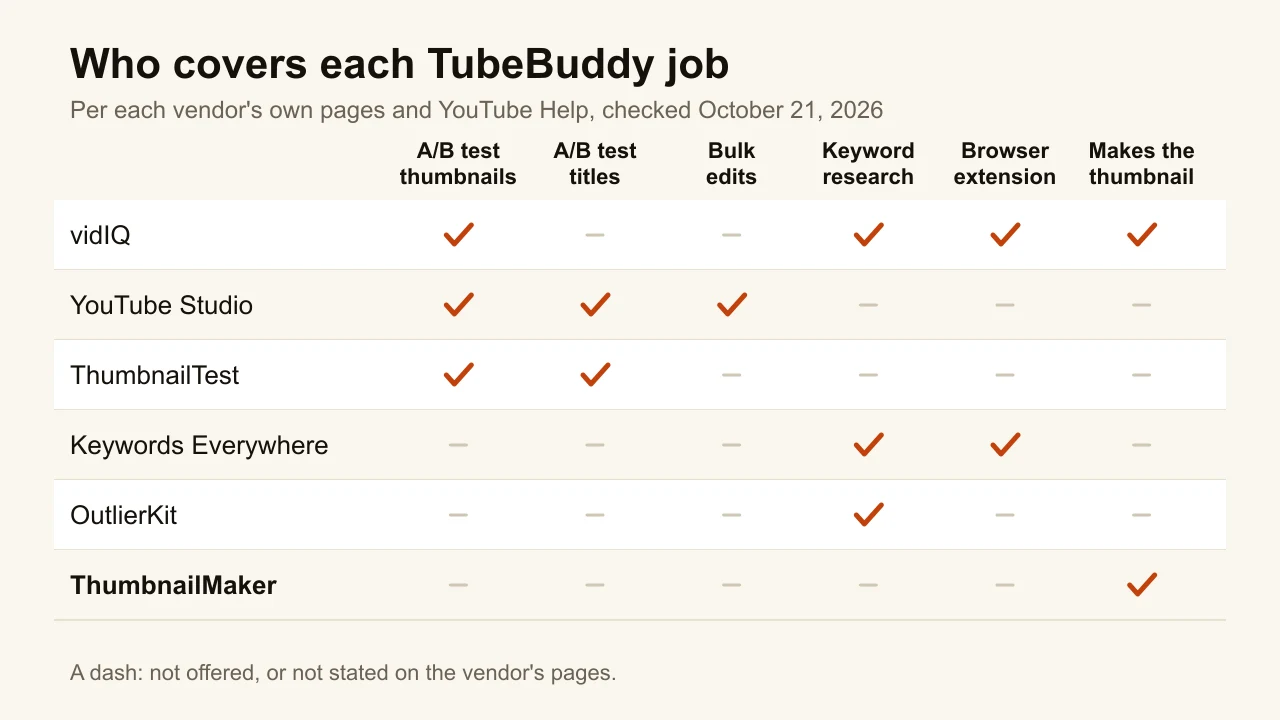
Quick answer: vidIQ is the closest TubeBuddy alternative: the same browser-extension format, keyword research and tag scores, with a free plan and Boost at $16.58 a month billed yearly. YouTube Studio now does two of TubeBuddy's signature jobs for free: Test & Compare runs A/B tests of up to three thumbnails or titles, and bulk editing changes titles, descriptions and tags across many videos at once. ThumbnailTest is the dedicated A/B testing tool, with unlimited hourly or daily tests from $49 a month. Keywords Everywhere adds search volume to YouTube for $7 a month, billed yearly. OutlierKit covers keyword and title research. ThumbnailMaker makes the three thumbnails a test needs, and that is all it does. If you mainly used TubeBuddy for A/B tests, try YouTube's own test before paying for anything. Prices were checked on each vendor's page on October 21, 2026.
TubeBuddy is three products sold as one. Its pricing page lists more than 50 tools, but most people pay for one of three things: thumbnail and title A/B tests, bulk editing of a back catalogue, or keyword research inside YouTube. The A/B tests sit on Legend, its top creator plan, which costs $32.99 a month, per TubeBuddy's pricing page.
That changes the question. Since YouTube added its own A/B test and bulk editing to Studio, part of what TubeBuddy charges for is now free. This list is sorted by which TubeBuddy job each tool replaces. ThumbnailMaker is our product and sits last: it makes the thumbnails you test, and it does not test or edit anything on YouTube. The other tools are described from their own pages, not from our use of them.
What kinds of TubeBuddy alternatives are there?
The six tools fall into three families:
- Another all-in-one extension: vidIQ, the only one shaped like TubeBuddy.
- The A/B test and bulk-edit replacements: YouTube Studio and ThumbnailTest.
- Single-job tools: Keywords Everywhere and OutlierKit for keywords and titles, ThumbnailMaker for making the thumbnails to test.
| Tool | Best for | Cheapest paid plan | Free option | The TubeBuddy job it replaces |
|---|---|---|---|---|
| vidIQ | The closest extension swap | $16.58/mo, billed yearly | Free plan, 150 AI credits | Keywords, tags, extension |
| YouTube Studio | Free A/B tests and bulk edits | Free | Built into YouTube | A/B tests, bulk edits |
| ThumbnailTest | Unlimited, hourly A/B tests | $49/mo | 14-day money-back | A/B tests |
| Keywords Everywhere | Search volume inside YouTube | $7/mo, billed yearly | Free extension, no volume | Keyword research |
| OutlierKit | Keywords, titles and tags research | $49/mo, or $24.92/mo yearly | 30 trial credits, no card | SEO Studio, keywords |
| ThumbnailMaker | Making the three versions to test | $12/mo | Free previews, no card | Thumbnail generator |
1. vidIQ, best for the closest extension swap
vidIQ is the only tool here built the same way as TubeBuddy: a free browser extension that shows view velocity, SEO scores and tags on any video, plus a web app with keyword research, daily ideas, title and description help, an AI coach and an AI thumbnail maker. Its homepage also lists Shorts clipping and script writing. Where TubeBuddy leans on bulk tools and testing, vidIQ leans on AI generation and coaching. Its homepage mentions A/B testing alongside its thumbnail templates; it does not list bulk metadata editing.

Key features
- Free extension with SEO scores, tags and view velocity
- Keyword research with search volume and competition scores
- Daily ideas, AI coach, title and description help
- AI thumbnail maker and Shorts clipping
- MCP server on every plan, Free included
Best for
- TubeBuddy users who lived in the extension's keyword and tag panels
- Creators who want AI ideas more than bulk tools
Pricing
- Free: 150 AI credits a month
- Boost: $16.58 a month, billed $199 yearly, 2,000 AI credits
- Max: $39 a month, billed $468 yearly, 6,000 AI credits
Pros
- Same format as TubeBuddy, so the switch is short
- A real free plan
Cons
- No bulk find-and-replace advertised
- Monthly prices are not shown on its plans page, only yearly
2. YouTube Studio, best for free A/B tests and bulk edits
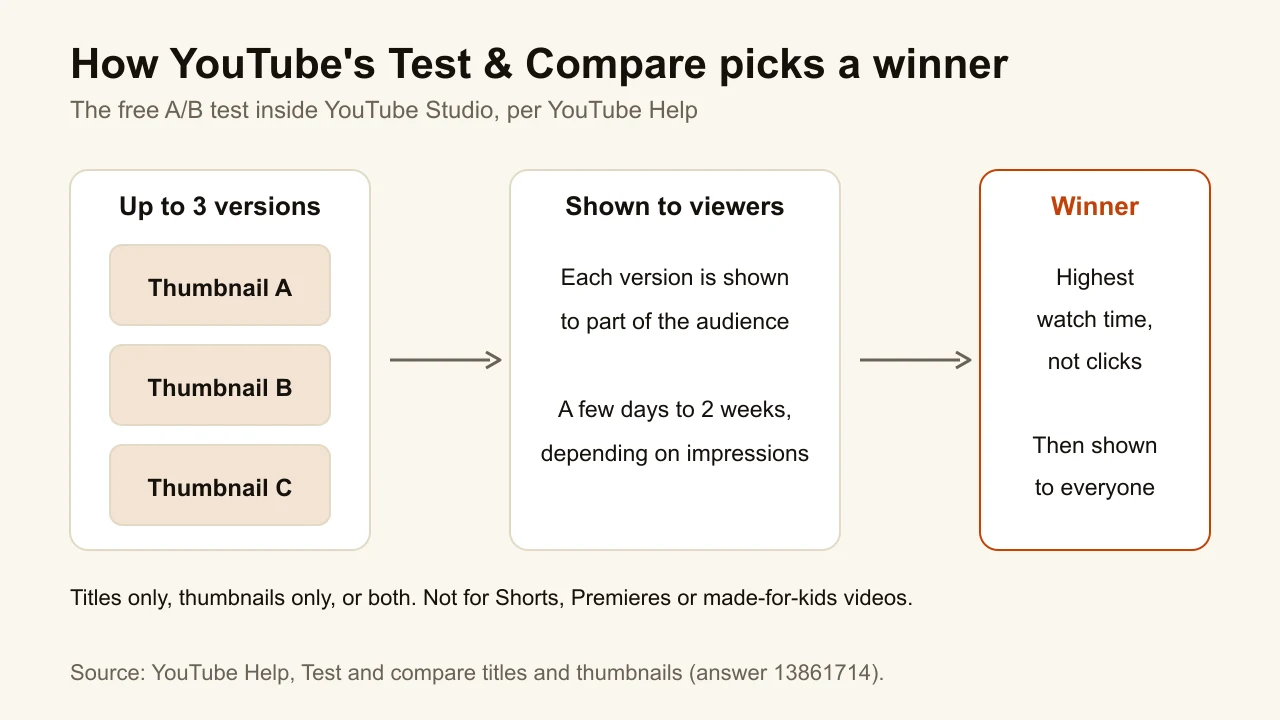
Two of TubeBuddy's best-known tools now exist inside YouTube Studio at no cost. Test & Compare tests up to three titles, three thumbnails or three combinations on one video and keeps the one with the highest watch time. Tests usually finish within two weeks. Bulk editing lets you tick several videos in Content and change the title, description, tags, visibility, category, comments and more than a dozen other fields in one go. What Studio lacks is TubeBuddy's find-and-replace inside descriptions: its help page describes setting a new value, not editing part of one.
Key features
- Test & Compare: titles only, thumbnails only, or both, up to three
- The winner is picked by watch time
- Bulk edits to title, description, tags and 14 other fields
- Free with any channel
Best for
- Anyone who paid for TubeBuddy Legend mainly for A/B tests
- Channels updating tags or descriptions on many videos at once
Pricing
- Free
Pros
- First-party test: real viewers, YouTube's own measure
- Nothing to install or connect
Cons
- Computer only, advanced features required, no Shorts, Premieres or made-for-kids videos
- No find-and-replace across descriptions
- A test can take up to two weeks to finish
3. ThumbnailTest, best for unlimited, hourly A/B tests
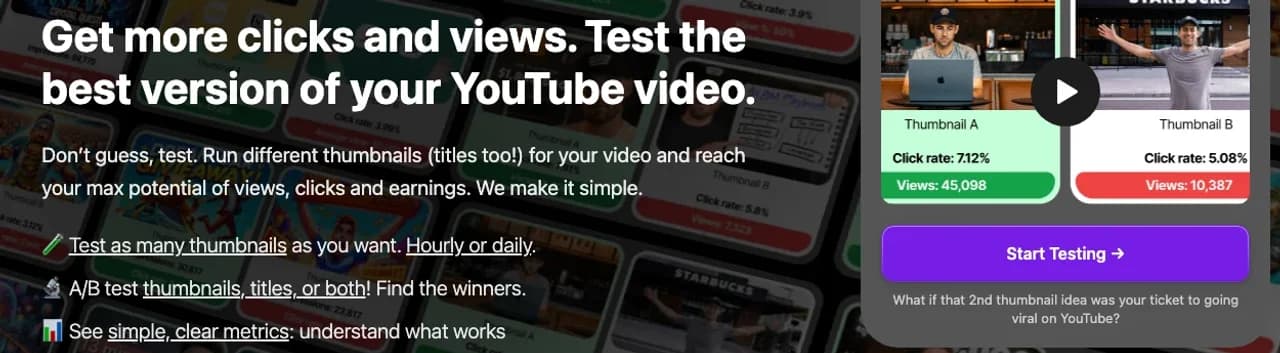
ThumbnailTest does one thing: A/B tests of thumbnails, titles or both on your YouTube videos. Its plans include unlimited tests, run daily or hourly, with analytics under every test that combine YouTube's numbers and its own. Higher plans add more channels, API access, Zapier and team seats. It is the closest match for the TubeBuddy Legend user whose whole reason to pay was testing, and who wants more control than YouTube's own test gives: more variants over time, hourly rotation, a team.
Key features
- Unlimited thumbnail, title and title-plus-thumbnail tests
- Daily or hourly rotation
- Analytics under every test
- API access and Zapier on Pro and Business
Best for
- Channels that test every upload, not once a quarter
- Teams that share test results across several channels
Pricing
- Basic $49 a month (1 channel), Pro $69 (up to 3), Business $99 (up to 10)
- Yearly: two months free on Basic, three on Pro and Business
- 14-day money-back guarantee; Basic is 40% less for channels under 10,000 subscribers, on application
Pros
- Built for testing and nothing else
- Unlimited tests on every plan
Cons
- No keyword research, no bulk edits
- At $49 a month, more than TubeBuddy's Legend price
4. Keywords Everywhere, best for search volume inside YouTube
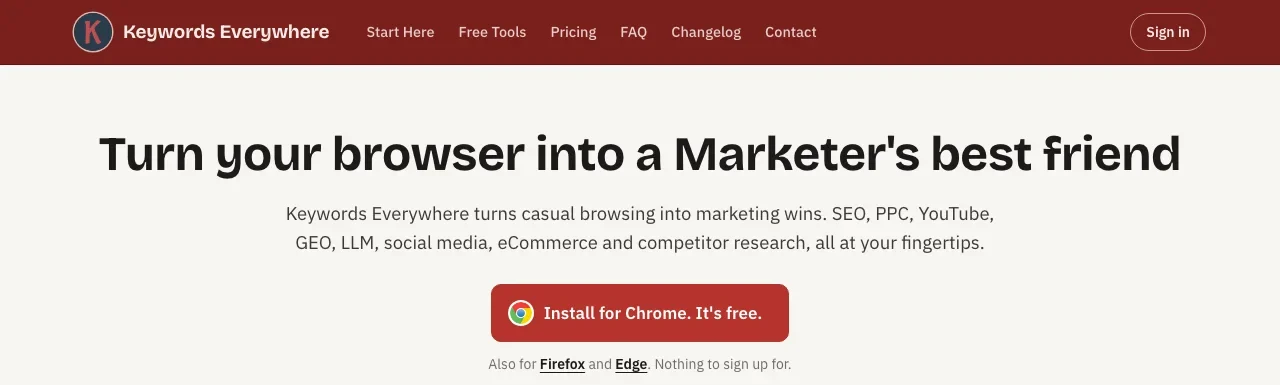
Keywords Everywhere is a browser extension for Chrome, Firefox and Edge that adds keyword data to the sites you already use, YouTube included. The free version needs no sign-up and shows keyword lists, YouTube insights and tags. Search volume, cost per click, competition and 12-month trends cost credits: one credit per keyword shown. It replaces TubeBuddy's Keyword Explorer for creators who want a number next to a search, not a full suite. Nothing else is in the box: no testing, no bulk tools, no channel analytics.
Key features
- Free extension for Chrome, Firefox and Edge, no sign-up
- YouTube insights and tags in the free version
- Search volume, CPC, competition and 12-month trends on credits
- Also works on Google, Amazon, Bing and Etsy
Best for
- Creators who only used TubeBuddy for keyword scores
- Anyone who wants volume data without a monthly suite
Pricing
- Bronze: $7 a month, billed $84 yearly, 100,000 credits a year
- Silver: $14 a month, billed $168 yearly, 400,000 credits
- Annual billing only; credits expire after one year
Pros
- The cheapest way to see YouTube search volume here
- Pay for the data you pull, not for features
Cons
- One search can use dozens of credits, since every related keyword shown counts
- Keyword data only
5. OutlierKit, best for keywords, titles and tags research
OutlierKit is a research tool that covers the part of TubeBuddy's SEO Studio most creators use before they publish: a keyword finder aimed at low-competition terms, idea scoring before you film, and title, description, tags and chapter tools. Its larger draw is research: outlier videos, single-channel competitor analysis and, on Pro, a niche mapped from one seed channel. It has no extension and does not touch your channel's settings, so there are no bulk edits.

Key features
- Keyword finder and outlier research, 2 credits each
- Idea scoring before you film
- Title, description, tags and chapters tools
- Competitor Studio on Pro and Max
Best for
- Creators who want research and metadata in one place
- Channels picking topics more than tweaking old uploads
Pricing
- Hobby: $49 a month, or $24.92 a month billed $299 yearly, 100 credits
- Pro: $99 a month, or $49.92 a month billed $599 yearly, 500 credits
- 30 trial credits, no card
Pros
- Research and metadata on one bill
- A trial that needs no card
Cons
- No A/B tests and no bulk edits
- Monthly Hobby costs more than TubeBuddy Legend
6. ThumbnailMaker, best for making the three versions to test
A/B testing only helps if the versions are actually different. Three thumbnails with the same face in three colours test the colour, not the idea. ThumbnailMaker's Pro plan makes a Test & Compare pack: three concepts for the same video on three angles, the emotion, the object and a contrast, ready for YouTube's own test, which takes up to three. It replaces TubeBuddy's thumbnail generator, not its testing: the test itself runs in YouTube Studio or ThumbnailTest. It is our product, so the placement reflects one narrow job.

Key features
- Brief written from your video's link
- Test & Compare pack: three concepts on three angles (Pro and up)
- Text drawn in, read back and fixed if a letter is wrong
- Feed-size check with the duration-badge corner kept clear
- Correction by instruction, the rest of the image kept
Best for
- Channels that run YouTube's test but struggle to make three real options
- Creators who used TubeBuddy's thumbnail generator
Pricing
- Starter $12 a month for 40 thumbnails, Pro $39 for 100, Studio $99 for 300
- A pack of three counts as three thumbnails
- Up to four free previews with no card; downloading starts a 7-day free trial
Pros
- Three different ideas, not three colourways
- A free tester to compare candidates at feed size, no account
Cons
- Runs no tests and edits nothing on YouTube
- The pack needs Pro, $39 a month
How you'd do it here. Paste the video's link in the AI YouTube thumbnail maker and pick the three-concept pack. Put the three into the free YouTube thumbnail tester to see them side by side in a mock feed, then upload them to YouTube's Test & Compare. ThumbnailMaker's plans list what each tier includes.
How to choose a TubeBuddy alternative
Did you pay for TubeBuddy for the A/B tests?
Then start with YouTube's A/B testing, which is free and judges by watch time. Move to ThumbnailTest only if you need what YouTube does not do: hourly rotation, unlimited tests running across many videos, or a team view. Either way, a test is only as good as the options in it.
Do you edit your back catalogue in bulk?
YouTube Studio's bulk edit covers setting a field across many videos: tags, category, visibility, a whole new description. TubeBuddy's bulk find, replace and append, changing one link inside 300 descriptions, has no free equivalent in Studio's help pages. If that is your use, it may be the one reason to keep TubeBuddy.
Is a keyword score worth a monthly fee?
YouTube's own help page says tags "play a minimal role" in discovery. Keyword research still matters for titles, but a $7-a-month credit plan in Keywords Everywhere covers the number most people look at. vidIQ's free plan and OutlierKit's trial are the next step. The vidIQ alternatives are worth a look for anyone leaving both suites.
Are you optimising for clicks or for watch time?
YouTube's test picks the winner by watch time, not click-through rate, and that is the right call. A thumbnail that wins clicks and loses viewers is what YouTube reads as clickbait. Judge any testing tool by whether it shows watch time next to the click rate.
Frequently asked questions
Is there a free alternative to TubeBuddy?
Yes. YouTube Studio runs A/B tests of thumbnails and titles and bulk-edits video details for free. vidIQ has a free plan with 150 AI credits a month, and Keywords Everywhere's extension is free without the volume data.
Does YouTube have its own A/B testing now?
Yes. Test & Compare in YouTube Studio tests up to three titles, thumbnails or both on one video and keeps the version with the highest watch time. It works on a computer, needs advanced features turned on, and does not cover Shorts.
Is vidIQ better than TubeBuddy?
Neither is better across the board. vidIQ leans on AI ideas, coaching and generation; TubeBuddy lists bulk tools and A/B tests on its top plan. If you used TubeBuddy for testing, YouTube's free test may replace it better than vidIQ does.
How much does TubeBuddy cost?
As of October 21, 2026, Pro is $4.99 a month (or $47.90 a year) and Legend is $32.99 a month (or $26.39 a month billed yearly). TubeBuddy shows local prices outside the US, so check the page from where you are.
Do tags still matter on YouTube?
Very little. YouTube's help page says tags "play a minimal role" in discovery and matter mostly for commonly misspelled terms. The title, thumbnail and description carry far more weight.
How long should a thumbnail A/B test run?
Long enough for YouTube to decide. Its help page says tests usually finish within two weeks, sooner on videos with more impressions. Ending a test early on a hunch defeats the point of running it.
Keep the job, drop the bundle
Most TubeBuddy users can cancel and keep the job they cared about. Tests move to YouTube Studio, or ThumbnailTest if you test every upload. Keywords move to vidIQ or Keywords Everywhere. And the three thumbnails a test needs can come from ThumbnailMaker's pack.
Prices and features were checked on each vendor's own pages on October 21, 2026: vidIQ, ThumbnailTest, Keywords Everywhere, OutlierKit and TubeBuddy, with YouTube's features from YouTube Help.
ThumbnailMaker is an independent product and is not affiliated with, sponsored by, or endorsed by TubeBuddy, vidIQ, ThumbnailTest, Keywords Everywhere, OutlierKit or Google. TubeBuddy, vidIQ, ThumbnailTest, Keywords Everywhere, OutlierKit and YouTube are trademarks of their respective owners, named here only to compare publicly documented features. The other tools' descriptions come from their own pages, not from our testing. Details were accurate when written and may have changed since.
ThumbnailMaker Team — Guides from the people building ThumbnailMaker: thumbnail design, CTR, and what happens under the hood of an AI generator. Every number is checked against YouTube's own pages and dated.
Try it on your next video
Paste the video's link: the brief is written for you, then you generate. Previews are free, then a 7-day free trial.