12 YouTube Thumbnail Ideas With Examples and Prompts (2026)
By ThumbnailMaker Team · · 24 min read
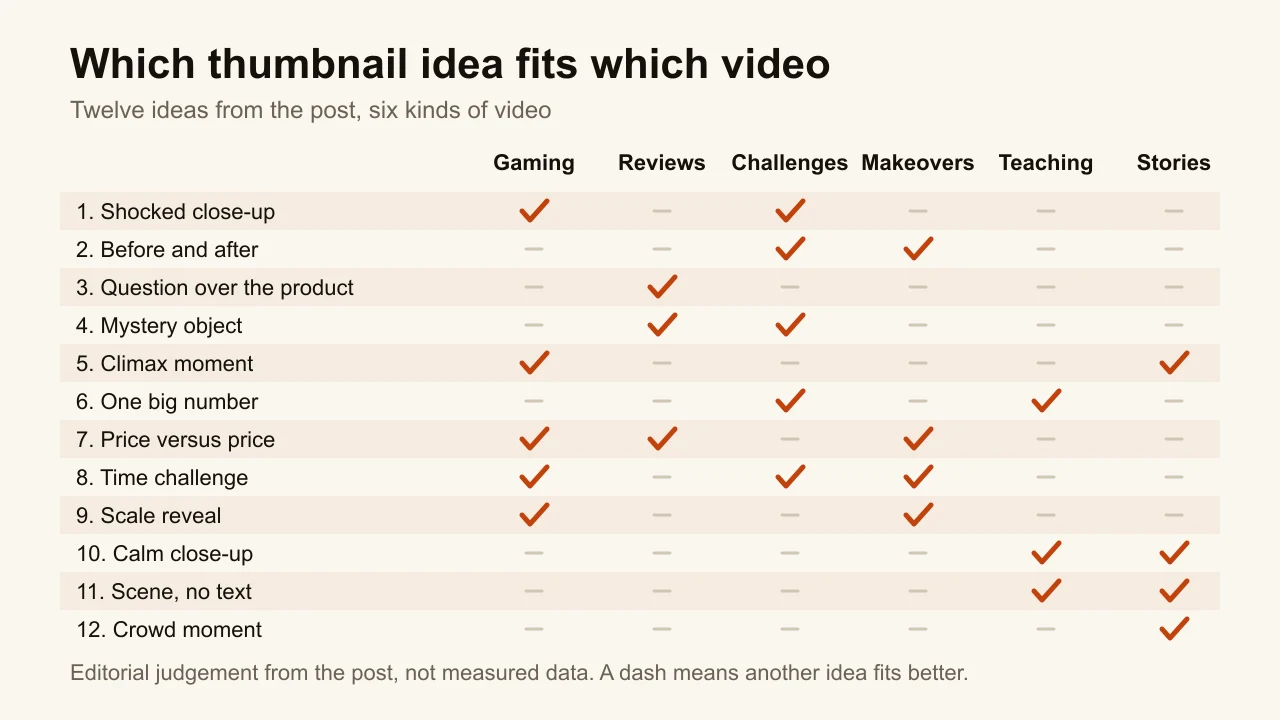
Quick answer: the best YouTube thumbnail ideas are formats, not pictures to copy. Each one shows the single thing the video delivers, with two to four words of text, never more than five, and the bottom-right corner left clear for YouTube's duration badge. Twelve formats cover most videos: a shocked close-up for a discovery, a before-and-after split for a transformation, a question over the product for a review, a mystery object for an unboxing, the climax frame for a highlight, one big number for stakes, two prices side by side for an upgrade, a day counter for a series, a scale reveal for a build, a calm close-up for teaching, a scene with no text for a story, and a crowd moment for an event. Each idea below comes with a real ThumbnailMaker example, the exact brief behind it, the videos it suits and the case where it backfires. Pick the format that matches the video's payoff.
Most lists of thumbnail ideas are galleries. You get a famous creator's thumbnail, a label like "use bright colours", and no way to make your own version. The idea is visible. The mechanism is not.
This list does it the other way round. Every example below is a real output from ThumbnailMaker, an AI YouTube thumbnail maker, and under each one is the brief that made it: what to type in the Describe box, the text, the lettering and the style. Change the subject, keep the mechanism. The examples come from the same prompt builder and model as a normal generation; a second run of the same brief will not be identical. None of them has been published on a real channel, so treat them as demonstrations of a format, not as proof of a click-through rate. The people in them are AI-generated.
What are the best YouTube thumbnail ideas and examples?
The twelve ideas fall into four families, grouped by what does the work in the frame:
- The face does the work. The shocked close-up (1) and the calm close-up (10). The expression is the hook.
- The contrast does the work. Before and after (2) and price versus price (7). Two halves, one gap between them.
- The stakes do the work. The question over the product (3), the mystery object (4), the climax moment (5), one big number (6) and the time challenge (8). Something is about to be won, lost or revealed.
- The scene does the work. The scale reveal (9), the scene with no text (11) and the crowd moment (12). The place or the moment carries it, with or without a face.
Here are the twelve YouTube thumbnail ideas side by side, with the videos each one suits, how much text it carries and the case where it backfires:
| Idea | Best for | Text on it | Backfires when |
|---|---|---|---|
| The shocked close-up | A discovery in a game or a challenge | 2 words | The video has no real surprise |
| Before and after | Fitness, makeovers, renovations | 2 words or none | The change is too small to see at feed size |
| The question over the product | Reviews and buying advice | A 2-word question | The verdict is obvious from the product |
| The mystery object | Unboxings and challenges | 2 words | The box holds nothing worth the wait |
| The climax moment | Gaming highlights, close finishes | 3 words | The win is not in the video |
| One big number | Money, records, stakes | The number only | The number is rounded up or invented |
| Price versus price | Budget upgrades and comparisons | Two prices | The two halves look alike when shrunk |
| The time challenge | Day-count series and survival runs | The day count | Every episode looks the same |
| The scale reveal | Builds, DIY, faceless channels | 3 words | Nothing in the frame shows the size |
| The calm close-up | Teaching, commentary, faith content | 2 words | The face is generic and says nothing |
| The scene with no text | Stories, sermons, documentaries | None | The scene needs explaining to make sense |
| The crowd moment | Live events, music, worship | None | The crowd is small or the frame is dark |
1. The shocked close-up, for discovery and reaction videos
The face takes half the frame, the mouth is open, and the reason for the shock is visible behind it. It is the format everyone recognises, and YouTube itself names "a shocked face" as an emotion casual viewers relate to in its thumbnail and title tips. It works because an expression still reads when the image is shrunk to the size of a matchbox, long after small details have gone. The shock has to point at something, though. A shocked face over nothing is a face, not a thumbnail.

- The brief: Describe "Extreme close-up of a young gamer in a black headset, jaw dropped and eyes huge, face lit violet and orange by a Minecraft cave full of glowing diamond ore behind him, shallow depth of field". Text on the image: RAREST DIAMOND. Lettering: Heavy condensed caps. Style: Shocked Reaction.
- Best for: a find, a reveal or a result the video actually shows. The shocked reaction thumbnail page has more on this one format.
- When it backfires: when every video on the channel uses it. Ten identical gasps in a row read as a template, and the viewer stops believing any of them.
2. Before and after, for transformations
The same subject twice, split down the middle: dull and flat on one side, bright and saturated on the other. The gap between the two halves is the story, so the viewer does not need to read anything to understand the promise. It appears in five of the eight ranking articles we read for this topic, and for once the popularity is earned. The rule that makes it work is contrast you can see at 168 pixels: posture, light and colour have to change, not just a detail.

- The brief: Describe "Split frame of the same man: on the left slumped and pale in a dim cluttered garage with one dumbbell, on the right lean, tanned and grinning in a bright fully equipped home gym, hard vertical split". Text: 90 DAYS. Lettering: Heavy condensed caps. Style: Before/After.
- Best for: fitness journeys, room and car makeovers, skill progress, a channel's own glow-up.
- When it backfires: when the "after" is barely different. A small change disappears at feed size, and the thumbnail reads as two similar photos.
3. The question over the product, for reviews
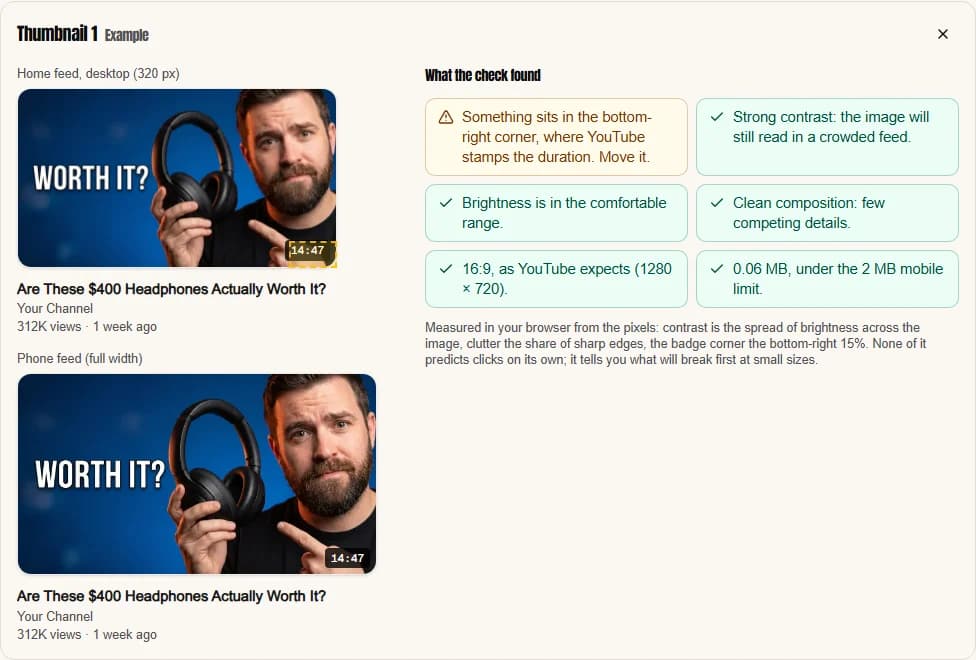
A person holds the product up, looks unconvinced, and two words ask the question the viewer already has: worth it? It turns a review into a verdict the viewer wants to hear. The product has to be sharp and recognisable, which is why the Tech / Review style keeps the background plain and uses a single accent colour. The doubt on the face matters as much as the product. An enthusiastic face answers the question before anyone clicks.
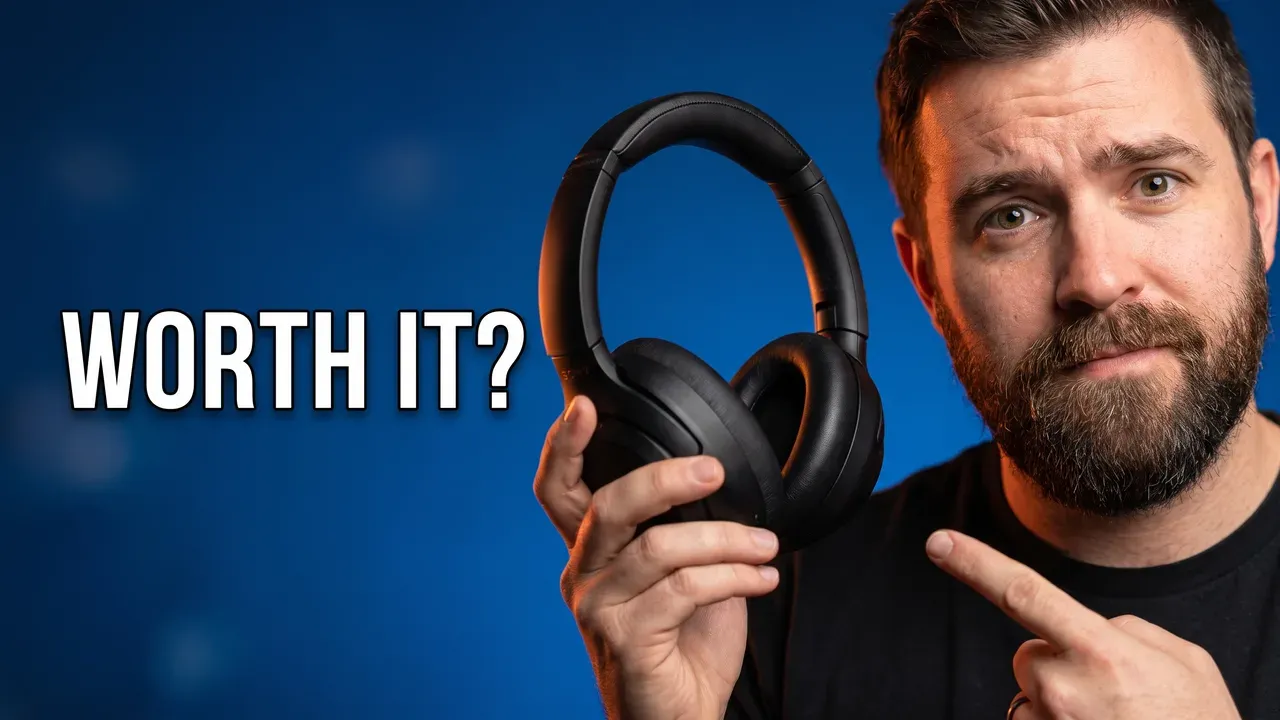
- The brief: Describe "A bearded tech reviewer holds premium black over-ear headphones up to the camera with one hand and points at them with the other, eyebrows raised in doubt, deep blue studio backdrop with a single orange rim light". Text: WORTH IT? Lettering: Bold sans-serif. Style: Tech / Review.
- Best for: reviews, "should you buy" videos, long-term tests.
- When it backfires: when the answer is obvious. Nobody wonders whether a flagship phone is good; they wonder whether it beats last year's.
4. The mystery object, for unboxings and challenges
Something is hidden, and the thumbnail shows only the container: a giant box, a locked case, a wrapped shape. Curiosity is the hook. The person in frame reacts to what is inside, so the viewer gets the emotion without the answer. This is the idea that most often tips into clickbait, and the line is simple: the video has to open the box and show something that earns the reaction. YouTube measures that in watch time, as the clickbait thumbnails post explains.
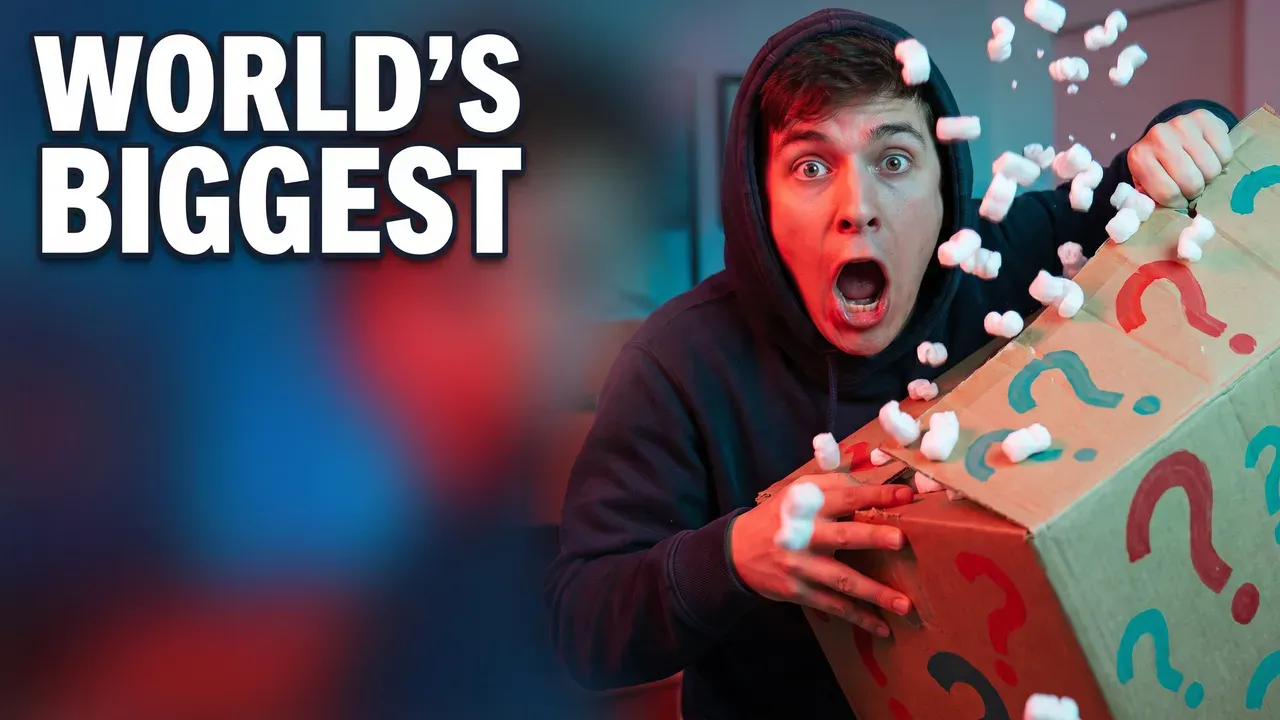
- The brief: Describe "A creator in a hoodie tears open a giant cardboard box covered in painted question marks, mouth open in shock, red and teal lighting, confetti of packing peanuts in the air". Text: WORLD'S BIGGEST. Lettering: Heavy condensed caps. Style: Shocked Reaction.
- Best for: unboxings, mystery buys, challenge videos with a reveal.
- When it backfires: when the box is the most interesting thing in the video.
5. The climax moment, for gaming highlights
Freeze the best second of the video. The final hit, the last-second win, the goal. The face shows the release of tension, and the text gives the one number that makes it extraordinary: 1 HP, one second left, the last player standing. The reflection in the glasses is the useful trick here: it keeps the cause of the scream in frame without adding a second subject. It is also the most honest of the high-energy ideas, because the moment has to exist in the video.

- The brief: Describe "A gamer in glasses and a headset screams in triumph at his screen, a glowing victory banner reflected in both lenses, neon pink and blue gaming room, sweat on his brow". Text: 1 HP WIN. Lettering: Heavy condensed caps. Style: Shocked Reaction.
- Best for: gaming clips, sports, speedruns, any video built around one moment. More ideas for this audience are on the thumbnails for gaming channels page.
- When it backfires: on a video that is mostly the build-up. If the climax is a few seconds of a long video, viewers who clicked for it leave early.
6. One big number, for money and stakes
A number the size of the frame, next to a face reacting to it. $100,000, 1,000 subscribers, 24 hours. A number survives being shrunk where a sentence does not: in the feed-size sheet further down, $100,000 is still legible at about 150 pixels wide. It also sets the stakes before the title is read. The number has to be the real one from the video. A rounded-up figure is the cheapest way to lose the viewer's trust in the first minute.
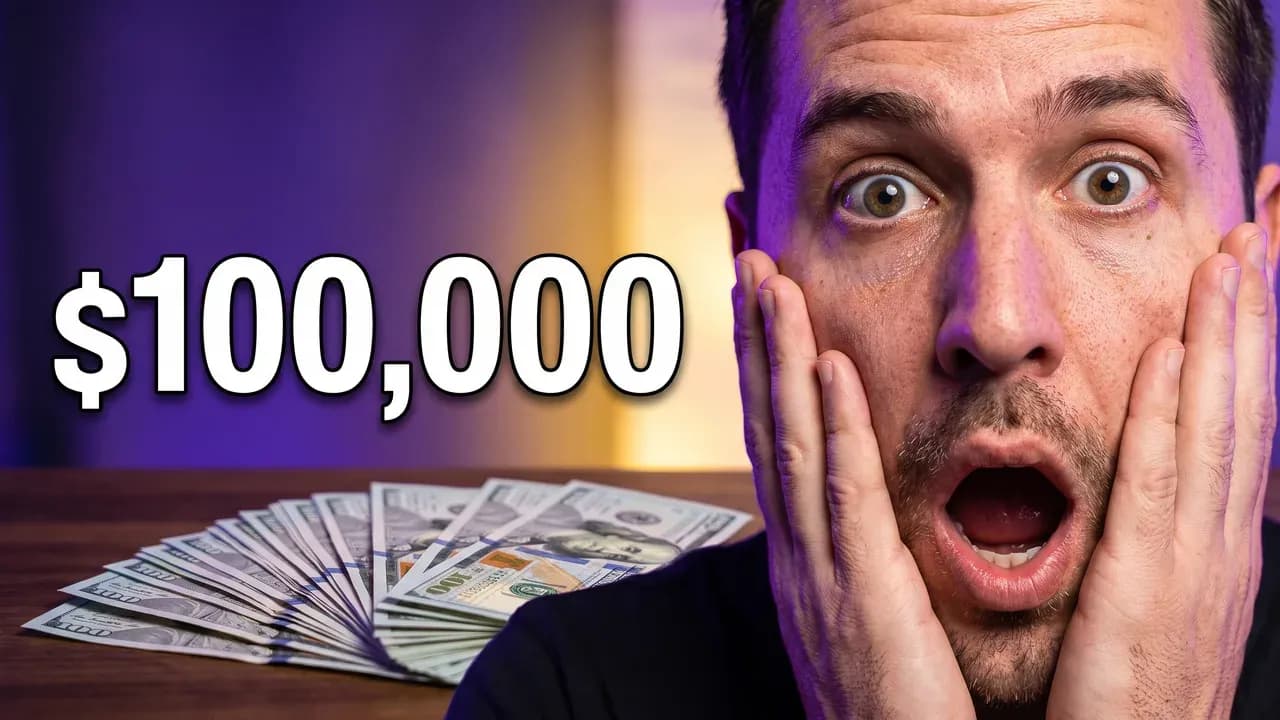
- The brief: Describe "A wide-eyed creator gasps with both hands on his cheeks beside a fanned stack of hundred-dollar bills on a dark table, dramatic top light, purple backdrop". Text: $100,000. Lettering: Bold sans-serif. Style: Shocked Reaction.
- Best for: challenges with a prize, finance explainers, records, milestones.
- When it backfires: when the number has nothing to do with the payoff, or when the video never mentions it.
7. Price versus price, for upgrades and comparisons
Two halves again, but the gap is a price. A cramped old setup on one side, a dream setup on the other, and the two numbers between them. The viewer instantly knows what the video compares and what is at stake for their wallet. This is a before-and-after that works without a transformation story, which makes it useful for review and buying-guide channels.
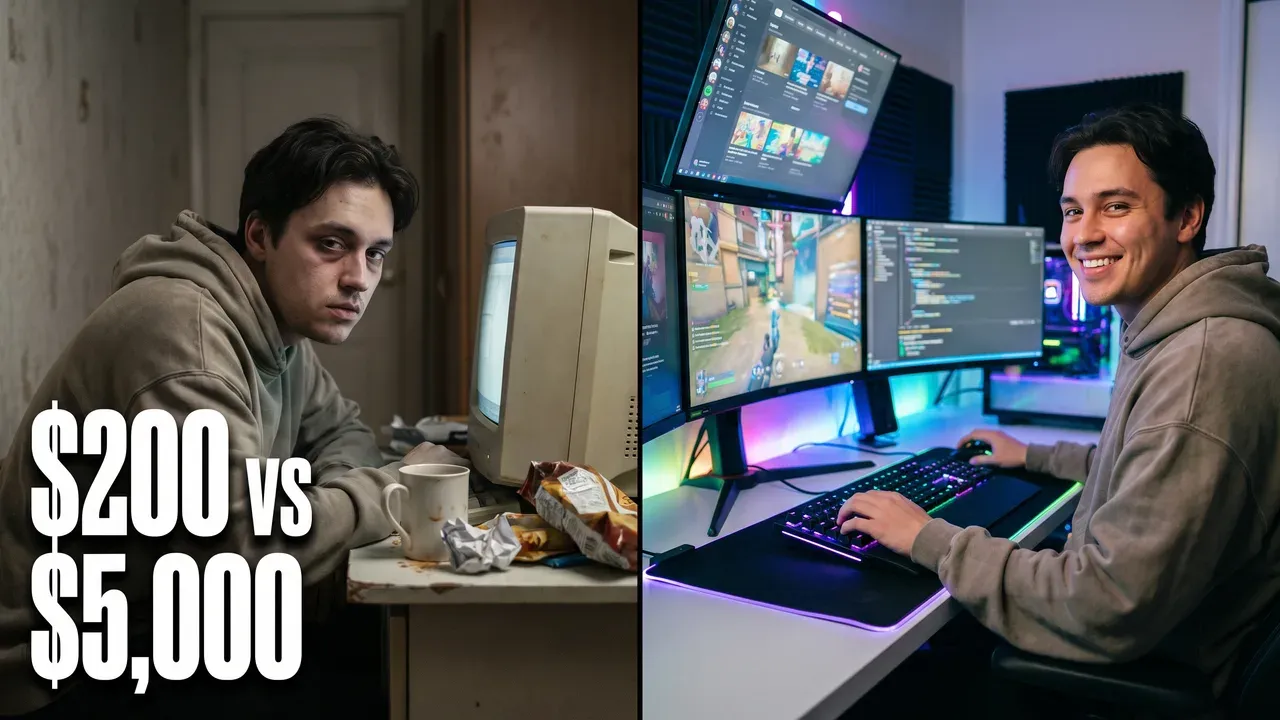
- The brief: Describe "Split frame: on the left a tired creator at a cramped desk with an old beige monitor and snack wrappers, on the right the same creator grinning at a bright RGB battlestation with three monitors". Text: $200 vs $5,000. Lettering: Heavy condensed caps. Style: Before/After.
- Best for: budget versus premium, cheap versus expensive, "I tried the cheapest" videos.
- When it backfires: when the two halves look alike once shrunk. Two similar desks with two prices make the viewer squint, and squinting is a scroll.
8. The time challenge, for day-count series
A number of days, a person in trouble, and a setting that shows what the days will be like. 100 DAYS on a dark forest full of zombies tells the viewer the format, the length and the danger in two words. It works especially well for series, because the counter becomes the channel's signature: day 50, day 100, day 365. For Minecraft thumbnails, it is the format the genre is known for.

- The brief: Describe "A terrified young player in a headset holds a torch at night in a blocky Minecraft forest, red-eyed zombies closing in from the darkness behind him, torchlight on his face". Text: 100 DAYS. Lettering: Heavy condensed caps. Style: Shocked Reaction.
- Best for: survival series, habit challenges, "I did X every day" videos.
- When it backfires: when every episode in the series uses the same picture. Keep the counter and the layout, change the threat.
9. The scale reveal, for builds and faceless channels
Show the finished thing, huge, with something small in the frame for scale. A castle next to a dirt hut, a garden next to the shovel, a model next to a hand. The size does the work a face would do elsewhere, which makes this the best idea on the list for channels that never show a face. The scale reference is the part people forget. Without it, a giant build looks like a small one photographed closely.

- The brief: Describe "A towering white quartz Minecraft castle glowing at sunset, a tiny dirt hut in the foreground for scale, a blocky player character pointing up at it in awe". Text: I BUILT THIS. Lettering: Heavy condensed caps. Style: none.
- Best for: builds, DIY, art and craft, renovation results, faceless channels.
- When it backfires: when there is no reference object. The frame then shows a nice picture with no sense of effort.
10. The calm close-up, for teaching and commentary
Not every video should scream. A teacher, a commentator or a preacher earns the click with calm intensity: direct eye contact, warm light, an object that tells you the subject. Two words of text name the topic. This idea suits channels whose audience comes back for the person. It is also where AI faces fail most often, because a smoothed, waxy face reads as fake at once; the Expressive Close-up style asks for natural skin texture for that reason.
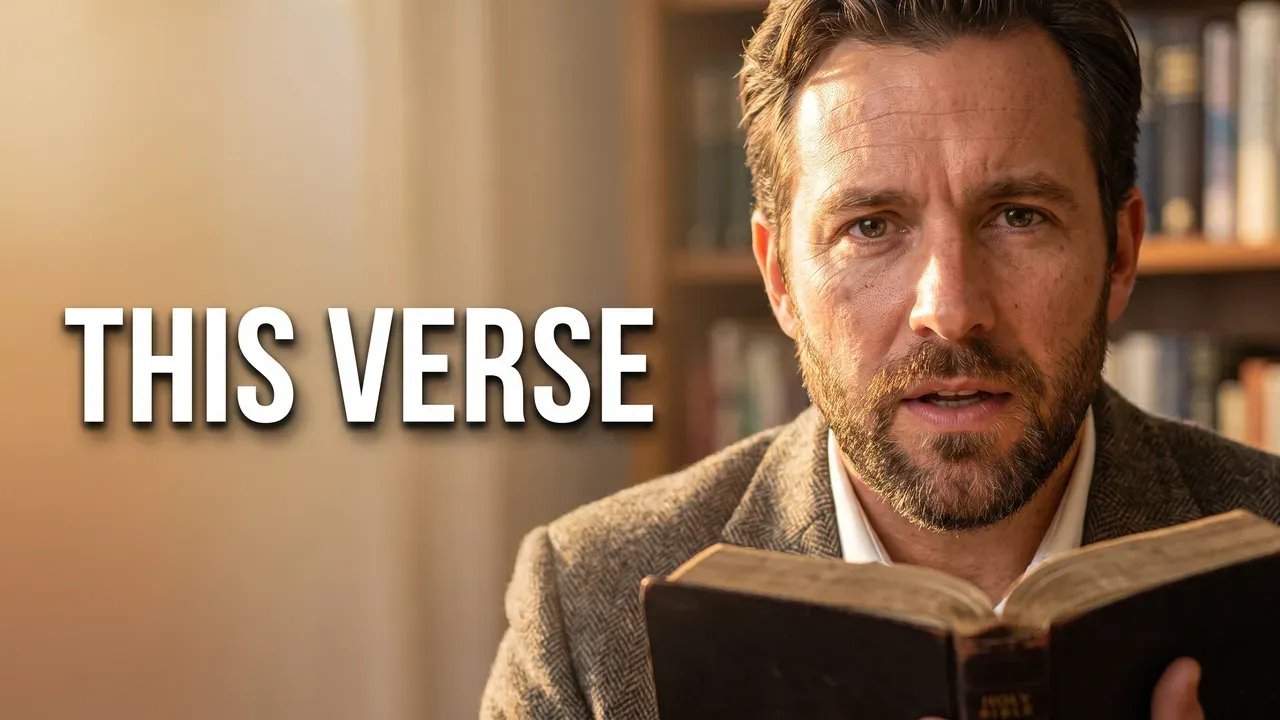
- The brief: Describe "A warm close-up of a man in a tweed jacket holding an open Bible, speaking to the camera with calm intensity, sunlit study with bookshelves softly out of focus behind him". Text: THIS VERSE. Lettering: Bold sans-serif. Style: Expressive Close-up.
- Best for: tutorials, essays, commentary, faith content, interviews.
- When it backfires: when the face is generic. A calm face that could belong to any video gives no reason to pick this one. The first version of this example used a thin serif font and was unreadable when shrunk; the brief now asks for a heavy sans.
11. The scene with no text, for stories and sermons
Sometimes the strongest thumbnail has no words at all. A preacher mid-sentence in a stone church, a hiker on a ridge, a cook at the moment the pan flames. The title, shown next to the thumbnail, does the explaining. With no text, the image has the whole frame, and it reads as a moment rather than an advert. This is the idea to try when a video's text keeps repeating its title.
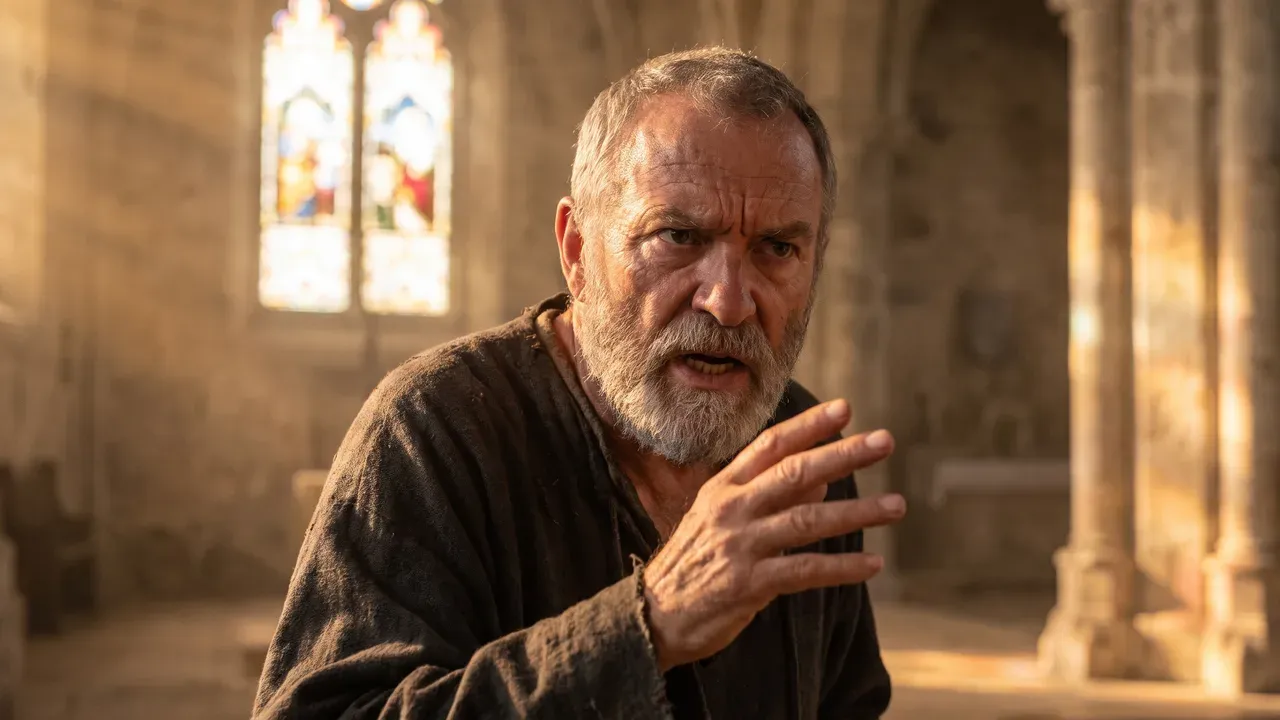
- The brief: Describe "A grey-bearded preacher mid-sentence with one hand raised in a sunlit stone church, a stained-glass window glowing behind him, dust in the light beams". Text: none. Style: Expressive Close-up.
- Best for: storytelling, sermons, documentaries, travel, slow vlogs.
- When it backfires: when the scene needs a caption to make sense. If you have to explain it, add the two words.
12. The crowd moment, for live events and worship
The camera turns from one person to a shared moment: hands raised, stage lights, a crowd in soft focus. It promises an experience rather than information, which is what live music, conferences, sports and worship videos actually sell. The person in front keeps it from becoming a stock photo of a crowd. Light matters more here than anywhere else, because a dark venue shrinks to a black rectangle.

- The brief: Describe "A worship leader with eyes closed and hands raised on a warm stage, golden haze and soft spotlights, a blurred congregation with raised hands in the foreground, a single photograph filling the whole frame edge to edge with no graphic shapes, panels or borders". Text: none. Style: Expressive Close-up.
- Best for: concerts, events, conferences, worship services, sports crowds.
- When it backfires: when the venue is dark or the crowd is small. Both read as empty once shrunk.
Which thumbnail ideas did we leave out on purpose?
Three ideas appear on most lists and are not on this one, by choice. In our view, the red arrow and circle pointing at a detail is a crutch: if the detail needs an arrow to be seen, it is too small to be the subject. The collage of four images in one frame splits the eye four ways, and at feed size it reads as none of them. The fake screenshot, a notification or a message that never existed, is a promise the video cannot keep, and YouTube's thumbnail policy bans thumbnails that mislead viewers about what they are about to see. One focal point beats a collage, every time.
How to choose a YouTube thumbnail idea for your video
What is the one thing the video delivers?
Start from the payoff, not the topic. A video about a new phone can be a question over the product (3) if it ends with a verdict, price versus price (7) if it compares models, or a scale reveal (9) if it is about the size. Say the payoff in one sentence. The idea whose "best for" matches that sentence is the one to make first. The six steps for a thumbnail that gets clicks start from the same question.
Is there a face, and does it have a reason to react?
A face is the strongest hook in the feed, but only with a cause in frame. If the video has a real surprise, use the shocked close-up (1) or the mystery object (4). If the person is the reason people watch, the calm close-up (10). If there is no face at all, go straight to the scale reveal (9) or the scene with no text (11); they were made for that.
What about cooking, beauty, podcast and vlog channels?
The examples above lean on gaming and faith content, but the formats are not tied to a niche. A cooking channel uses the climax moment (5) for the finished dish and before and after (2) for raw against cooked. A beauty channel uses before and after for a look and the question over the product (3) for a review. A podcast uses the calm close-up (10) of the guest with two words naming the topic. A vlog uses the scene with no text (11) or the crowd moment (12) when the place is the point. In each case the brief changes, not the mechanism.
Is the video part of a series?
Then the idea matters less than keeping it. A series needs a layout people recognise in the feed: the same counter position, the same lettering, a changing threat. The time challenge (8) is built for this. Pick the font once, at feed size; the best fonts for YouTube thumbnails are compared at 168 pixels for exactly that reason.
Can you test three ideas instead of picking one?
For a video that matters, yes. YouTube's A/B Testing runs up to three thumbnails against each other and picks the winner on watch time, not on clicks, over up to two weeks. Three variations of one idea teach you little. Three different ideas, say a shocked close-up, a big number and a scene with no text, tell you which family your audience answers to. The Three to test mode in the AI YouTube thumbnail maker, a Pro plan feature, makes three different concepts for the same video in one go, and adding them to the A/B test takes a minute in YouTube Studio.
Does it still read at 168 pixels?
That is the last question, and it rules out more ideas than any other. In the suggested column on desktop a thumbnail is about 168 pixels wide. The design rules that survive that size are the same for every idea: one subject, strong contrast between it and the background, and two to four words. Here are all twelve examples shrunk to roughly that size.
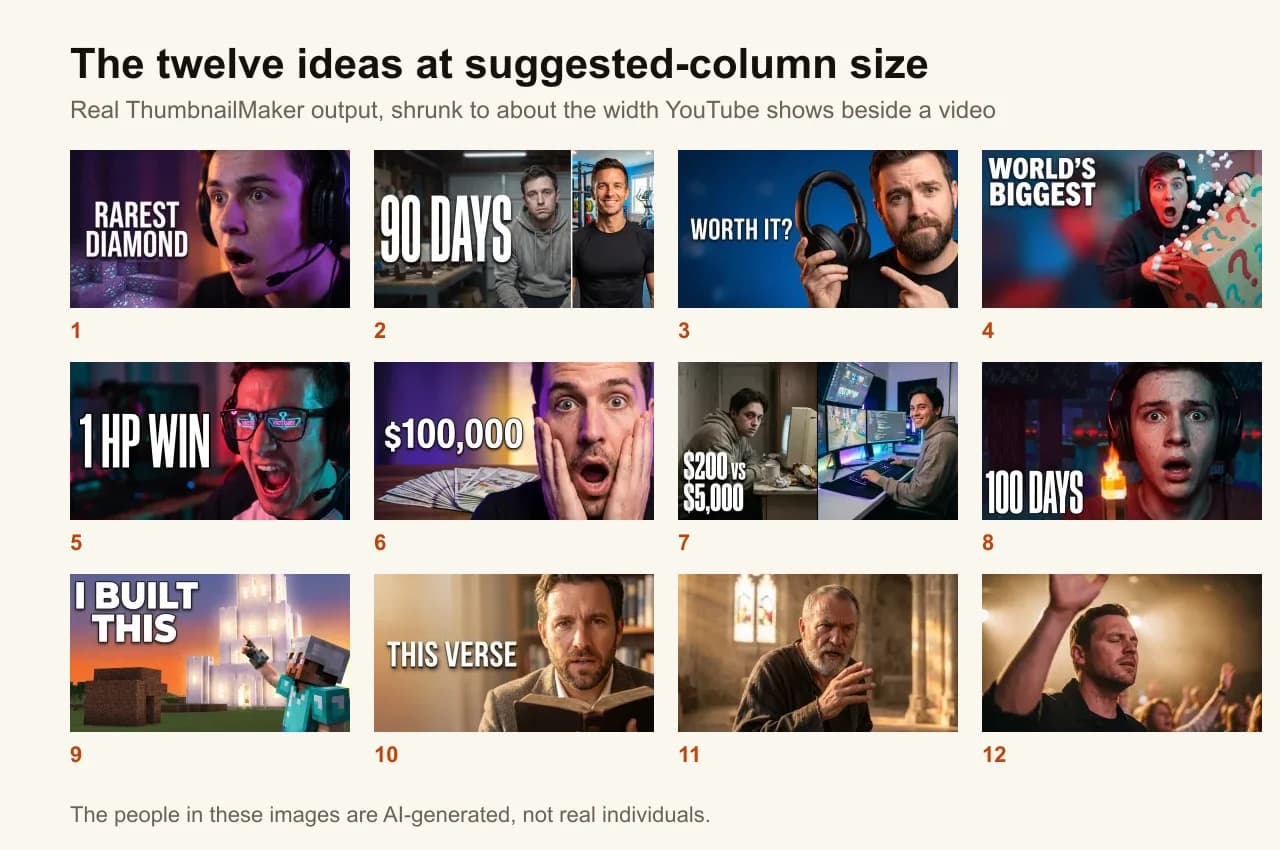
To check your own, the free YouTube thumbnail tester puts your image in a mock feed at both sizes, next to a title, with the duration badge drawn in, and flags a busy badge corner and weak contrast.
Frequently asked questions
Where can I find YouTube thumbnail ideas?
Start with the videos that outperformed their own channel's average in your niche: the format that won there is the idea worth borrowing, not the picture. A simple method: open a channel the size of yours, go to its Videos tab, sort by Popular, and note which of the twelve formats the videos far above its usual views use. YouTube Studio's research and Audience tabs show what your own viewers watch, and YouTube's thumbnail and title tips point to them for exactly this. Galleries on Pinterest or Behance are good for visual style, weaker for knowing what gets clicked.
Can ChatGPT make a YouTube thumbnail?
Yes. ChatGPT can generate a YouTube thumbnail image from a text description, and it is a reasonable way to sketch a first idea. Before uploading, check three things. The shape must be 16:9: YouTube recommends 3840 × 2160 and still accepts 1280 × 720, so an image in another landscape shape has to be cropped, which moves the subject. Every word must be spelled correctly, because image models can misspell text. And the file has to fit YouTube's limits on custom thumbnails: 2 MB when you upload from the phone app, 50 MB on desktop. ThumbnailMaker does the shape and the spelling check for you; like any image model, two runs of the same brief still differ.
What makes an attractive YouTube thumbnail?
One subject, strong contrast between that subject and the background, two to four words of text at most, and a promise the video keeps. Those four things are what keep a thumbnail readable in half a second at 168 pixels, which matters more than any colour choice. YouTube's own thumbnail and title tips make the same case from the other side: 90% of its best-performing videos have custom thumbnails, and it advises against designs "too complex" to read.
What is not allowed in a YouTube thumbnail?
YouTube's thumbnail policy rules out sexual imagery and nudity, violent imagery meant to shock or disgust, graphic imagery with blood or gore, vulgar or lewd language, and "a thumbnail that misleads viewers to think they're about to view something that's not in the video". A thumbnail that breaks it is removed and may bring a strike; a first violation usually gets a warning (policy page checked 19 October 2026). Bold is fine. Misleading is not.
Can I copy another channel's thumbnail idea?
You can use the same format: a split screen, a day counter or a shocked face belong to no one, and every niche reuses them. You cannot reuse their actual image, their artwork or their face. Copy the mechanism, then make it about your own video.
Should every YouTube thumbnail have text?
No. Text should add something the image cannot say. If it repeats the title, cut it. Two of the twelve ideas above, the scene and the crowd moment, use no text at all, and they read faster for it. When you do add words to an image you already have, the free thumbnail text editor shows the result at feed size as you type.
How many thumbnail ideas should I try for one video?
Three, if the video matters and YouTube's A/B Testing is available on your channel; it accepts up to three. For everyday uploads, one well-chosen idea is enough, and the click-through rate against your own channel's average will tell you whether it worked. What a good CTR looks like explains which number to compare it with.
ThumbnailMaker is an independent product and is not affiliated with, sponsored by, or endorsed by YouTube, Google, Mojang or Microsoft. YouTube and Minecraft are trademarks of their respective owners, named here only to describe the videos these ideas suit. YouTube's policies were checked on its Help pages on 19 October 2026 and may have changed since.
ThumbnailMaker Team — Guides from the people building ThumbnailMaker: thumbnail design, CTR, and what happens under the hood of an AI generator. Every number is checked against YouTube's own pages and dated.
Try it on your next video
Paste the video's link: the brief is written for you, then you generate. Previews are free, then a 7-day free trial.