6 Best AI Image Generators for YouTube Thumbnails (2026)
By ThumbnailMaker Team · · 18 min read
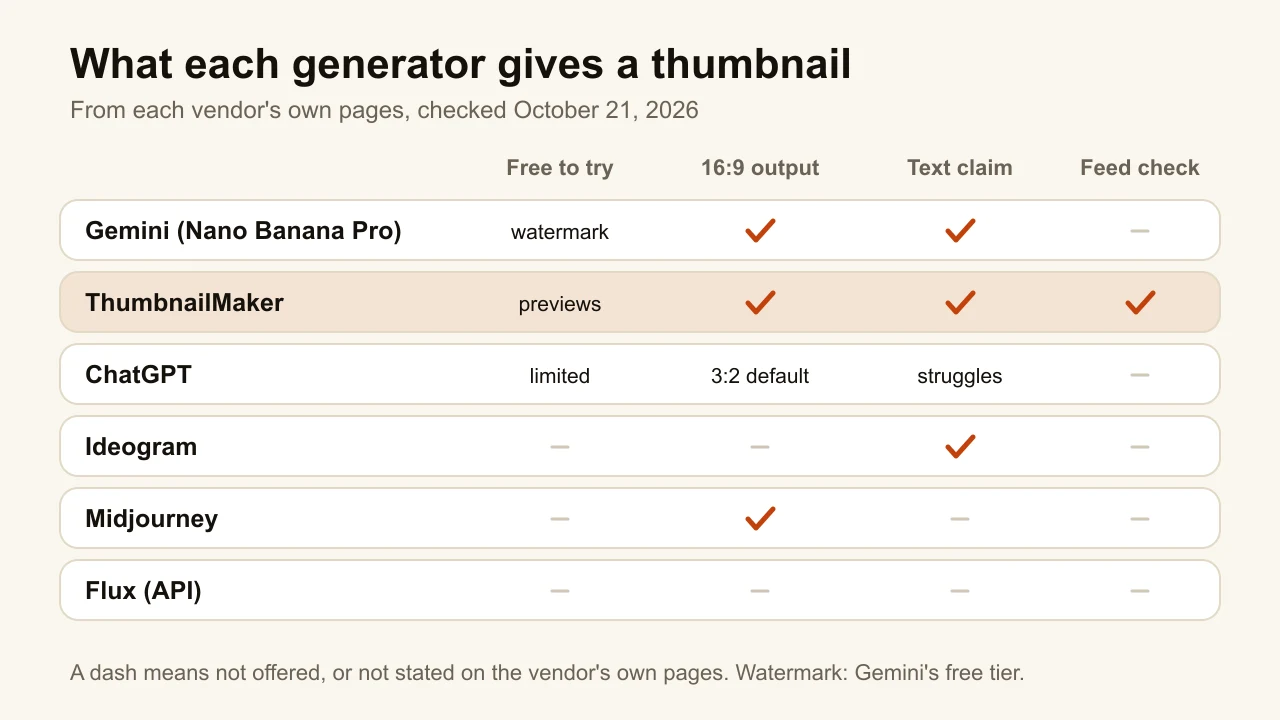
Quick answer: Gemini's Nano Banana Pro is the best general AI image generator for YouTube thumbnails in 2026: Google sells it on legible text inside the image, it outputs 16:9 directly, and the API costs $0.134 per 2K image. Its catch is a visible Gemini sparkle on images made on the free and AI Pro plans. ThumbnailMaker runs on the same model and adds what a general generator leaves to you: the brief from your video link, the text read back and fixed, a check at feed size, no watermark, from $12 a month for 40 thumbnails. ChatGPT is the easiest to edit by conversation, but OpenAI's own guide says text placement can still struggle. Ideogram is built around typography. Midjourney has the strongest art direction and no free trial. Flux is the cheapest per image, through an API. Every price was checked on the vendor's own page on October 21, 2026.
A general image generator can make a great thumbnail. It just doesn't know it is making one. It does not know the image will be judged at 168 pixels wide in a suggested column, that YouTube draws a duration badge over the bottom-right corner, or that a misspelled word on a thumbnail reads as carelessness from across the room.
This list compares the general generators creators actually use for thumbnails, and puts ThumbnailMaker, a dedicated maker, next to them so the trade is visible. If you want the dedicated tools only, Pikzels, Thumbmagic, vidIQ and the rest, that comparison is in the best AI thumbnail makers. ThumbnailMaker is our product. We did not run a test of the other five; their entries come from their own pricing and documentation pages, dated.
Which kinds of AI image generators work for thumbnails?
The six tools fall into three families:
- Chat-based generators: Gemini and ChatGPT. You describe the image in a conversation and correct it in the next message. Both come with free plans that make images.
- Image-first studios: Ideogram and Midjourney. A prompt box, a gallery, styles and settings. Ideogram leads with type, Midjourney with look.
- Models you call directly: Flux, through Black Forest Labs' API, priced per image. The Gemini model is also available this way.
ThumbnailMaker sits apart: it is not a general generator but a thumbnail maker built on Gemini's image model.
Checked on each vendor's pricing or documentation page, October 21, 2026.
| Tool | Best for | Cheapest paid option | Free option | 16:9 and text |
|---|---|---|---|---|
| Gemini | Text inside the image | Google AI Plus $4.99/mo; API $0.134 per 2K image | Free plan, visible sparkle watermark | 16:9 supported; vendor claims legible text |
| ThumbnailMaker | A finished thumbnail from a video link | $12/mo for 40 thumbnails | Up to 4 previews, no card, blurred until a trial | 16:9 or 9:16; text read back and fixed |
| ChatGPT | Editing by conversation | Go $8/mo | Limited and slower image generation | API recommends 1536 × 1024; text can still struggle |
| Ideogram | Typography-led designs | Plus $20/mo, or $15/mo yearly | None listed; pay as you go at 1¢ a credit | Vendor claims "crystal-clear type" |
| Midjourney | Art direction and style | Basic $10/mo, or $8/mo yearly | No free trial on web or Discord | --ar 16:9; text not claimed |
| Flux | The lowest price per image | $0.048 per 1K image, pay as you go | None listed | Set per request; text not claimed |
1. Gemini, best for text inside the image
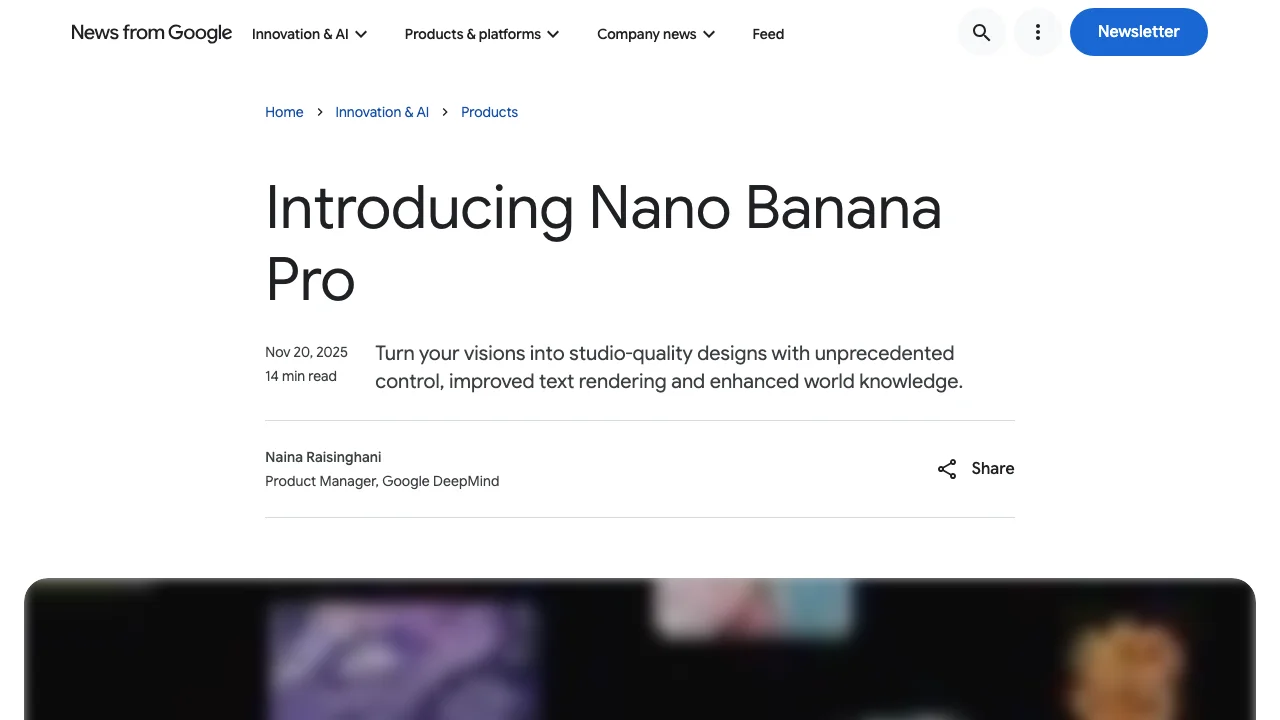
Gemini makes images in the Gemini app and through Google's API. Its image model, Nano Banana Pro (Gemini 3 Pro Image), is the one Google sells on text: its launch post promises "correctly rendered and legible text directly in the image", from a short tagline to a paragraph, plus a range of aspect ratios and 2K or 4K output. For a thumbnail that is the right promise, because three to five words carry most of the meaning. Google's API documentation shows 16:9 requested directly, so there is no crop.
The problem is the mark. Google's own announcement says it keeps a visible watermark, the Gemini sparkle, on images made on the free and AI Pro tiers, and removes it for AI Ultra subscribers and in Google AI Studio. Every image also carries SynthID, an invisible watermark.
Key features
- Nano Banana Pro for quality, Nano Banana 2 for speed
- 16:9 and other aspect ratios, 2K or 4K output
- Image generation and editing in the Gemini app
- Every image watermarked with SynthID
Best for
- Thumbnails where the words carry the idea: a number, a verdict, a question
- Developers who want the model by API, with no visible mark
Pricing
- Free plan with image generation; Google AI Plus $4.99/mo, AI Pro $19.99/mo, AI Ultra from $99.99/mo (US)
- API: $0.134 per 1K or 2K image and $0.24 per 4K image with Nano Banana Pro; $0.101 per 2K image with Nano Banana 2
Pros
- The strongest vendor claim on text of any tool here
- 16:9 straight out of the model, no crop
Cons
- A visible sparkle on free and AI Pro images, which you then have to cover or crop
- A general model: nothing checks the badge corner or the feed size
2. ThumbnailMaker, best for a finished thumbnail from a video link
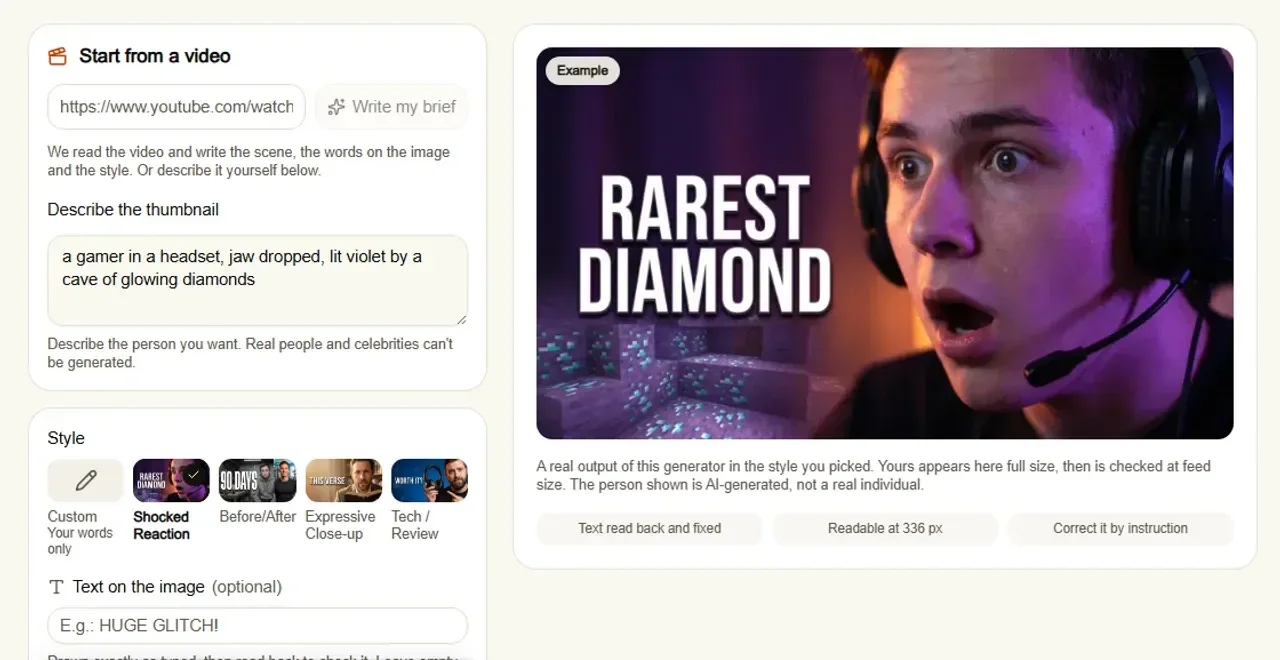
ThumbnailMaker generates with Gemini's image model, the same Nano Banana Pro as above, and handles the parts of a thumbnail a general generator leaves to you. Paste your video's link and it writes the brief from the video: the scene, the words on the image and the style. Generate, and every image goes through three checks before you see it. A vision model reads the text back, and if a letter came out wrong, the text is corrected once automatically, at no cost to you. The image is graded at feed size, 336 pixels wide. And the bottom-right corner, where YouTube puts the duration badge, is measured to make sure it stayed calm. Prompts asking for a recognisable real person or celebrity are refused.
Key features
- Brief written from your video's link, or from your own sentence
- Text drawn in, read back and corrected when wrong
- Graded at feed size, with the badge corner kept clear
- Correction by instruction ("make the title yellow"), the rest kept
- 16:9 or 9:16, optional 4K
Best for
- Channels publishing every week that want a usable thumbnail in minutes
- Creators who would rather paste a link than learn a prompting style
Pricing
- Starter $12/mo for 40 thumbnails, Pro $39/mo for 100, Studio $99/mo for 300; yearly is ten months' price
- One image counts as one thumbnail, a correction too; 4K counts as two
- Up to four free previews with no card; downloading them starts a 7-day free trial (card at checkout, nothing charged for seven days)
Pros
- The checks a general generator skips, run on every image
- No watermark on anything you download
Cons
- More per image than the raw model: about $0.30 a thumbnail on Starter, against $0.134 for the same model by API
- Previews stay blurred until you start the trial
- Narrower than a general generator: thumbnails only, no free-form art direction
How you'd do it here. Paste the link on the AI YouTube thumbnail maker, read the brief and change any word, pick a style or keep your own words, then generate. Read the checks under the image, correct it in a sentence if needed, download. Already made a thumbnail elsewhere? The free YouTube thumbnail tester shows it in a mock feed and checks the badge corner, with no account.
3. ChatGPT, best for editing by conversation
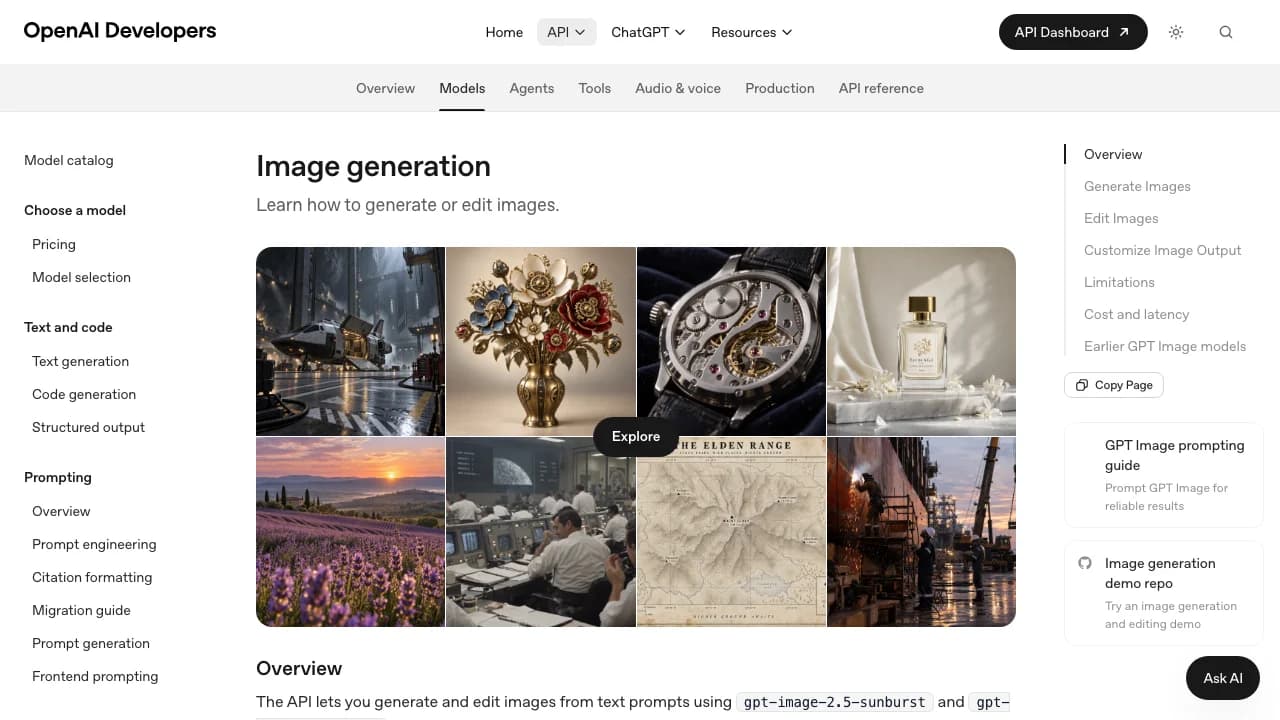
ChatGPT makes images with OpenAI's GPT Image models, inside the same chat you already use. Its strength is iteration: ask for the thumbnail, then say "move the text left", "make her look surprised", "darker background", and it edits the image in context. That suits creators who know what they want but not how to prompt for it.
OpenAI is unusually direct about the weak spots. Its image generation guide lists limitations: the model "can still struggle with precise text placement and clarity", and "may have difficulty placing elements precisely in structured or layout-sensitive compositions". A thumbnail is exactly a layout-sensitive composition with text. The guide's recommended landscape size is 1536 × 1024, a 3:2 frame; the API also accepts custom sizes such as 1536 × 864.
Key features
- Generation and editing in one conversation
- Edits applied to the image already in the chat
- Custom sizes through the API, up to 3840 pixels on a side
- Free plan with image generation
Best for
- Creators already paying for ChatGPT who want one tool for scripts, titles and images
- Rough concepts you refine in a few messages
Pricing
- Free plan with "limited and slower image generation"
- Go $8/mo, Plus $20/mo, Pro from $100/mo; OpenAI does not publish a number of images per plan
Pros
- The easiest correction loop here: talk to it
- Most creators already have an account
Cons
- OpenAI's own guide warns about text placement and clarity
- The default landscape frame is 3:2, so a thumbnail made at that size has to be cropped
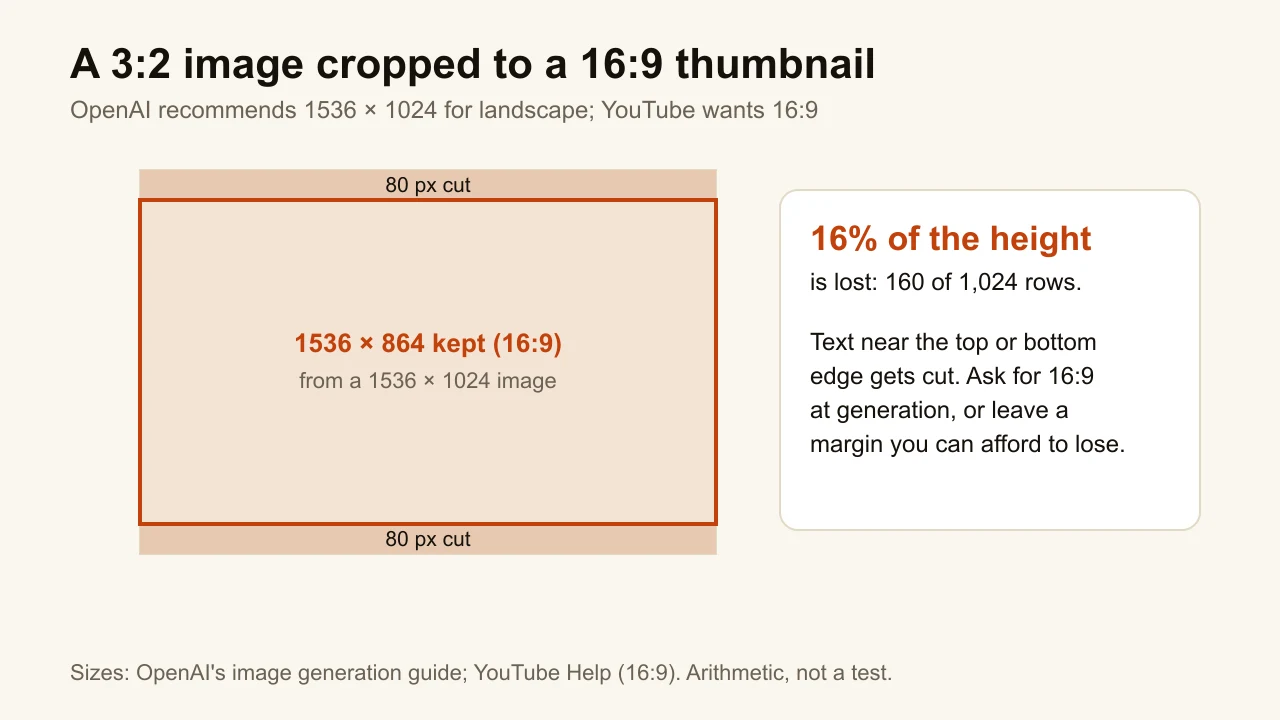
The crop is the quiet failure. A 3:2 image trimmed to 16:9 loses 160 of its 1,024 rows, and the model placed the title knowing nothing about that. Ask for 16:9 in the prompt, or generate with room to spare and check the result in the YouTube thumbnail resizer, which flags the wrong shape before upload.
4. Ideogram, best for typography-led designs
Ideogram's homepage leads with text: "Prompt fidelity. Crystal-clear type. Reliable editing." The current model is Ideogram 4.5, sold on "readable type in every layout". For a thumbnail where the words are the design, a big number, a one-word verdict, a stylised title, that is the right focus. Ideogram also offers background removal and an object remover among its apps.
Key features
- Ideogram 4.5, sold on prompt fidelity and readable type
- Private generation on paid plans
- Background remover and object remover apps
- API and MCP access
Best for
- Text-heavy thumbnails: lists, numbers, stylised titles
- Designers who want a type-first generator next to their editor
Pricing
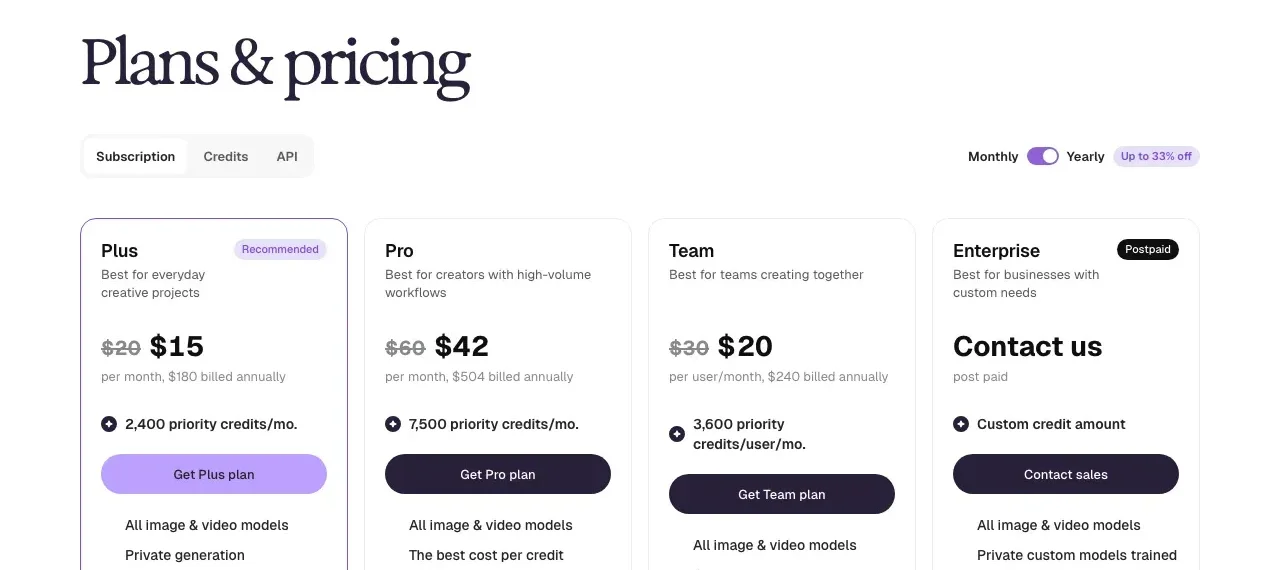
- Plus $20/mo, or $15/mo billed yearly at $180, 2,400 priority credits a month
- Pro $60/mo, or $42/mo billed yearly at $504, 7,500 priority credits
- Pay as you go at 1 cent per credit; credits per image depend on the model and were not listed
Pros
- The clearest type-first positioning of any general generator
- Unlimited slow credits on paid plans
Cons
- No free plan on its pricing page
- No 16:9 output stated on the pages checked, and nothing checks the image at feed size
5. Midjourney, best for art direction and style
Midjourney is the generator people pick for how the image looks: lighting, texture, a coherent style across a series. For a channel that wants a distinctive visual identity, painterly, cinematic, illustrated, that matters more than anything else on this list. Set the frame with --ar 16:9 and it generates a widescreen image.
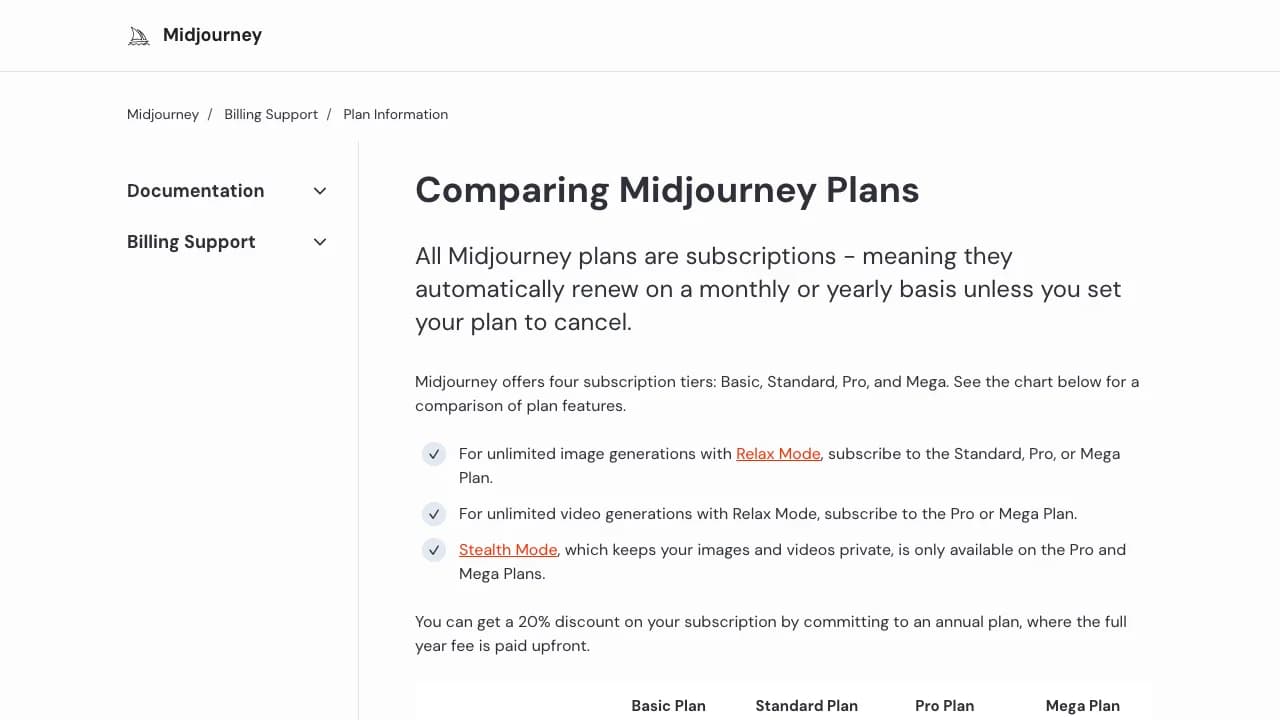
Two things to know before you subscribe. Midjourney's documentation says there is no free trial on its website or Discord. And Stealth Mode, which keeps your images private, is only on the Pro and Mega plans: on Basic and Standard, your thumbnail can appear in the public gallery before your video is out.
Key features
- Strong control over look and style
--ar 16:9for a widescreen frame- Unlimited Relax Mode images from Standard up
- Stealth Mode on Pro and Mega
Best for
- Channels with a signature illustrated or cinematic style
- Background plates you finish in an editor with your own text
Pricing
- Basic $10/mo ($8/mo yearly), 3.3 hours of fast GPU time a month
- Standard $30/mo ($24 yearly), Pro $60/mo ($48 yearly), Mega $120/mo ($96 yearly)
- No free trial on the website or Discord
Pros
- The most control over the look of the image
- Yearly billing saves 20%
Cons
- Images are public unless you pay for Pro or Mega
- Midjourney does not sell itself on text, so plan on adding the words yourself
6. Flux, best for the lowest price per image
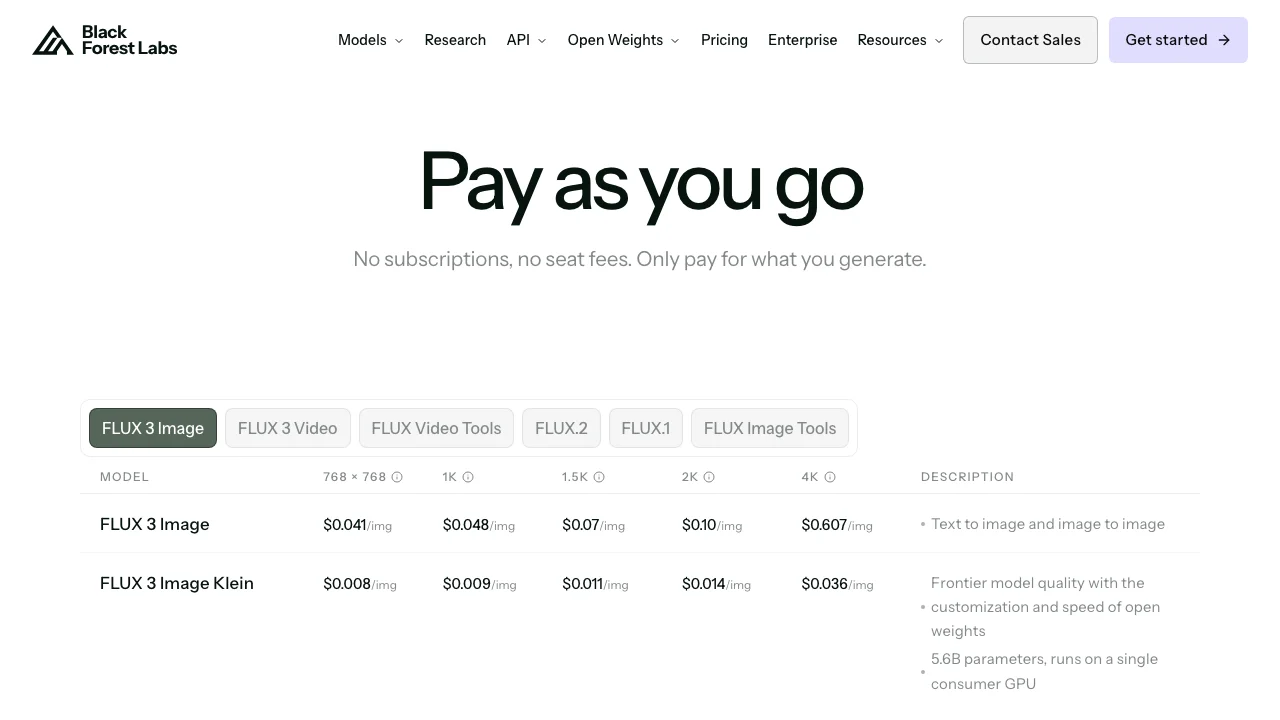
Flux is Black Forest Labs' family of image models, sold by API with "no subscriptions, no seat fees". FLUX 3 Image costs $0.048 per 1K image and $0.10 per 2K image; the smaller FLUX 3 Image Klein costs $0.009 per 1K image. Reference images are included at no extra charge, and failed or moderated generations are not billed. This is a tool for someone who writes code, or uses an app built on it, not a place to type a prompt and download.
Key features
- FLUX 3 Image for text-to-image and image-to-image
- FLUX 3 Image Klein, an open-weights model that runs on a single consumer GPU
- Reference images at no extra cost
- Failed and moderated generations not charged
Best for
- Developers building a thumbnail workflow of their own
- High volume, where a cent per image adds up
Pricing
- FLUX 3 Image: $0.041 (768 × 768) to $0.607 (4K) per image; $0.10 at 2K
- FLUX 3 Image Klein: $0.008 to $0.036 per image
Pros
- The lowest price per image here
- Open weights for the Klein model
Cons
- An API, not an app: no editor, no gallery, no correction loop
- Text quality is not a claim BFL makes on the pages checked
How to choose an AI image generator for thumbnails
Is the text part of the idea?
If the thumbnail lives or dies on its words, pick a tool that is sold on text: Gemini's Nano Banana Pro or Ideogram. ChatGPT can do it, but OpenAI's own guide warns about placement. Midjourney and Flux are better used for the image alone, with the words added in an editor. The free thumbnail text editor does that in the browser with no account.
Will it read at 168 pixels?
Every generator shows you the image large. YouTube shows it at around 168 pixels in the suggested column and about 360 on a phone feed. A thumbnail that looks rich at full size can turn to mud there, and no general generator checks it for you.
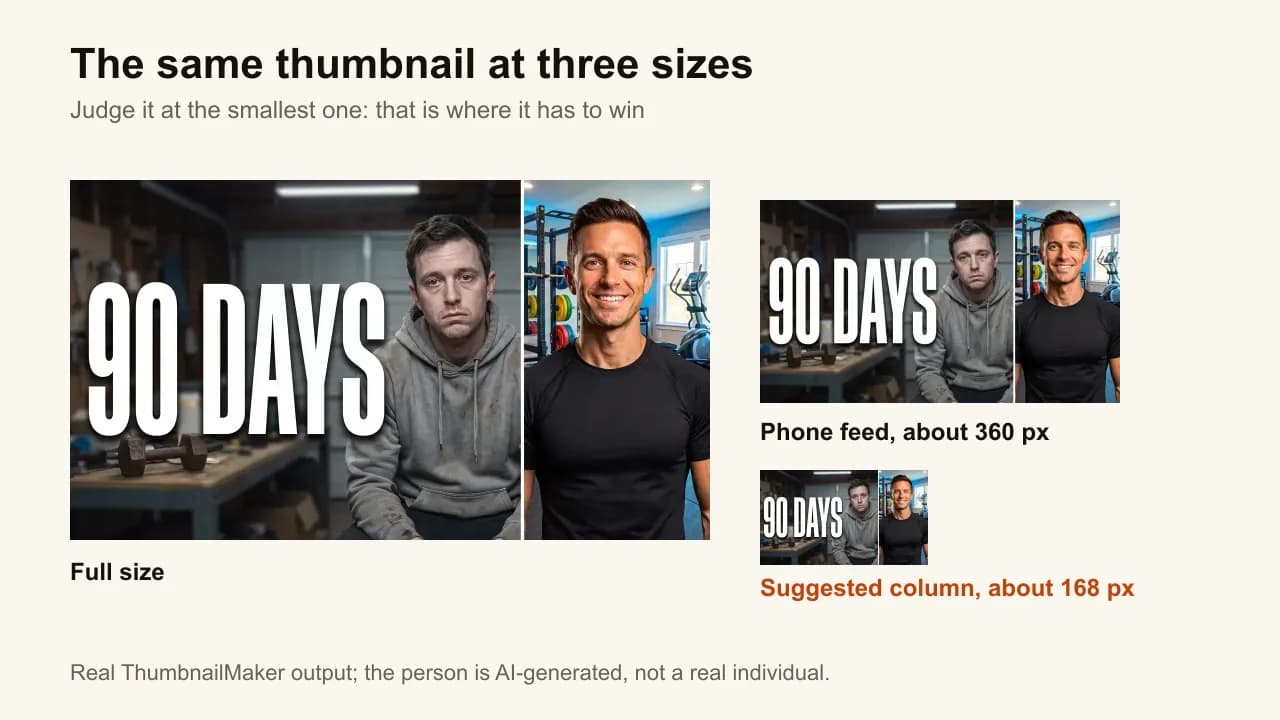
Shrink it before you upload. ThumbnailMaker grades every image at feed size; with any other tool, drop the file into a feed preview and look at the smallest copy.
Does a watermark or a public gallery matter?
For a thumbnail, both do. Gemini's free and AI Pro images carry a visible sparkle, so plan on AI Ultra or the API, or a crop that removes the corner. Midjourney's Basic and Standard images are public, which matters for a video that isn't out yet. ThumbnailMaker and the API routes add no visible mark.
Do you want to prompt, or paste a link?
A general generator gives you more control and asks more of you: a scene, a style, the words and where they go, every time. ThumbnailMaker writes that brief from your video, and you change what you want. If you enjoy art direction, Midjourney or Gemini will reward you. If you want the thumbnail done so you can get back to the video, paste the link. The dedicated makers are compared side by side in the roundup linked at the top of this page.
How many thumbnails do you make a month?
A channel posting twice a week needs eight or nine finished thumbnails a month, plus the takes that did not make it. At that volume, price per image barely matters: Flux at $0.10 a 2K image or Gemini's API at $0.134 are the cheapest, a ChatGPT or Gemini plan you already pay for costs nothing extra, and ThumbnailMaker's Starter covers 40. The number that matters is minutes per finished thumbnail.
Frequently asked questions
Can ChatGPT make YouTube thumbnails?
Yes. ChatGPT generates and edits images in the chat, including on the free plan, with limits. Ask for a 16:9 frame, because the default landscape size in OpenAI's guide is 3:2, and check the spelling: OpenAI says the model can still struggle with text placement and clarity.
Which AI image generator is best at text?
On the vendors' own claims, Gemini's Nano Banana Pro and Ideogram. Google promises correctly rendered, legible text; Ideogram sells "crystal-clear type". Neither claim is a guarantee, so read every word at full size before you upload.
Is there a free AI image generator for thumbnails?
Gemini and ChatGPT both make images on their free plans, with limits, and Gemini's free images carry a visible sparkle. Midjourney has no free trial on its website. ThumbnailMaker gives up to four previews with no card, and its four free tools (a tester, a resizer, a text editor and a thumbnail viewer) need no account.
What size should an AI-generated thumbnail be?
YouTube recommends 3840 × 2160 in 16:9 for a video thumbnail and 2160 × 3840 for a Short; the minimum width is 640 pixels. Generate at 16:9 rather than cropping to it later. The YouTube thumbnail size guide has the file limits.
Can I put a celebrity or a real person in an AI thumbnail?
Not with ThumbnailMaker: prompts asking for a recognisable real person are refused. Other generators have their own policies, so check them. Even where it is possible, a fake likeness of a real person misleads viewers about the video, and a misleading thumbnail is what YouTube treats as clickbait.
Do I need a dedicated thumbnail maker if I already pay for an image generator?
Not necessarily. If you enjoy prompting and you check the text, the shape and the feed size yourself, a general generator does the job. A dedicated maker earns its price when those checks take you longer than the video's edit.
Pick by what you are willing to check yourself
A general generator gives you the image; you supply the brief, the frame, the spelling check and the feed-size check. If you would rather hand those over, start with ThumbnailMaker's free previews; if you want the model itself, Gemini. For pure style, Midjourney. For type, Ideogram. For volume through code, Flux. ThumbnailMaker's plans are on one page.
Prices and features were checked on each vendor's own pages on October 21, 2026: Gemini plans, Gemini API pricing, Google's Nano Banana Pro announcement, ChatGPT plans, OpenAI's image generation guide, Ideogram, Midjourney's plans, Black Forest Labs and YouTube's thumbnail requirements.
ThumbnailMaker is an independent product and is not affiliated with, sponsored by, or endorsed by Google, OpenAI, Ideogram, Midjourney or Black Forest Labs. Gemini, Nano Banana, ChatGPT, Ideogram, Midjourney and FLUX are trademarks of their respective owners, named here only to compare publicly documented features. ThumbnailMaker uses Google's Gemini image models under Google's API terms. The other tools' descriptions come from their own pages, not from our testing. Details were accurate when written and may have changed since.
ThumbnailMaker Team — Guides from the people building ThumbnailMaker: thumbnail design, CTR, and what happens under the hood of an AI generator. Every number is checked against YouTube's own pages and dated.
Try it on your next video
Paste the video's link: the brief is written for you, then you generate. Previews are free, then a 7-day free trial.