YouTube Thumbnail Size (2026): 3840×2160, 1280×720 Still OK
By ThumbnailMaker Team · · Updated · 9 min read
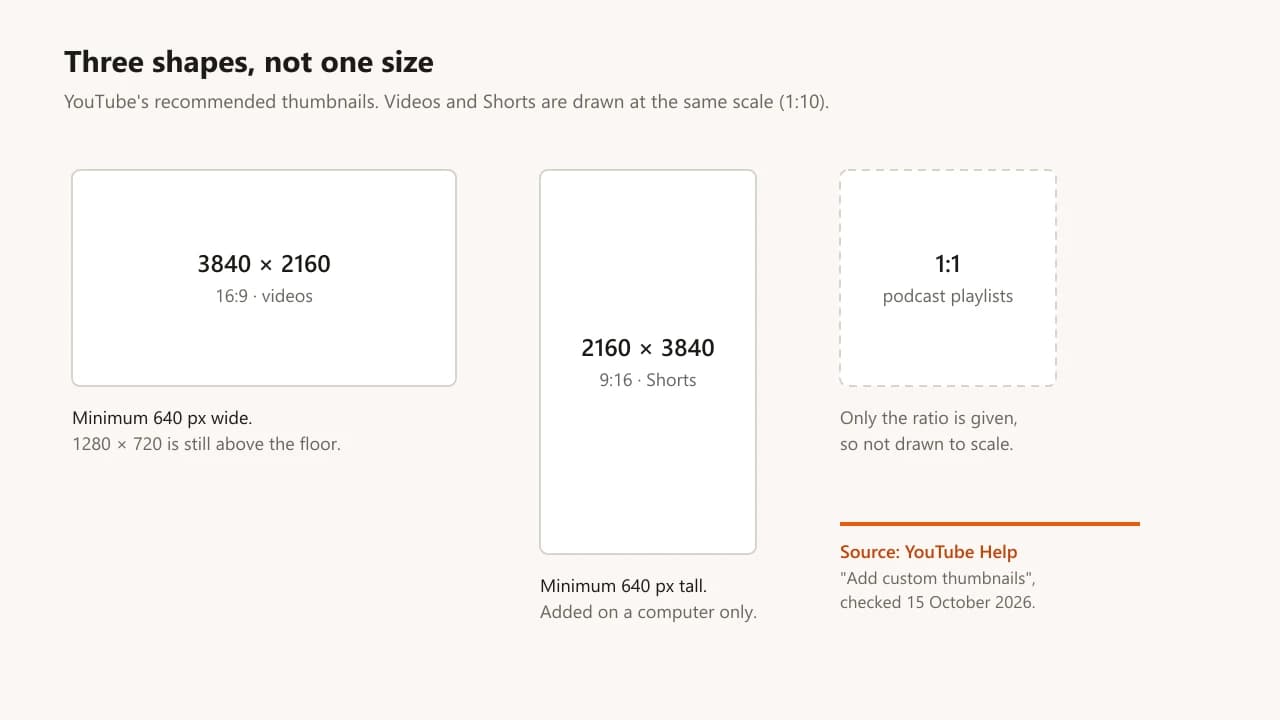
Quick answer: the YouTube thumbnail size YouTube recommends is 3840 × 2160 pixels in 16:9 for a video, and 2160 × 3840 in 9:16 for a Short. That is its own Help page, checked on October 15, 2026. The minimum is 640 pixels: the width for a video thumbnail, the height for a Shorts one. 1280 × 720, the dimensions most guides still quote, is still accepted; it is the old recommendation, the same shape, twice the minimum. If you are exporting a new thumbnail today, export the larger size. File limits depend on where you upload from: 50 MB for any thumbnail from a computer, 2 MB for a video thumbnail from the phone app, 10 MB for a podcast thumbnail from the app. JPG and PNG both work. Podcast playlist thumbnails are 1:1. Custom Shorts thumbnails can only be added in YouTube Studio on a computer.
Every YouTube thumbnail size at a glance
YouTube publishes three shapes, two minimums and three file limits. Here they are, from its own Help page, so the YT thumbnail dimensions you design to are the ones the upload form checks.
| Thumbnail | Recommended size | Shape | Minimum |
|---|---|---|---|
| Video | 3840 × 2160 | 16:9 | 640 px wide |
| Shorts | 2160 × 3840 | 9:16 | 640 px tall |
| Podcast playlist | no size given | 1:1 | not stated |
| Upload from | Video or Shorts thumbnail | Podcast thumbnail |
|---|---|---|
| Computer | 50 MB | 50 MB |
| Phone app | 2 MB | 10 MB |
Every figure comes from YouTube's "Add custom thumbnails" Help page. Your account has to be verified before the custom thumbnail option appears at all.
What size should a YouTube thumbnail be?
3840 × 2160 pixels, in 16:9. That is YouTube's current recommendation, and its Help page adds that the image "should be as large as possible." The reason is downscaling. YouTube shows the same thumbnail at many sizes: the home feed, search, the suggested column, a TV screen. A big source gives it more detail to shrink from. A small source gets enlarged on large screens, which is where soft, blurry thumbnails come from.
The number YouTube used to recommend was 1280 × 720. Most articles still lead with it, and it still works. It is the same 16:9 shape, and twice the 640-pixel minimum. What changed is the target, not the floor.
Is 1280 × 720 still OK for a YouTube thumbnail?
Yes. It is accepted, it is 16:9, and it is well above the 640-pixel minimum width. Nothing gets rejected or cropped.
It is no longer the best you can upload, though. On a phone the difference is invisible. On a TV, or a 4K monitor in full screen, a 3840 × 2160 source holds up and a 1280 × 720 one starts to look soft. If you already have a library of 1280 × 720 thumbnails, there is no reason to redo them. If you are making a new one, export at the larger size when your tool allows it.
Not sure what size a live thumbnail was uploaded at? Paste the video link into the free YouTube thumbnail viewer. It lists every file YouTube serves for that video. The largest of those public files is 1280 × 720, so it shows you the shape and how the thumbnail reads, not the exact size it was uploaded at.
Is 1920 × 1080 or 1280 × 720 better?
1920 × 1080 is better, and 3840 × 2160 is better than both. All three are 16:9, so the composition is identical. The only difference is how much detail YouTube has when it resizes the image for each screen.
The one case for going smaller is the phone app's 2 MB limit. A 3840 × 2160 PNG can run well past 2 MB. Either upload from a computer, where the limit is 50 MB, or export as JPG, which keeps a photo-style thumbnail far smaller at the same visible quality.
Is 16:9 or 4:3 better for a YouTube thumbnail?
16:9, without exception, for videos. It matches the player, so nothing is cropped or letterboxed.
The 4:3 sizes you may have seen, 640 × 480 and 480 × 360, are not upload sizes. They are smaller fallback files YouTube generates from your thumbnail, with black bars added to fill the 4:3 frame. The free viewer shows them next to the full-size file. Don't design to them.
What size are YouTube Shorts thumbnails?
2160 × 3840 pixels, a 9:16 vertical frame, with a minimum height of 640 pixels. It is the video thumbnail turned on its side, not cropped from it.
Two details catch people out. Custom Shorts thumbnails can only be added in YouTube Studio on a computer, not from the phone app. And on vertical videos, a 16:9 custom thumbnail gets replaced by an auto-generated 4:5 one on the home, Explore and Subscriptions pages. Your thumbnail still shows in the watch feed, in watch history and on non-mobile platforms. If a vertical video's thumbnail matters to you, make it 9:16.
Designing a Shorts thumbnail from a landscape one throws away most of the width, which is usually where the subject and the text were. Compose it vertically from the start, with the text above or below the subject rather than beside it. If you would rather not build the vertical version by hand, ThumbnailMaker's YouTube Shorts thumbnail maker composes the 9:16 cover from the video's link, and we compared the other Shorts thumbnail makers worth using.
How do I convert an image to YouTube thumbnail size?
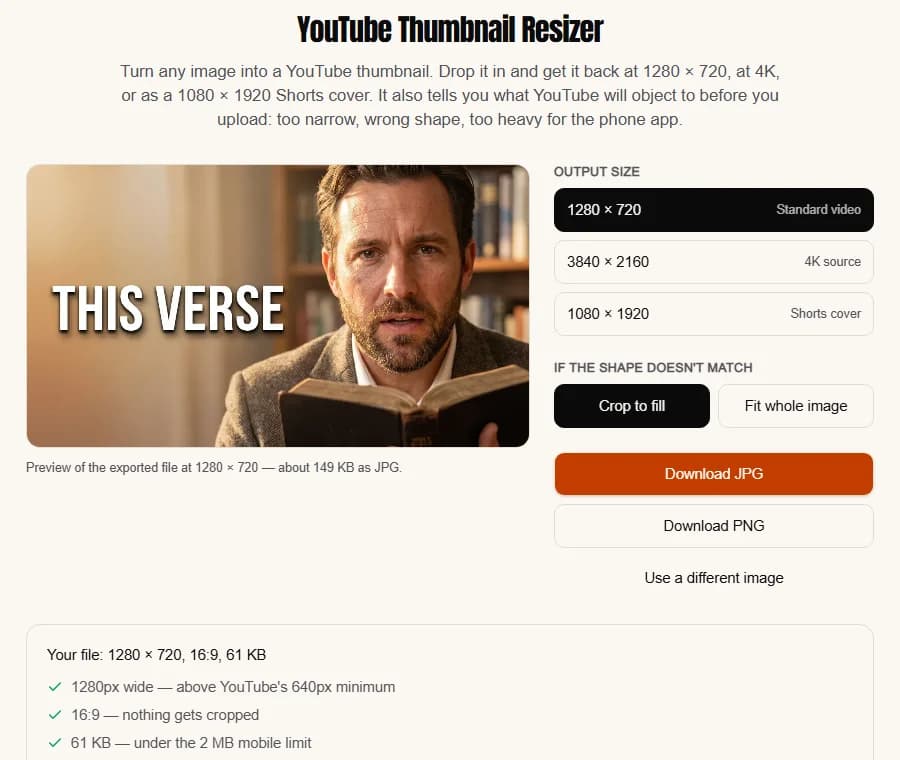
Shape first, then size: the free YouTube thumbnail resizer crops or pads any image to 16:9 and exports 1280 × 720, 3840 × 2160 or a 1080 × 1920 Shorts cover, and checks the width, the shape and the 2 MB phone limit before you upload. If the image needs a headline first, the thumbnail text editor adds it at the same size.
What's the most common thumbnail sizing mistake?
Designing at one shape and cropping to another afterwards. A 4:3 photo cropped to 16:9 technically fits, the way a shirt one size too small technically fits. The subject sits too high, the text collides with the edge, and the bottom-right corner, where YouTube stamps the video length, ends up holding something important.
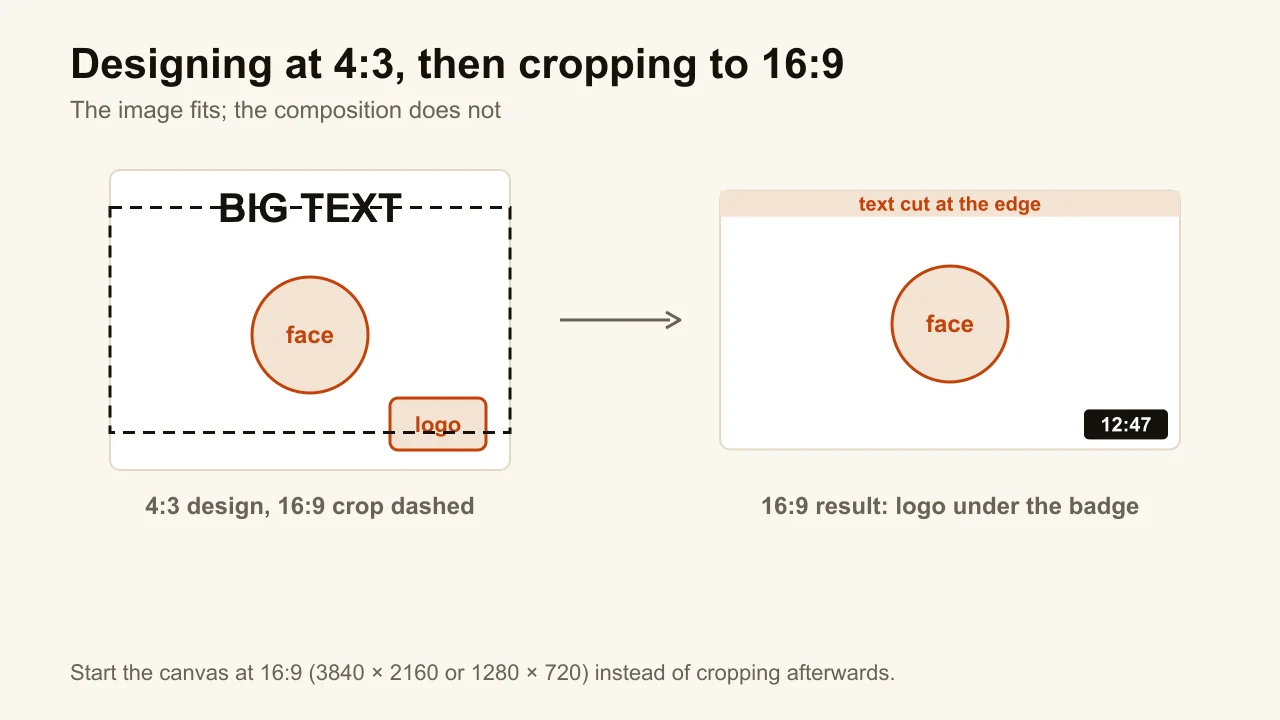
Picking 1280 × 720 instead of 3840 × 2160 costs you some sharpness on big screens. Picking the wrong shape costs you the composition everywhere. Get the shape right first. The design side, from the duration badge to how much text a thumbnail can carry, is in how to make a thumbnail that gets clicks.
YouTube thumbnail size FAQ
What is the YouTube thumbnail size in cm or inches?
There is no size in centimetres or inches, because a thumbnail is only ever shown on screens, where pixels are the unit and print resolution does not apply. If your editor insists on a physical size, set 3840 × 2160 pixels at 300 dpi, which it will show as about 32.5 × 18.3 cm (12.8 × 7.2 in); 1280 × 720 at the same setting is about 10.8 × 6.1 cm (4.3 × 2.4 in). Change the dpi and the centimetres change while the pixels, the only thing YouTube reads, stay the same.
Why does my thumbnail upload fail on the phone app?
Almost always the 2 MB limit. A photo-style thumbnail saved as PNG at 3840 × 2160 is often 5 to 15 MB; the same image as a JPG at 85% quality is usually under 1 MB with no visible loss. Export as JPG, or upload from a computer, where the limit is 50 MB. The second cause is a width under 640 pixels, which YouTube refuses outright.
Which size do I need for YouTube's A/B test?
At least 1280 × 720 for every variant. YouTube's page on A/B testing titles and thumbnails states that if any thumbnail in the test is below 720p, all of them are downscaled to 480p (854 × 480) for the test. One small file blurs the whole experiment.
What size is a YouTube podcast thumbnail?
Square, 1:1. YouTube gives the ratio and no pixel size; 3000 × 3000 is a safe choice because podcast directories use it. The file limit is 10 MB from the phone app and 50 MB from a computer.
Is there a maximum YouTube thumbnail size?
No pixel maximum is published. The ceilings are file size: 50 MB from a computer, 2 MB (video) or 10 MB (podcast) from the app. YouTube's own advice is "as large as possible", which in practice means 3840 × 2160.
Where do I upload it?
In YouTube Studio: Content, open the video, then the edit icon, and under Thumbnail choose Upload file. The phone app has its own path, and the option stays hidden until your account is verified. Both are covered step by step in how to add or change a custom thumbnail.
If you generate the thumbnail instead of designing it, ThumbnailMaker's AI thumbnail maker composes it in the frame you pick, 16:9 for videos and 9:16 for Shorts, and downloads it at 1280 × 720 or 1080 × 1920 as standard, which YouTube accepts and its A/B test needs as a minimum. The 4K option exports the same image at 3840 × 2160, the size YouTube now recommends. Plans start at $12 a month.
ThumbnailMaker Team — Guides from the people building ThumbnailMaker: thumbnail design, CTR, and what happens under the hood of an AI generator. Every number is checked against YouTube's own pages and dated.
Try it on your next video
Paste the video's link: the brief is written for you, then you generate with a plan from $12 a month.