6 Best AI Tools for YouTubers, One per Step (2026)
By ThumbnailMaker Team · · 14 min read
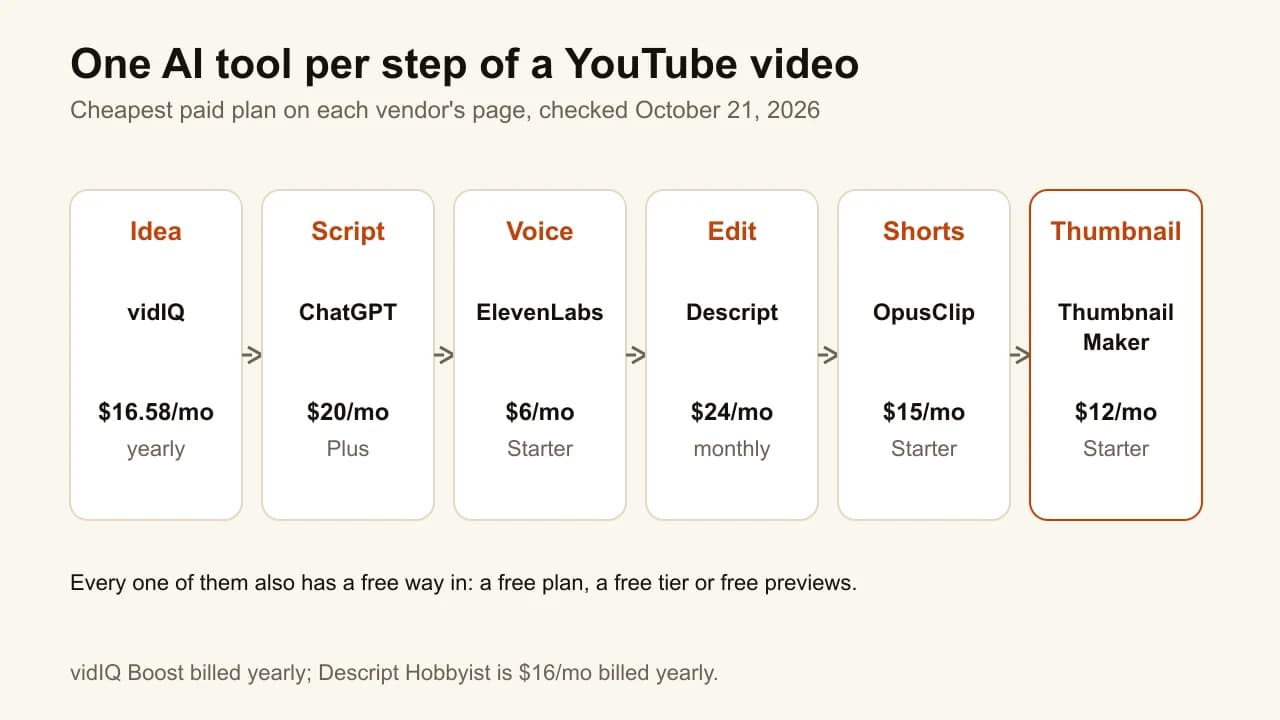
Quick answer: The best AI tools for YouTubers are the ones that each take over one step of making a video. vidIQ finds the idea, with a free plan and Boost at $16.58 a month billed yearly. ChatGPT drafts the outline and script, free or $20 a month for Plus. ElevenLabs reads it in a natural voice, from $6 a month. Descript edits the video by editing its transcript, from $24 a month, or $16 billed yearly. OpusClip cuts the long video into Shorts, from $15 a month. ThumbnailMaker makes the thumbnail from the video's link, from $12 a month. Every one of the six has a free way to try it. The full stack costs about $94 a month at the cheapest paid plans, so start with the step that eats most of your week. YouTube does not ask you to label AI used for scripts, ideas, captions or thumbnails. Prices were checked on each vendor's page on October 21, 2026.
"AI tools for YouTube" is a category with hundreds of entries and no shape. Most roundups list twenty tools that do overlapping things, and the reader leaves with a longer list than they arrived with. The useful question is narrower: which step of your video takes the most hours, and which tool takes that step over?
So this list has one tool per step, in the order a video gets made: idea, script, voice, edit, Shorts, thumbnail. The numbers are the order of the steps, not a ranking of one tool against another. ThumbnailMaker is our product and covers the thumbnail step; the other five are described from their own pages, not from our testing.
Which AI tools does a YouTube video actually need?
The six tools group into three families:
- Before the camera: vidIQ for the idea and ChatGPT for the script.
- Making the video: ElevenLabs for the voice, Descript for the edit and OpusClip for the Shorts.
- Packaging: ThumbnailMaker for the thumbnail.
| Tool | Best for | Cheapest paid plan | Free option | Step |
|---|---|---|---|---|
| vidIQ | Finding the next idea | $16.58/mo, billed yearly | Free plan, 150 AI credits | Idea |
| ChatGPT | Drafting the outline and script | $20/mo (Plus) | Free plan | Script |
| ElevenLabs | A narrated voice-over | $6/mo (Starter) | 10,000 credits a month | Voice |
| Descript | Editing by editing the transcript | $24/mo, or $16/mo yearly | Free plan, 1 media hour | Edit |
| OpusClip | Turning one video into Shorts | $15/mo (Starter) | 60 credits a month, watermark | Shorts |
| ThumbnailMaker | The thumbnail, from the video's link | $12/mo | Free previews, no card | Thumbnail |
1. vidIQ, best for finding the next idea
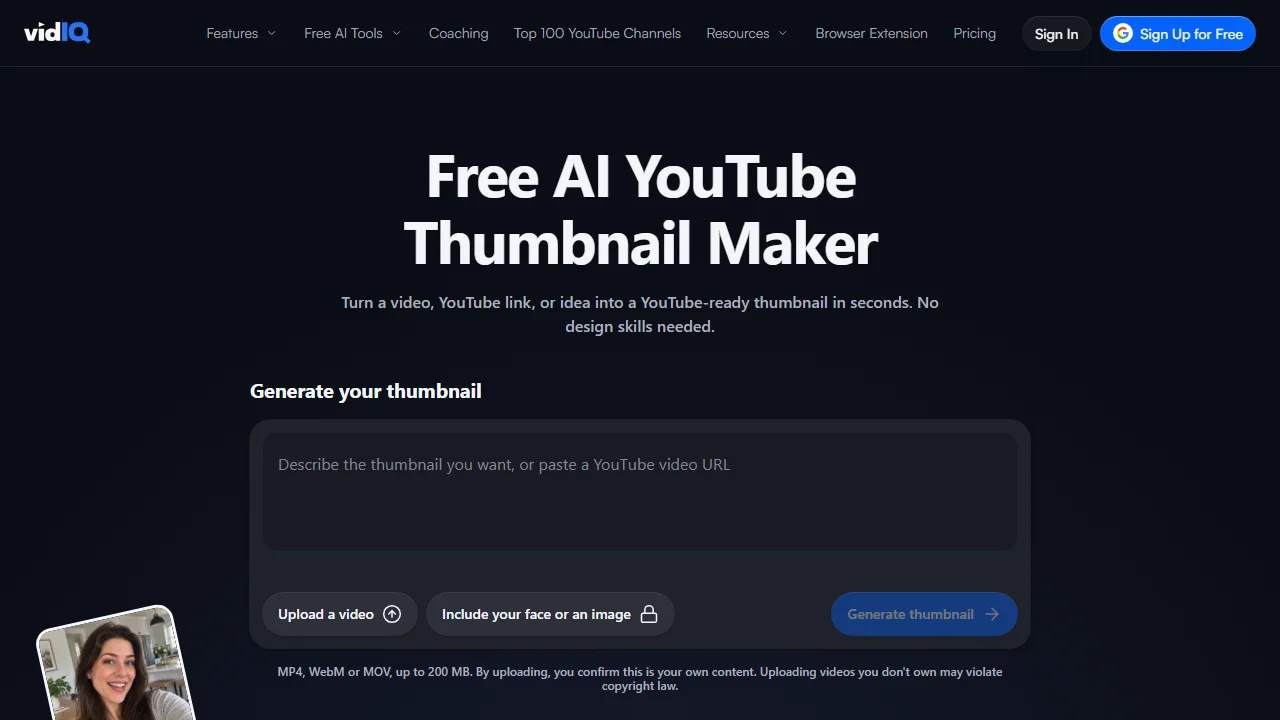
vidIQ is a YouTube growth suite whose AI side is built around the question before the video: what to make. Its daily ideas are tuned to your channel and niche, its AI Coach analyses the channel and suggests a plan, and its trend research flags topics and outlier videos in your niche. It also writes scripts, clips Shorts and makes thumbnails, but those are the steps the dedicated tools below do in more depth. Use it for the idea and the keyword behind the title. For the SEO side in detail, the best YouTube SEO tools compare it with five others.
Key features
- Daily ideas tuned to your channel and niche
- AI Coach for a channel-specific plan
- Trend and outlier research, keyword research
- Script writing, Shorts clipping, thumbnail maker
- MCP server for Claude and ChatGPT, on every plan
Best for
- Creators who run out of ideas before they run out of time
- Channels that pick titles around searched phrases
Pricing
- Free: 150 AI credits a month
- Boost: $16.58 a month, billed $199 yearly, 2,000 credits
- Max: $39 a month, billed $468 yearly, 6,000 credits
Pros
- Ideas grounded in YouTube data, not a blank chat
- A useful free plan
Cons
- Monthly prices are not shown, only yearly
- Its script, clipping and thumbnail tools compete with specialists
2. ChatGPT, best for drafting the outline and script
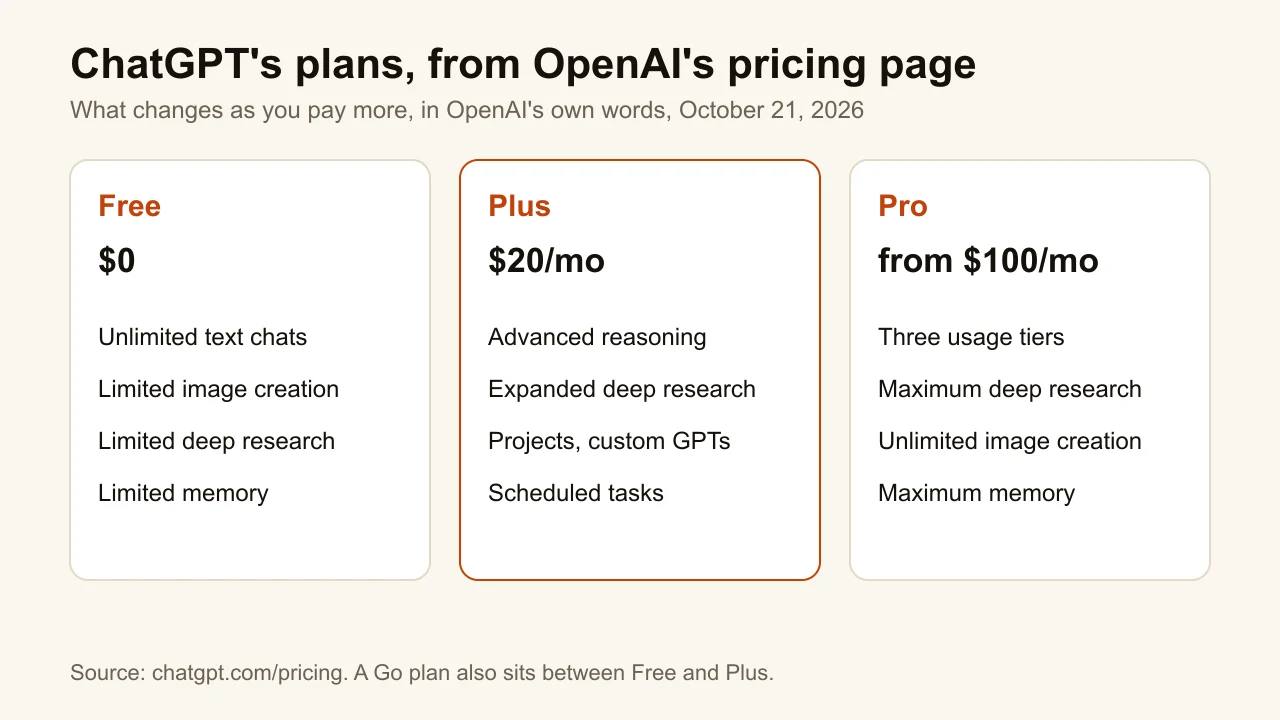
ChatGPT is the general-purpose tool on this list, and that is its strength at the script step. Give it the idea, your notes and two of your old scripts, and it drafts an outline, a hook and a first pass in your structure. It does not know your channel's numbers, so it pairs with vidIQ or YouTube Studio for the "what", not the "how well". The free plan covers most script work; Plus adds advanced reasoning, more deep research and Projects, where a channel's style notes can live across chats. Read every draft aloud before you record: a script that sounds written loses viewers in the first minute.
Key features
- Outlines, hooks and full script drafts
- Projects and custom GPTs to keep a channel's style (Plus)
- Deep research for fact-heavy topics
- Image creation, limited on the free plan
Best for
- Solo creators who outline before they film
- Faceless channels where the script is the product
Pricing
- Free: $0
- Plus: $20 a month
- Pro: from $100 a month; a Go plan sits between Free and Plus
Pros
- A free plan that handles most scripting
- Works in any niche and language
Cons
- No YouTube data unless you paste it in
- Drafts need a rewrite in your own voice
3. ElevenLabs, best for a narrated voice-over
ElevenLabs turns a script into speech, which makes it the core tool of a faceless channel. Its Studio projects handle long-form narration, its voice library and voice design give you a voice that is not yours, and voice cloning makes one that is. Dubbing Studio translates a finished video's audio. The free plan includes 10,000 credits a month; the commercial licence, instant voice cloning and Dubbing Studio start on Starter, so a monetised channel should not publish on the free plan. YouTube's own disclosure rules exempt cloning your own voice for voice-overs or dubs.
Key features
- Text to speech for long scripts, in Studio projects
- Voice design and a voice library
- Instant voice cloning (Starter), professional cloning (Creator)
- Dubbing Studio for translated audio
Best for
- Faceless channels: explainers, history, top-tens
- Creators dubbing their videos into other languages
Pricing
- Free: 10,000 credits a month, 3 Studio projects
- Starter: $6 a month, 30,000 credits, commercial licence
- Creator: $22 a month, $11 the first month, 121,000 credits
Pros
- A free plan large enough to test a full script
- Commercial licence from $6 a month
Cons
- No commercial licence on the free plan
- Credits go fast on long videos; prices exclude tax
4. Descript, best for editing by editing the transcript
Descript edits video the way you edit a document: delete a sentence from the transcript and it disappears from the video. Its AI co-editor, Underlord, takes instructions, and its AI tools cover the chores that eat an editing session: Studio Sound to clean audio, removing filler words and retakes, eye contact correction, green screen, chapters and clips. For talking-head and podcast-style videos, this is where most of the hours go, which makes it the step where AI saves the most time.
Key features
- Text-based editing: edit the transcript, edit the video
- Underlord, an AI co-editor
- Studio Sound, filler-word and retake removal, eye contact
- Captions, chapters, clips; dubbing on Business
Best for
- Talking-head channels and video podcasts
- Creators who edit their own videos and hate the timeline
Pricing
- Free: 1 media hour a month, 100 AI credits once
- Hobbyist: $24 a month, or $16 billed yearly, 10 media hours, 1080p
- Creator: $35 a month, or $24 billed yearly, 30 media hours, 4K
Pros
- Removes the slowest editing chores
- A free plan to try the transcript editor
Cons
- Media hours cap how much footage you can bring in each month
- Built around speech: footage without dialogue gains little from a transcript
5. OpusClip, best for turning one video into Shorts
OpusClip takes a long video, finds the moments most likely to work as Shorts and cuts them, with animated captions in more than 20 languages, auto reframing to 9:16 and a virality score on each clip. It can post straight to YouTube Shorts, TikTok and Instagram Reels. The free plan shows the idea but is limited: watermarked clips, no editing, and clips that can no longer be exported after three days. Starter removes the watermark.
Key features
- AI clipping with a virality score
- Animated captions in 20+ languages
- Auto reframe to 9:16; 1:1 and 16:9 on Pro
- Scheduling and auto-posting to Shorts, TikTok and Reels
Best for
- Podcasts, interviews and streams with long footage
- Channels that want Shorts without a second editor
Pricing
- Free: 60 credits a month, watermark, no editing
- Starter: $15 a month, monthly only, 150 credits, no watermark
- Pro: $29 a month, or $14.50 billed $174 yearly, 300 credits
Pros
- One upload turns into many clips
- Free trial on paid plans with no card
Cons
- Free clips are watermarked and expire for export after 3 days
- The best moment is still a judgement call the score only estimates
6. ThumbnailMaker, best for the thumbnail from the video's link
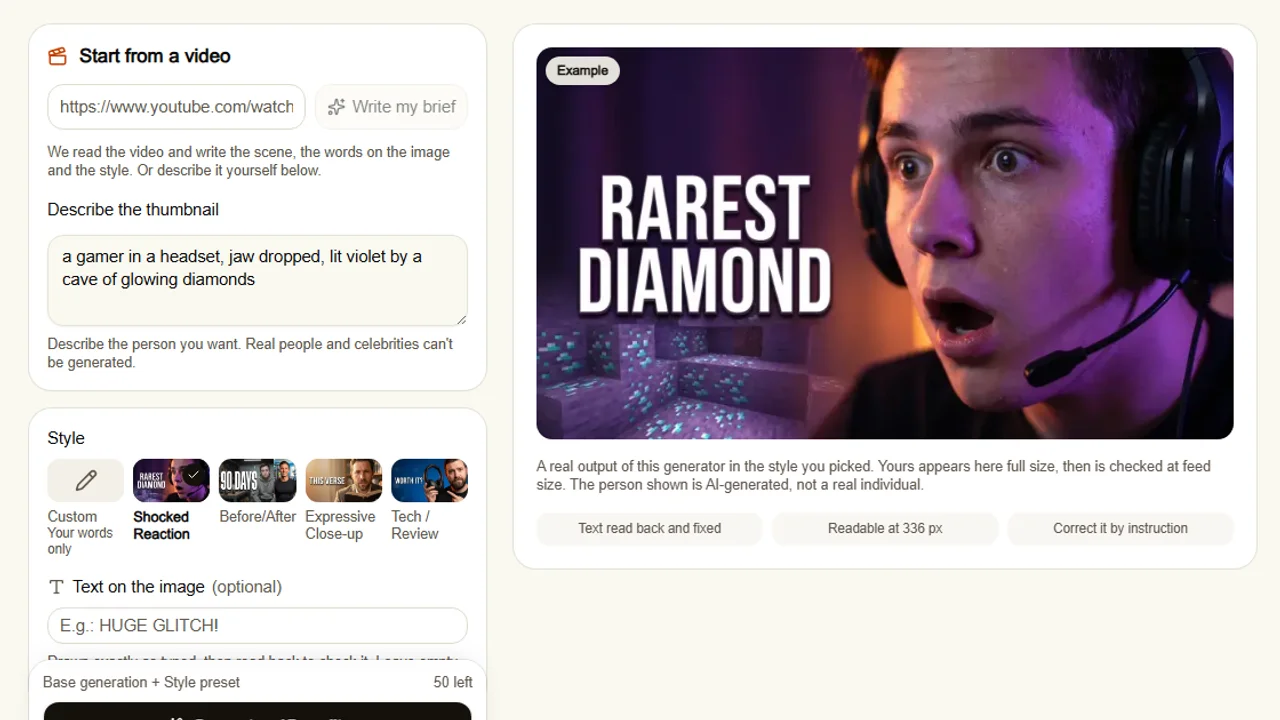
The thumbnail is the step most AI stacks leave to a template editor, and it is the one that decides whether anyone sees the other five. ThumbnailMaker reads the video from its link and writes the brief: the scene, the words on the image and the style. It then generates a finished 16:9 thumbnail, or 9:16 for Shorts, draws the words in, reads them back to fix a misspelled letter, and checks the image at feed size with the duration-badge corner kept clear. It does none of the other five steps. It is our product, and it sits sixth because the thumbnail is the sixth step, not because of a score.
Key features
- Brief written from the video's link
- Text drawn in, read back and fixed when wrong
- 16:9 or 9:16, composed for the frame, optional 4K
- Correction by instruction, the rest of the image kept
- Three concepts for YouTube's A/B test (Pro and up)
Best for
- Creators who finish the video and have nothing left for the thumbnail
- Channels where the words on the thumbnail carry the hook
Pricing
- Starter $12 a month for 40 thumbnails, Pro $39 for 100, Studio $99 for 300
- Up to four free previews with no card; downloading starts a 7-day free trial
- No watermark, full commercial rights
Pros
- Starts from the video, so there is no prompt to write
- Text checked at the size the feed shows it
Cons
- Thumbnails only
- No free download without starting the trial
How you'd do it here. Paste the video's link in the AI YouTube thumbnail maker. The brief appears in about ten seconds; change any word. Generate, read the checks, then download or correct it in a sentence. For a Short, pick 9:16 before generating. The best AI thumbnail makers compares it with seven other generators if you want options for this step alone.
How to choose AI tools for your channel
Which step takes most of your week?
Start there and nowhere else. For most talking-head creators it is the edit, which points to Descript. For faceless channels it is the script and the voice, ChatGPT and ElevenLabs. For channels repurposing long streams it is the Shorts, OpusClip. Buying all six on day one is how a channel ends up paying $94 a month for tools it opens twice.
Are you on camera or faceless?
On camera, the voice step disappears and the edit grows: Descript's filler-word and retake removal earns its price fastest. Faceless, the voice is the product, so ElevenLabs' commercial licence on Starter is the first $6 worth spending. The idea, the script and the thumbnail apply to both.
What does the whole stack cost?
At the cheapest paid plan of each: vidIQ $16.58 (billed yearly), ChatGPT Plus $20, ElevenLabs Starter $6, Descript Hobbyist $24, OpusClip Starter $15 and ThumbnailMaker Starter $12, about $94 a month. Every one of them has a free way in, so the real number is what you add after the free plans stop being enough.
Do you have to tell viewers you used AI?
Not for most of this stack. YouTube's disclosure rules exempt AI used to create or improve "a video outline, script, thumbnail, title, or infographic", captions and idea generation, and cloning your own voice for voice-overs or dubs. Disclosure is required for realistic altered or synthetic content: a real person appearing to say something they did not, altered footage of real events, or realistic scenes that never happened.
Frequently asked questions
What is the best free AI tool for YouTube?
There is one per step. vidIQ's free plan for ideas, ChatGPT's free plan for scripts, ElevenLabs' 10,000 free credits for a voice test, Descript's free hour of media, and OpusClip's 60 free credits for Shorts. ThumbnailMaker gives up to four free thumbnail previews with no card.
Can AI make a whole YouTube video?
Each step can be AI-assisted, but stitching them into a channel still takes judgement: which idea, which take, which moment is the Short.
Do AI thumbnails work on YouTube?
Yes, and YouTube does not require a label for an AI-made thumbnail; its disclosure page lists thumbnails under production help. What matters is whether the thumbnail is readable at feed size and true to the video. A thumbnail that misleads is clickbait, whoever made it.
Is ChatGPT good for YouTube scripts?
For a first draft, yes. It structures an outline and a hook quickly. It does not know your audience's numbers or your voice, so rewrite the draft aloud and check every fact before recording.
Which AI voice tool sounds the most natural?
We did not test voices, so this list makes no claim on which sounds best. ElevenLabs is included because it covers narration, cloning and dubbing on one plan with a free tier large enough to judge for yourself.
Do I own what these AI tools make?
It depends on the plan. ElevenLabs grants a commercial licence from Starter, not on Free. ThumbnailMaker gives full commercial rights on every plan, with no watermark. For the others, read the terms of the plan you are on before monetising.
Pick one step this week
Choose the step that costs you the most hours, try its tool on the free plan for one video, and keep it only if the hours actually drop. If that step is the thumbnail, the plans and what a thumbnail costs are on one page, and the free YouTube thumbnail resizer fixes the size of one you already have, with no account.
Prices and features were checked on each vendor's own pages on October 21, 2026: vidIQ, ChatGPT, ElevenLabs, Descript and OpusClip.
ThumbnailMaker is an independent product and is not affiliated with, sponsored by, or endorsed by vidIQ, OpenAI, ElevenLabs, Descript, OpusClip or Google. vidIQ, ChatGPT, ElevenLabs, Descript, OpusClip and YouTube are trademarks of their respective owners, named here only to compare publicly documented features. The other tools' descriptions come from their own pages, not from our testing. Details were accurate when written and may have changed since.
ThumbnailMaker Team — Guides from the people building ThumbnailMaker: thumbnail design, CTR, and what happens under the hood of an AI generator. Every number is checked against YouTube's own pages and dated.
Try it on your next video
Paste the video's link: the brief is written for you, then you generate. Previews are free, then a 7-day free trial.