VS Thumbnail: How to Make a Versus Thumbnail (2026)
By ThumbnailMaker Team · · 13 min read
Quick answer: a VS thumbnail puts two different things side by side in one frame, at the same size and at the same moment, so the viewer's first thought is "which one?". Split the 16:9 frame with one sharp line, vertical or diagonal, and give each side its own colour: red against blue, or orange against teal. Put two to four words in the gap between the two sides, built around VS: "$5 VS $500", "8 VS 80", "OLD VS NEW". If there are faces, they show rivalry or doubt. Keep the bottom-right corner clear, because YouTube draws the duration badge there. A versus thumbnail is not a before-and-after: before and after is one thing changing over time, versus is two things competing now. What breaks one is almost always the same four things: unequal sizes, a blurred seam, too many words, and a brand's logo or a real person's face you have no right to use.
ThumbnailMaker's Versus style builds exactly this layout from your video's link, words included, so the AI thumbnail maker handles the split, the two colours and the gap. Your first thumbnail is a free preview; plans start at $12 a month for 40 thumbnails.
What is a VS thumbnail?
A VS thumbnail is a YouTube thumbnail that sets two subjects against each other, with "VS" (versus) between them. The two subjects can be prices, products, players, cars, ages or eras. The format asks the viewer a question they can't answer from the feed: which one wins, which one is worth it, which one is real. The video is the answer, and that is the whole reason to click.
It works because it turns the thumbnail into a decision. Most thumbnails ask the viewer to be curious about one thing. A versus thumbnail gives them two, and most people pick a side before they have read the title. If the video settles the comparison, the thumbnail kept its promise.
What makes a good versus thumbnail?
A good versus thumbnail is balanced on purpose. Each part below exists so that neither side looks like the answer before the click.
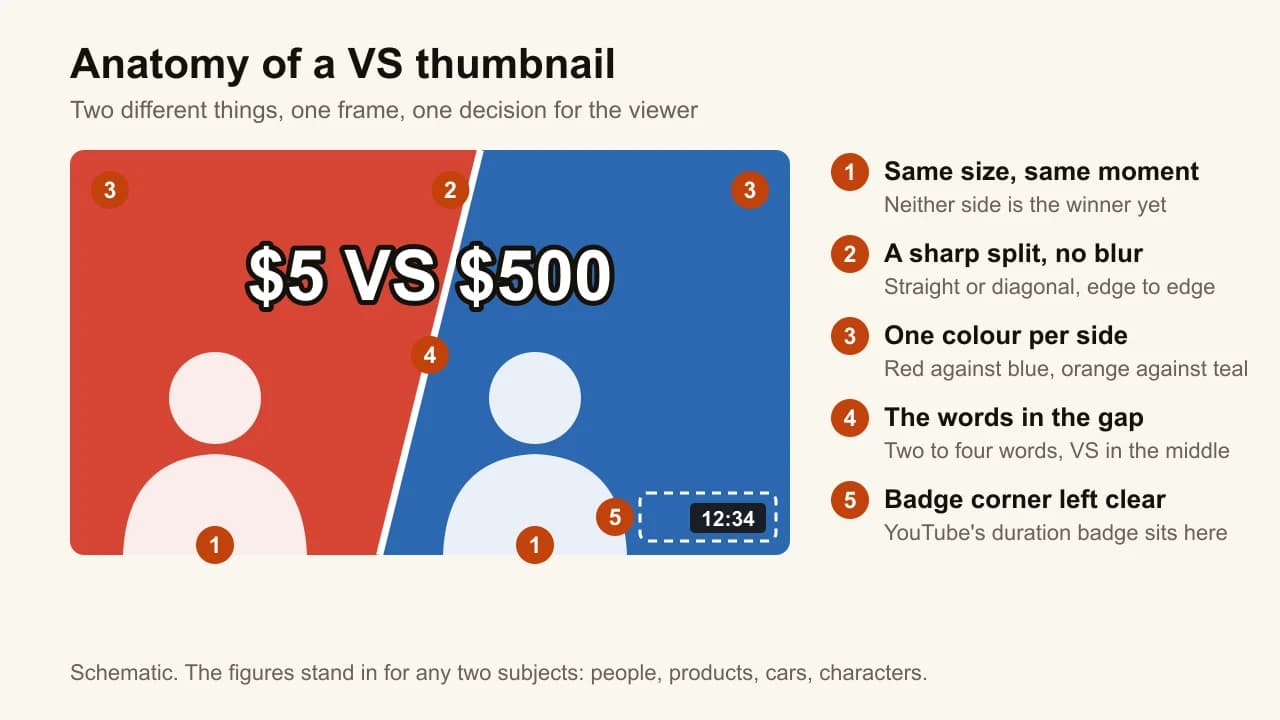
- Same size, same moment. Both subjects take the same share of the frame and are caught at the same instant. A big subject next to a small one reads as a winner and a loser, and then there is no question left to click on.
- A sharp dividing line. Vertical or diagonal, edge to edge, hard-edged. Two photos that fade into each other look like one muddy picture at feed size.
- One colour per side. Light or tint each half in its own colour: red against blue, or orange against teal. Opposite colours do the separating before the eye finds the line.
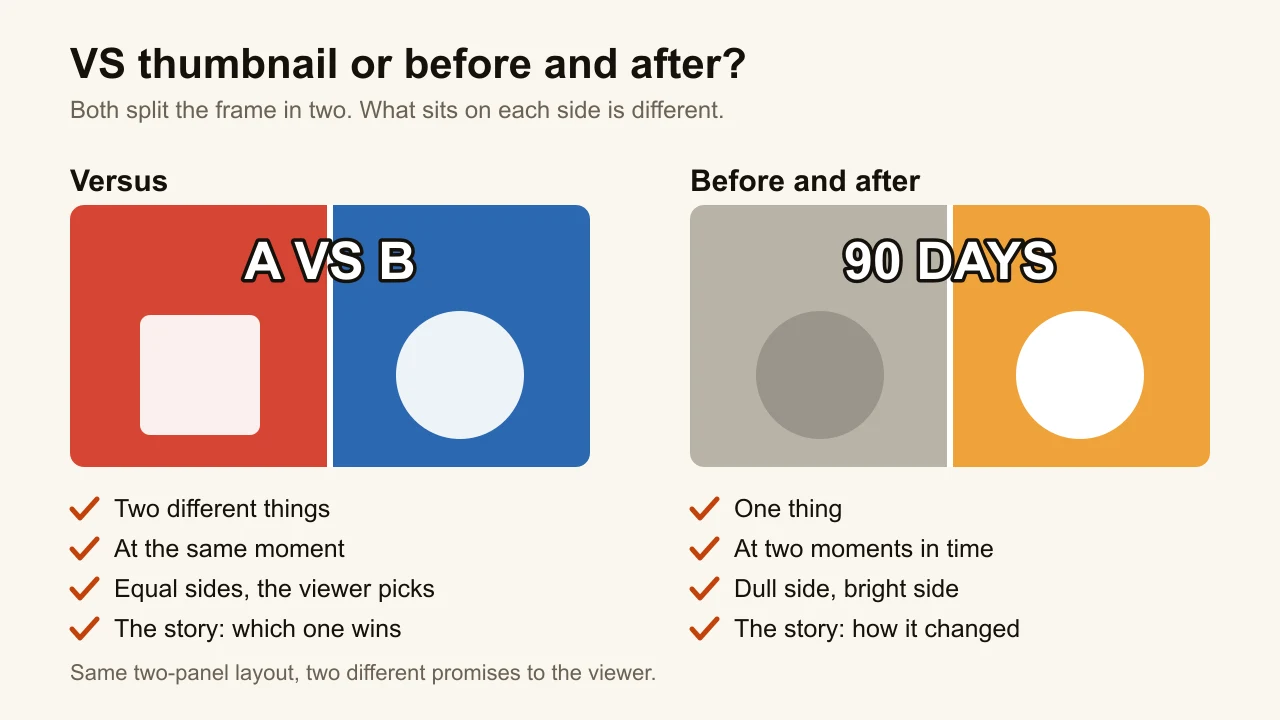
- The words in the gap. Two to four words, with VS in the middle: "$5 VS $500" says the stakes, "8 VS 80" says the matchup. The words name what the image can't show, usually a number.
- Rivalry or doubt on faces. When people are in frame, they look at each other or at the viewer with a challenge. A smile on both sides kills the tension.
- The bottom-right corner left clear. YouTube draws the video's duration badge there on every video thumbnail, whatever is underneath.
What is the difference between a VS thumbnail and a before-and-after?
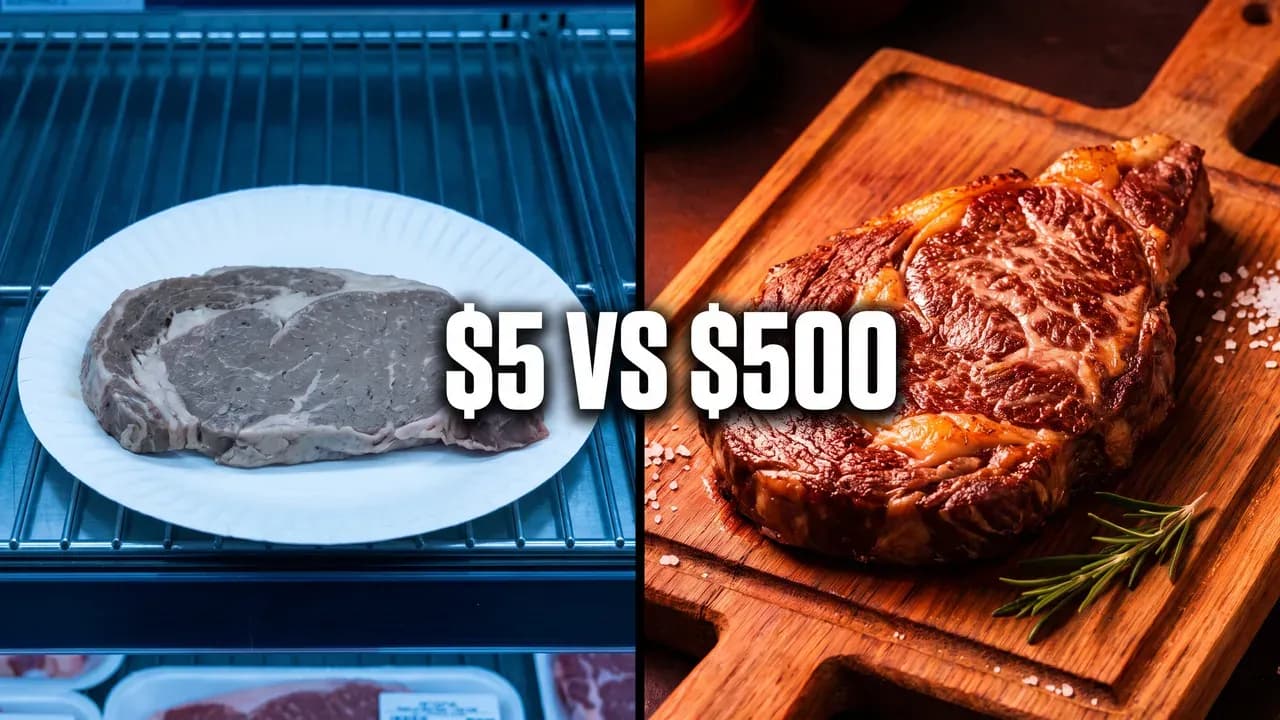
A VS thumbnail compares two different things at the same moment; a before-and-after shows one thing at two moments. They share a layout, two halves and a line, which is why they get mixed up. They make different promises. Versus says "these two compete, find out which wins". Before and after says "this changed, see how".
| VS thumbnail | Before and after | |
|---|---|---|
| Subjects | Two different things | One thing, twice |
| Time | The same moment | Two moments |
| The two sides | Equal: neither is better yet | Dull side, bright side |
| Colour | One colour per side, both saturated | Muted before, vivid after |
| Typical words | "$5 VS $500", "OLD VS NEW" | "90 DAYS", "1 YEAR LATER" |
| The video answers | Which one wins | How it changed |
The test is simple: if the same person or object appears on both sides, it is a before-and-after, even with "VS" written between them. The price versus price idea in our list of twelve thumbnail ideas sits on that border: one creator, two setups, two prices. It works when the prices are the story. When the setups are the story, it is a before-and-after, and it should be built like one.
Which videos suit a VS thumbnail?
A VS thumbnail suits any video whose answer is a choice between two things. Five kinds of video use it most:
| Video | Example words | Split that suits it |
|---|---|---|
| Price comparisons | "$5 VS $500", "CHEAP VS PRO" | Vertical |
| Challenges | "8 VS 80", "1 VS 100" | Diagonal |
| Rivalries | "BEST FRIEND VS ME", "MOM VS DAD" | Diagonal |
| Product comparisons | "OLD VS NEW", "PHONE VS CAMERA" | Vertical |
| Gaming 1v1s | "NOOB VS PRO", "1V1" | Diagonal or lightning |
Gaming is where the format is most at home: a noob against a pro, two builds, two characters squaring off. The gaming thumbnail maker keeps that look without any game's logo, HUD or official character, which is also the safe way to do it by hand.
Which split should you use: vertical, diagonal or lightning?
Use a vertical split for calm comparisons, a diagonal for tension, and a lightning bolt only when the video is loud. The split is the first thing the eye reads, so it sets the mood before anything else does.
- Vertical gives each side exactly half. It suits prices, products and cars, where fairness is the point.
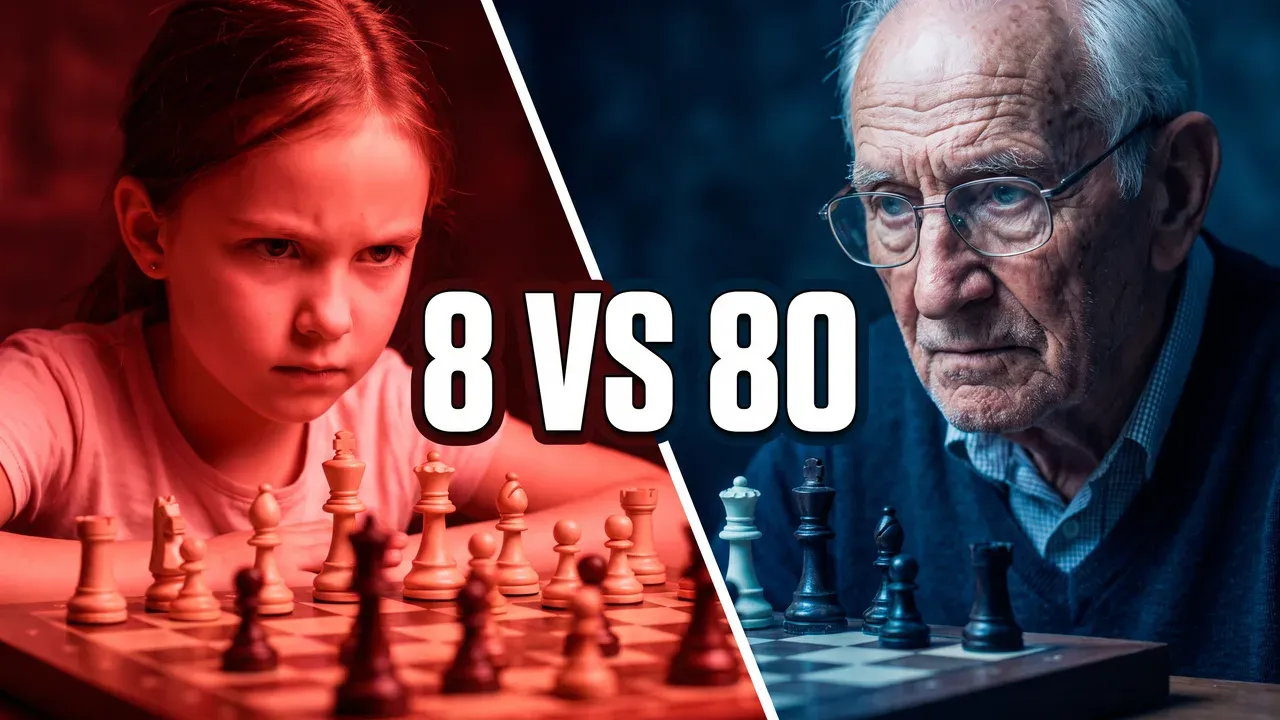
- Diagonal adds motion: the two sides lean into each other. It suits rivals, matches and 1v1s.
- Lightning is a zigzag diagonal. It says fight. Keep it thin; a thick bolt becomes a third subject.
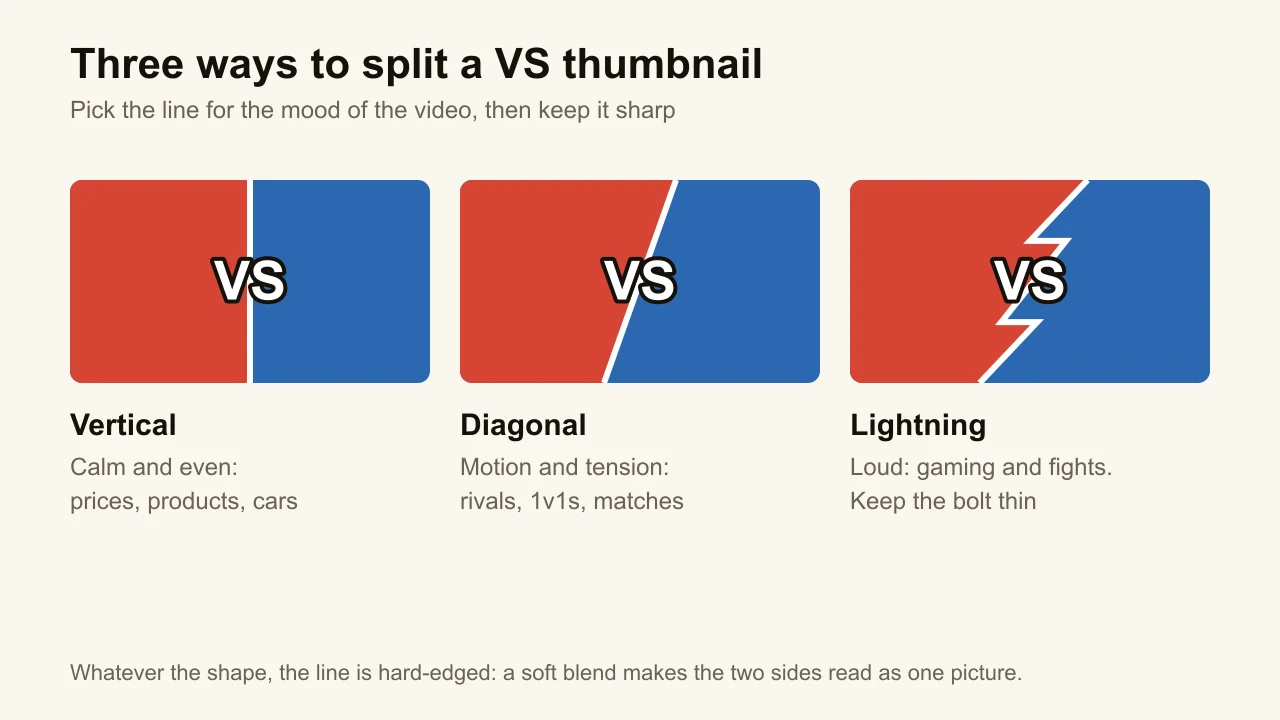
Whatever the shape, keep the line sharp. A soft gradient between the halves is the most common way a VS thumbnail turns into one blurry picture once it shrinks. The steak thumbnail above uses a vertical split because the price is the question; the chess one uses a diagonal because the match is.
How big should the text be on a VS thumbnail?
The text on a VS thumbnail should be two to four words, set in a heavy face, large enough to read when the thumbnail is 168 pixels wide. That is the size of the suggested-videos column on desktop, and it is where thin letters fail first.
Three rules hold up at that size:
- Numbers get a condensed face. Anton or Oswald Bold keep "$", commas and digits distinct when small; the best fonts for YouTube thumbnails are compared at 168 pixels, and Oswald's specimen is a VS line.
- VS can be smaller than the two sides. The words on each side carry the meaning. "VS" is a connector; at the same weight but a smaller size, it lets the two sides dominate.
- One outline for everything. A dark outline around light letters reads on red and on blue alike, which matters when the words sit across the line.
Five words is the ceiling for any thumbnail. A VS needs fewer, because the layout already says "comparison" before a single word is read.
What are the most common VS thumbnail mistakes?
The most common VS thumbnail mistakes break the balance or the legibility. Each one is easy to spot once you shrink the thumbnail.
- Unequal sizes. One subject fills its half and the other floats small in the distance. The viewer reads the big one as the winner, and the question is gone.
- A blurred seam. Two photos feathered into each other. At feed size the line disappears and so does the comparison.
- Too many words. "I TESTED THE CHEAPEST VS THE MOST EXPENSIVE STEAK" is a title, not a thumbnail. "$5 VS $500" is the thumbnail.
- Two sides that look alike. Two grey laptops on two grey desks make the viewer squint. Different colours, different shapes, different light.
- VS under the duration badge. The badge sits in the bottom-right corner. Words placed low and right lose their last letters to "12:34". Put the gap in the middle or the upper half.
- A brand's logo or a real person's face. A logo on your thumbnail can read as the brand's endorsement, and YouTube's trademark policy lets it block videos that use someone else's trademark in a way that might cause confusion. Show the products without their logos, in each side's colour, and let the title carry the names. A real person's face is worse: you need the right to use the photo, and YouTube's impersonation policy bans using AI to make a famous person appear to take part in a video or endorse a product.
A VS thumbnail is also only honest if the video compares the two things. Two prices on the thumbnail and one product in the video is the mismatch YouTube's thumbnail policy calls misleading, and our guide to clickbait thumbnails explains how YouTube measures it in watch time.
How do you make a VS thumbnail in Canva or another editor?
In an editor, a VS thumbnail is a template, two photos and an hour of adjustments. Canva is the usual starting point: it has a page of versus templates, not all of them sized for YouTube, next to its YouTube thumbnail templates. The workflow:
- Pick a split template and change the two halves to your colours.
- Drop in two photos you have the right to use, cut out the subjects and scale them to the same size.
- Light or tint each subject toward its side's colour, so the halves stay separate.
- Replace the words with your two to four, outlined, in the gap.
- Move anything out of the bottom-right corner and export at YouTube's 16:9 size.
It works, and it is free if the template and photos are. The cost is the photos (you need two that match in angle and light), the cutting out, and the fact that every other channel can pick the same template. Most of the hour goes to steps 2 and 3, and that is the part that makes a VS look finished.
How do you make a VS thumbnail with ThumbnailMaker?
In ThumbnailMaker you pick the Versus style and the composition comes with it. Behind the style is one instruction to the image model: two subjects or objects facing each other across a diagonal or vertical split, at the same size and the same moment, each side lit in its own colour, with a clear gap in the middle for the text, not a before and after, and a sharp dividing line with no blur. Those are the rules from the sections above, applied every time.
- Sign up and paste your video's link. Your first thumbnail is a free preview. No video yet? Switch to Describe and write the two sides in a sentence: "a cheap plastic controller on the left, a premium metal one on the right".
- Read the brief: three angles, each with a scene, the words and a style. The Contrast angle is the one built for "before / after, or versus". Change any word.
- Under Style, pick Versus, and choose Video 16:9 (or Shorts 9:16 for a Short).
- Type the words in "Text on the image", for example "$5 VS $500", and set Place of the words to Middle so they land in the gap.
- Click Generate. Under the image, the checks say whether the text is exact, readable in the feed and clear of the badge corner. The words are drawn into the image and read back; on a plan, a wrong letter gets one automatic redraw.
- If something is off, type it under "What should we fix?", for example "make the right side bluer", and click Correct. Then download it.
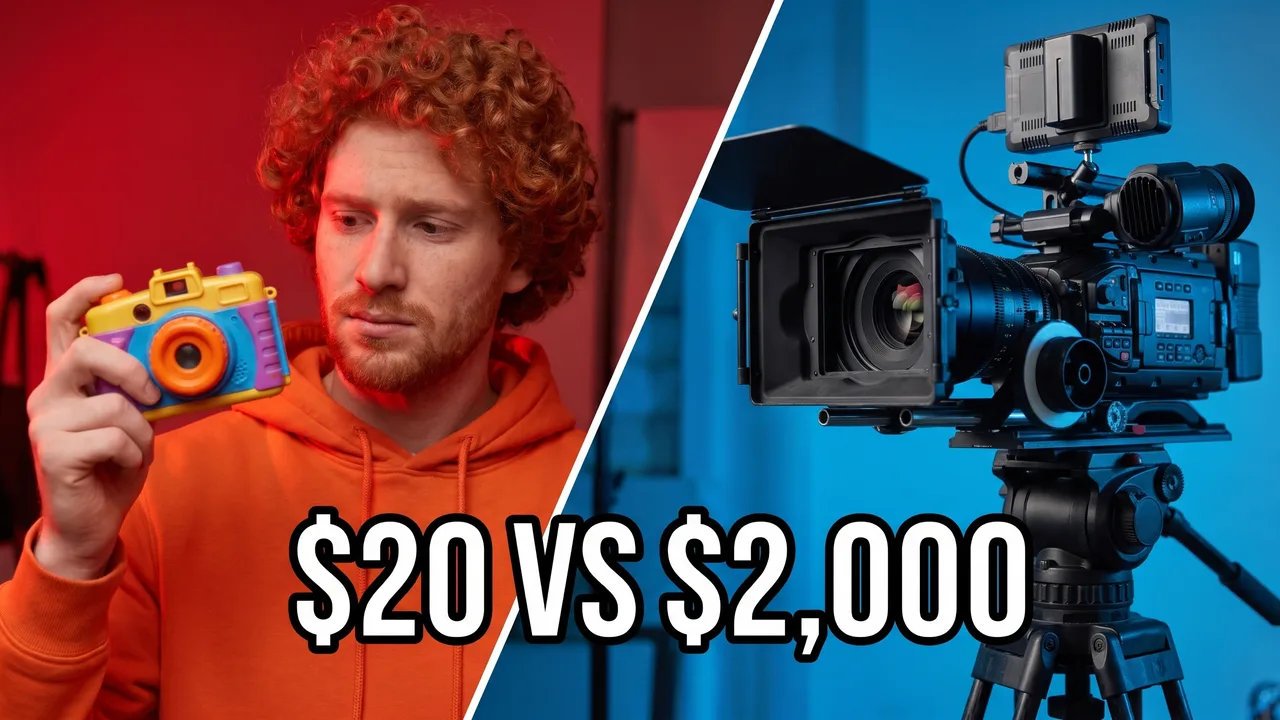
ThumbnailMaker refuses prompts that identify a real person, so a VS between two real creators isn't something it will draw; invented people, your own products and generic objects are. Before you upload, the free YouTube thumbnail tester puts the image in a mock feed at both feed sizes, next to a title, with the duration badge in place, which is the fastest way to see whether your two sides still read as two. The rest of the checklist, from one subject to the 168-pixel test, is in how to make thumbnails for YouTube.
Frequently asked questions
Where can I find a VS thumbnail template?
Canva has a page of versus templates, and a separate library of YouTube thumbnail templates; check that the one you pick is 16:9 before you start. A template gives you the split and the colours; you still need two matching photos and the cutting out. ThumbnailMaker has no templates: the Versus style is the template, applied to whatever your video is about.
What colours work best for a VS thumbnail?
Two opposite colours, one per side. Red against blue is the classic, orange against teal the warmer version. What matters is that the two halves never share a colour, so the split still reads when the thumbnail is the size of a stamp.
Can I put two YouTubers in a VS thumbnail?
Only with their permission and photos you have the right to use. A face you don't have the right to use is a copyright and likeness problem, and an AI-made face of a famous person that suggests they are in your video falls under YouTube's impersonation policy. ThumbnailMaker refuses prompts that identify real people.
Is a VS thumbnail clickbait?
No, as long as the video makes the comparison the thumbnail promises. "$5 VS $500" over a video that tastes both steaks is a promise kept. The same thumbnail over a video about only one of them is the mismatch YouTube treats as misleading.
What should you make first?
Pick the one comparison your video settles, put it in two to four words with VS in the middle, and give each side its own colour and the same size. If you would rather not spend the hour on photos and cutouts, ThumbnailMaker can make it from your video's link in the Versus style, with the words drawn in and checked at feed size.
ThumbnailMaker Team — Guides from the people building ThumbnailMaker: thumbnail design, CTR, and what happens under the hood of an AI generator. Every number is checked against YouTube's own pages and dated.
Try it on your next video
Paste the video's link: the brief is written for you and your first thumbnail is a free preview. Plans from $12 a month.