Quick answer: vidIQ pricing has three self-serve plans. Free costs $0 and gives 150 AI credits a month. Boost is $19 a month, or $199 a year ($16.58 a month), with 2,000 AI credits. Max is $49 a month, or $468 a year ($39 a month), with 6,000 credits. Those are one-channel US list prices. Boost and Max also come in 2- and 3-channel versions, from $29 and $89 a month, and vidIQ says local prices can differ at checkout. Human coaching starts at $199 a month, and Enterprise, for more than three channels, has no public price. Credits pay for the AI tools: a thumbnail generation costs 22, an AI Coach message 10, and unused credits don't roll over. The plans page lists no free trial, and vidIQ's terms make fees non-refundable outside billing errors and local consumer law. Every price here was read on vidiq.com on November 15, 2026.
If the thumbnail maker is the only part of vidIQ you use, the vidIQ thumbnail maker alternative does that one job on a plan from $12 a month, and a new account's first 3 thumbnails are free.
How much does vidIQ cost?
vidIQ costs $0, $19 or $49 a month for its three self-serve plans, or $0, $199 or $468 a year. Its plans page states it in one line: "One-channel US list prices: Boost $19/month or $199/year; MAX $49/month or $468/year. Local pricing may vary. Final pricing is shown at checkout." Prices are in US dollars, and paid plans renew automatically until you cancel.
The page opens on yearly billing, so the big number on each card is the yearly price divided by 12: $16.58 for Boost and $39 for Max. You pay the yearly total once, up front. Switch the toggle to Monthly to see $19 and $49.
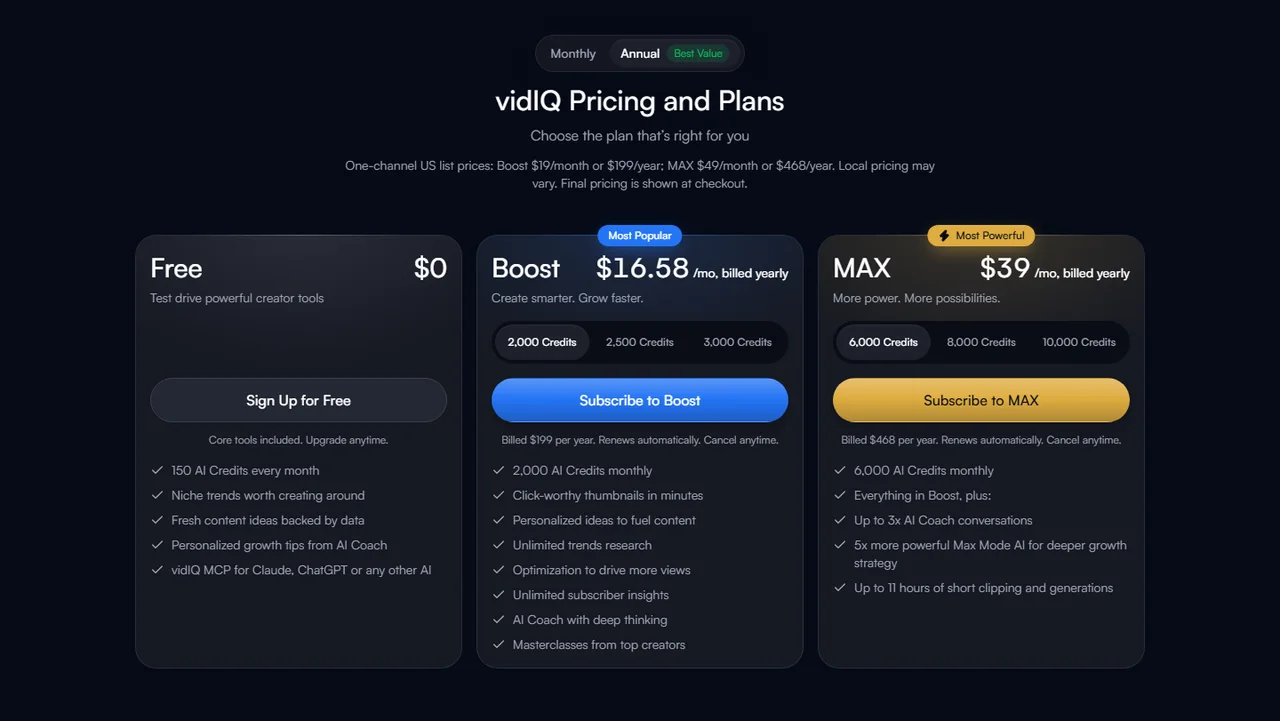
The credit buttons on the Boost and Max cards are also the channel selector. vidIQ's help article on channels per plan says so: 2,000, 2,500 and 3,000 credits are Boost for 1, 2 and 3 channels, and 6,000, 8,000 and 10,000 are Max for 1, 2 and 3. The credits are one shared balance for the account, not a balance per channel.
| Plan | Monthly | Yearly | AI credits a month |
|---|---|---|---|
| Free | $0 | $0 | 150 |
| Boost, 1 channel | $19 | $199 ($16.58 a month) | 2,000 |
| Boost, 2 channels | $29 | $276 ($23 a month) | 2,500 |
| Boost, 3 channels | $39 | $372 ($31 a month) | 3,000 |
| Max, 1 channel | $49 | $468 ($39 a month) | 6,000 |
| Max, 2 channels | $89 | $852 ($71 a month) | 8,000 |
| Max, 3 channels | $129 | $1,236 ($103 a month) | 10,000 |
| Chat Coaching | $199 | $1,188 ($99 a month) | 6,000 |
| VIP Coaching | $399 | $3,830 ($319 a month) | 6,000 |
| Enterprise | Contact sales | Contact sales | Not published |
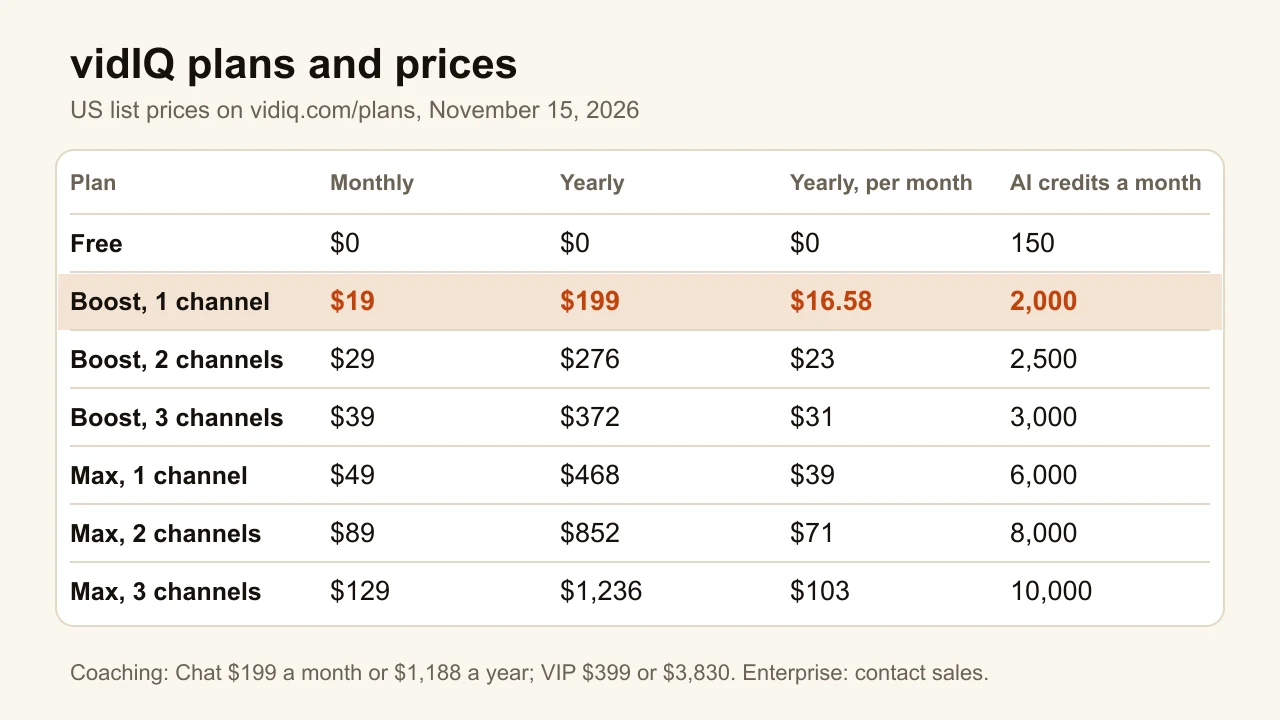
Coaching is sold on a separate coaching page. Both coaching plans include a human coach and 6,000 AI credits a month; VIP adds recurring live calls. vidIQ limits coaching to creators in the United States, the United Kingdom, Canada, Ireland, Australia and New Zealand, with an English-language channel.
What do vidIQ's AI credits pay for?
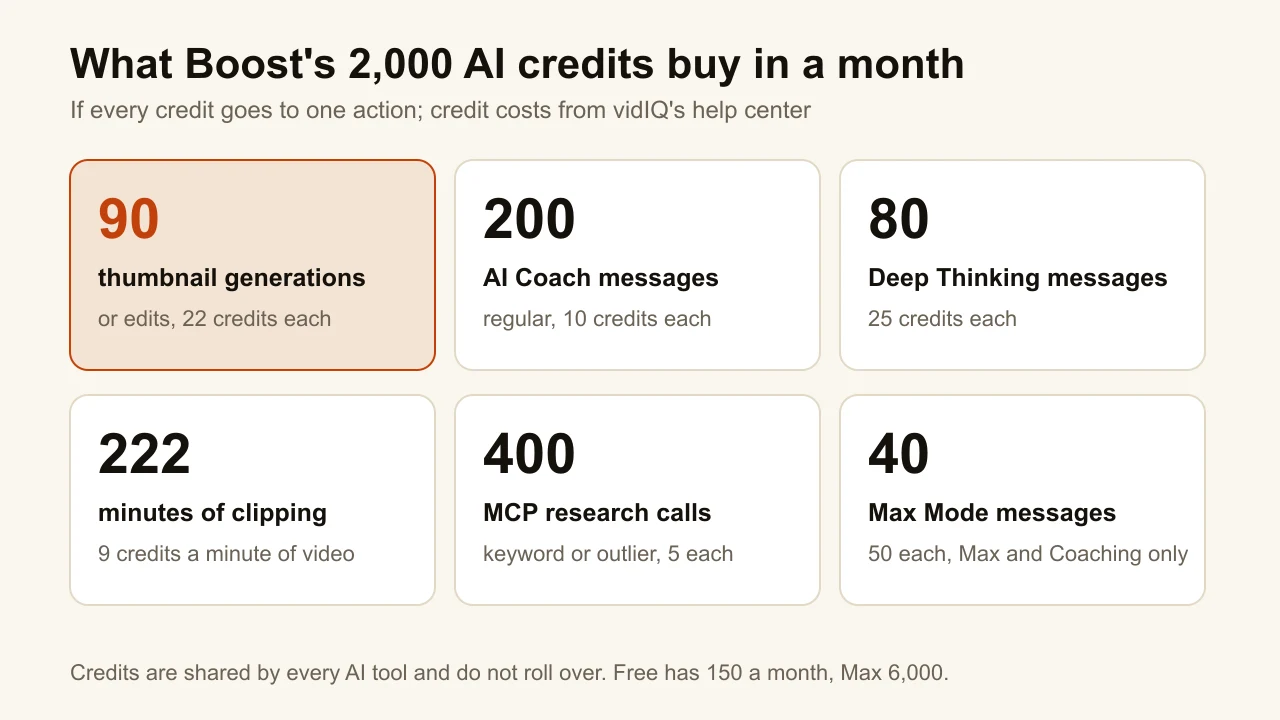
AI credits are the meter on every paid feature that runs a model. vidIQ's Features & Credits by Plan article lists the cost of each action. A thumbnail generation, regeneration or edit costs 22 credits. An AI Coach message costs 10, or 25 in Deep Thinking mode, or 50 in Max Mode, which only Max and Coaching have. Clipping costs 9 credits a minute of input video, and the Shorts generator 20 credits a second of output. A title generation is 3.
The same balance pays for vidIQ MCP, the connector that lets Claude or ChatGPT call vidIQ's tools. A keyword or outlier lookup through MCP costs 5 credits a call, and one question to an assistant can trigger several calls.
Three rules decide how far the credits go:
- They reset every month and don't roll over. Plan credits refresh on your sign-up or upgrade date; whatever is left is gone.
- Only Max and Coaching can buy more. Top-up packs and auto-refill are not available on Free or Boost. On those plans, the help article's answer is to upgrade.
- Every generation counts. A thumbnail you regenerate three times is 88 credits, not 22.
Not every feature uses credits. Keyword research, outliers, daily ideas and competitor tracking in the web app have their own per-plan limits instead, which is where the free plan feels small.
Is there a free version of vidIQ?
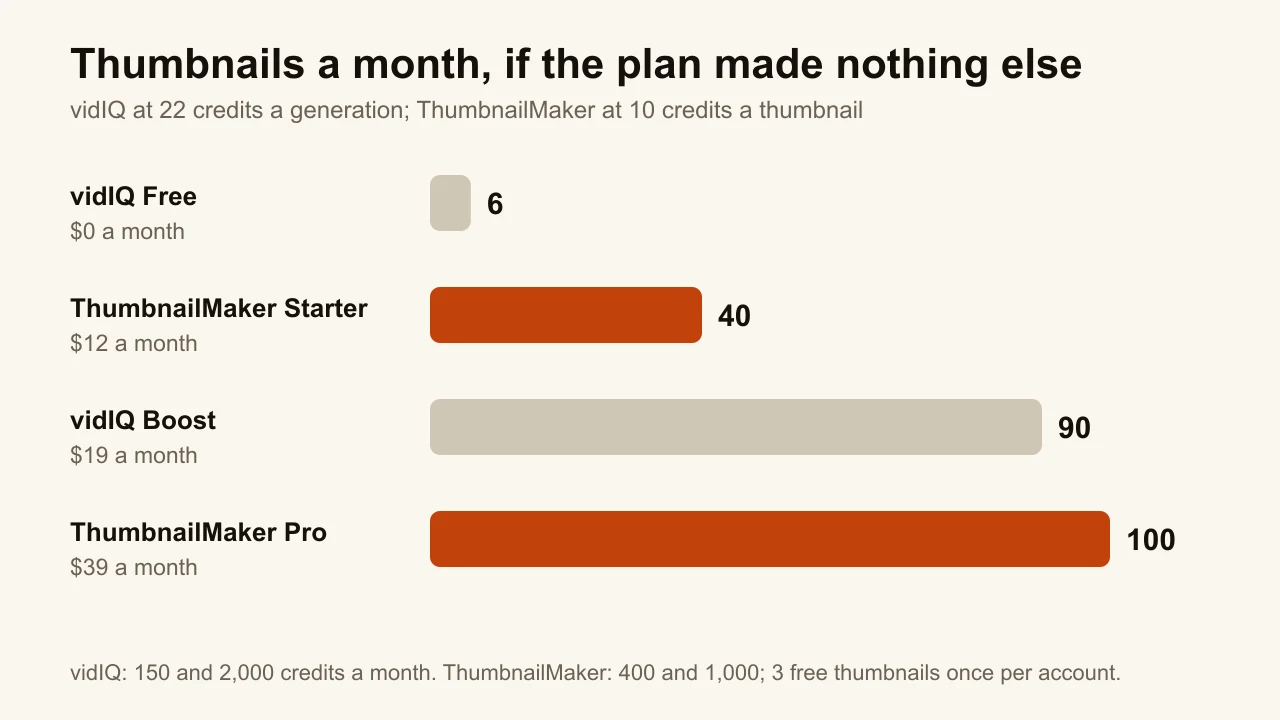
Yes. vidIQ Free costs $0 with no time limit, and gives 150 AI credits a month. That is 6 thumbnail generations at 22 credits each, or 15 AI Coach messages, if you spend it on nothing else. The free plan also includes niche trends, content ideas, AI Coach tips, the browser extension's scorecards and vidIQ MCP. One free account connects one YouTube channel.
The limits that matter are on research, not credits. Per vidIQ's own table, as of November 15, 2026:
| Feature | Free | Boost | Max |
|---|---|---|---|
| Keyword research | 3 results a search | Unlimited | Unlimited |
| Outliers | 8 results a search | Unlimited | Unlimited |
| Personalized daily ideas | 3 a day | 50 a day | 50 a day |
| Competitors tracked | Up to 3 | Up to 20 | Up to 50 |
| Keyword Inspector (extension) | 1 keyword a search | 5 | 5 |
| Best time to post, subscriber analysis | No | Yes | Yes |
Three keyword results a search is enough to see what the tool does, and not enough to plan a month of videos with it. That is the gap Boost is priced to close.
Boost or Max: which vidIQ plan should you pick?
Pick by the limit you actually hit, not by the feature list. The plans differ in four ways: credits, competitors tracked, Max Mode, and the option to buy more credits.
Stay on Free if you open vidIQ a few times a month to check a keyword or read the daily ideas. The extension's real-time stats and scorecards work on Free.
Pick Boost if you run one channel and use keyword research or outliers every week. It removes the 3-result and 8-result caps, raises daily ideas to 50 and tracked competitors to 20. Its 2,000 credits are 200 coach messages or 90 thumbnails a month, or any mix of the two. Paying yearly saves $29 against twelve monthly payments.
Pick Max if the AI tools are the main reason you pay. It triples the credits to 6,000, adds Max Mode for the AI Coach, tracks up to 50 competitors, lists "up to 11 hours of short clipping and generations", and is the cheapest plan that can buy top-ups. Paying yearly saves $120.
Pick a 2- or 3-channel version of either plan if you run more than one channel. The credits are shared across channels, so a second channel adds 500 Boost credits, not 2,000.
Pick Coaching only if you want a person reviewing your titles, thumbnails and videos. The $199 Chat plan costs more than ten times Boost's monthly price; what it buys is the coach, since the tools are the same.
Does vidIQ have a free trial, a discount or a coupon?
vidIQ's plans page mentions no free trial on November 15, 2026; the free plan is the way to try it. An older help article from 2024 says a paid plan can't be started without a card "even for the trial", so trials have existed. None is advertised now.
The one standing discount is yearly billing: Boost costs $199 a year instead of $228, and Max $468 instead of $588. That is about 13% off Boost and 20% off Max.
vidIQ also runs a coupon on its own YouTube Growth Offers page: "25% OFF FOREVER" with the code unlock2026. The fine print says it is "valid for new Boost monthly plan upgrades only", cannot be combined with other promotions, and can be withdrawn at any time. On the $19 list price, 25% off would be $14.25 a month. The page was live on November 15, 2026; the checkout is where you find out whether the code still applies.
Can you get a refund from vidIQ?
Usually not. vidIQ's Terms of Service, effective October 19, 2026, say: "Except as expressly stated in these Terms of Service or as required by applicable law, all fees are non-refundable." That covers renewals you didn't cancel in time, unused days, unused credits and one-time purchases. The exceptions are billing errors such as duplicate charges, a subscription vidIQ itself ends for reasons other than a breach, and any refund right under your own country's consumer law.
Cancelling stops the next renewal; you keep the paid plan until the end of the period you paid for. A plan bought through the Apple App Store or Google Play is cancelled and refunded through that store, not through vidIQ. Annual coaching plans are paid up front and, per the coaching page, non-refundable.
The practical advice: start monthly. A yearly plan you stop using after two months is $199 with no way back, while a monthly plan you stop using costs $19 or $38.
Is vidIQ worth it?
vidIQ is worth paying for when you use its research on other channels every week. Keyword research, outlier search and competitor tracking are the parts YouTube Studio can't give you, because Studio only shows your own channel. If those are in your routine, Boost at $16.58 a month, paid yearly, is a fair price for removing the free plan's caps.
It is not worth paying for one tab. A Boost subscription used only for daily ideas, or only for thumbnails, is $199 a year for a sliver of a suite. Paying for a suite to use one tab is the most common waste in this category. YouTube Studio's Trends tab and its free A/B test already cover part of what people pay vidIQ for. If you are weighing other tools for the research itself, the vidIQ alternatives roundup sorts them by the vidIQ job each one replaces.
What if you mainly pay vidIQ for thumbnails?
Then compare the bill, not the brand. vidIQ's thumbnail maker spends 22 credits a generation, regeneration or edit. On Free, that is 6 thumbnails a month. On Boost, it is 90 a month if every one of the 2,000 credits goes to thumbnails, which works out to about $0.21 each at $19. That is a low price per image, and it is fair to say so.
ThumbnailMaker, our product, does only the thumbnail. Its Starter plan is $12 a month, or $120 a year, for 400 credits; a thumbnail is 10 credits, so about 40 a month at $0.30 each. A correction in a sentence is 10 credits too. Every new account gets 3 free thumbnails, with no card. So per image, a fully spent vidIQ Boost is cheaper. Per month, ThumbnailMaker's bill is lower: $12 against $19, or $120 a year against $199.
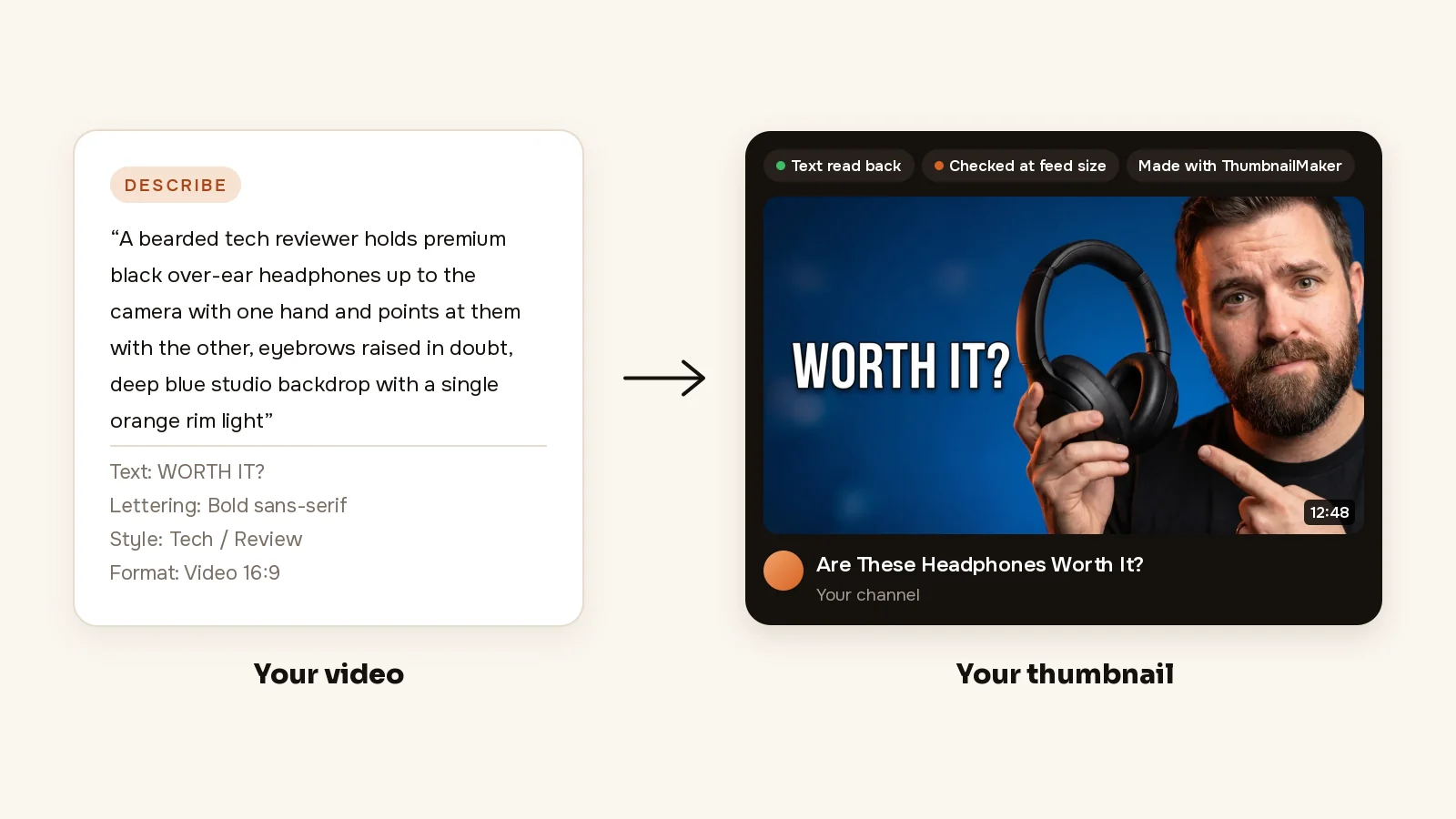
The real difference is what each credit buys. vidIQ's generator makes one 1280 × 720 PNG from a prompt, a link or an upload. ThumbnailMaker, an AI thumbnail maker built for that one step, writes the brief from your video's link: three angles, each with a scene, the words and a style. It draws the words into the image, reads them back, redraws a wrong letter and checks the result at the 336 px the feed shows, with the duration-badge corner kept clear.
What ThumbnailMaker doesn't do matters just as much. It has no keyword research, no outlier search, no competitor tracking, no AI coach and no browser extension. It doesn't replace any of vidIQ's research tools. If you use those, keep vidIQ, even the free plan, and make the thumbnail elsewhere. ThumbnailMaker's first monthly payment is refunded in full within 7 days and the first yearly payment within 14, and the ThumbnailMaker plans are on one page.
Start on Free, then pay for the cap you hit
Use vidIQ Free for a month and note the first limit that stops you. If it is keyword results or outliers, Boost is the plan, and yearly billing saves $29. If it is credits, Max is the only plan that can top up. If it is thumbnails, set the two thumbnail tools side by side before paying $199 a year for them.
Prices and limits were read on November 15, 2026 on vidIQ's own pages: the plans page with each credit option clicked in both billing modes, Features & Credits by Plan, channels per plan, the coaching page, the Growth Offers page, the billing policy article and the Terms of Service. Prices outside the US can differ at checkout.
ThumbnailMaker is an independent product and is not affiliated with, sponsored by, or endorsed by vidIQ or TubeBuddy. vidIQ, TubeBuddy and YouTube are trademarks of their respective owners, named here only to describe publicly documented prices and features. Details were accurate when written and may have changed since.
ThumbnailMaker Team: Guides from the people building ThumbnailMaker: thumbnail design, CTR, and what happens under the hood of an AI generator. Every number is checked against YouTube's own pages and dated.