Quick answer: Roblox thumbnail size for a game page is 1920 × 1080 pixels, a 16:9 image. Roblox's Creator Hub asks for "16:9 aspect ratio and ideally 1920×1080 pixels" and accepts .jpg, .gif, .png, .tga or .bmp. A game can show up to 10 thumbnails, and an image of any other shape is stretched to 16:9 when it is displayed. The game icon is a separate image: square, at least 512 × 512, one per locale, and shown as small as about 150 × 150 in some places. Keep essential text away from the bottom of a thumbnail, where the player count can cover it. Thumbnails used for Home page personalization should stay under 3 MB. Roblox publishes no size for a group icon; a square at 512 × 512 is the safe choice. Both game images are uploaded in the Creator Dashboard, under Configurations, then Places, and every upload is moderated. Every figure here was checked on the Creator Hub on November 15, 2026.
To make the images themselves, the Roblox game thumbnail maker draws a game page's 16:9 image from a sentence or a screenshot of your avatar and downloads it at 1920 × 1080, and a square icon at 512 × 512. A new account's first 3 thumbnails are free with no card; after those, a plan from $12 a month.
What is the Roblox thumbnail size?
The Roblox thumbnail size is 1920 × 1080 pixels, in 16:9. That is the number on the Thumbnails page of Roblox's Creator Hub: "A thumbnail image should be 16:9 aspect ratio and ideally 1920×1080 pixels so that it always displays in high resolution across the Roblox site and app." The Roblox game thumbnail size and the Roblox thumbnail dimensions people search for are the same figure. A game thumbnail appears on Roblox's Home page and at the top of the game's detail page.
The two images a Roblox game needs, drawn at the same scale:
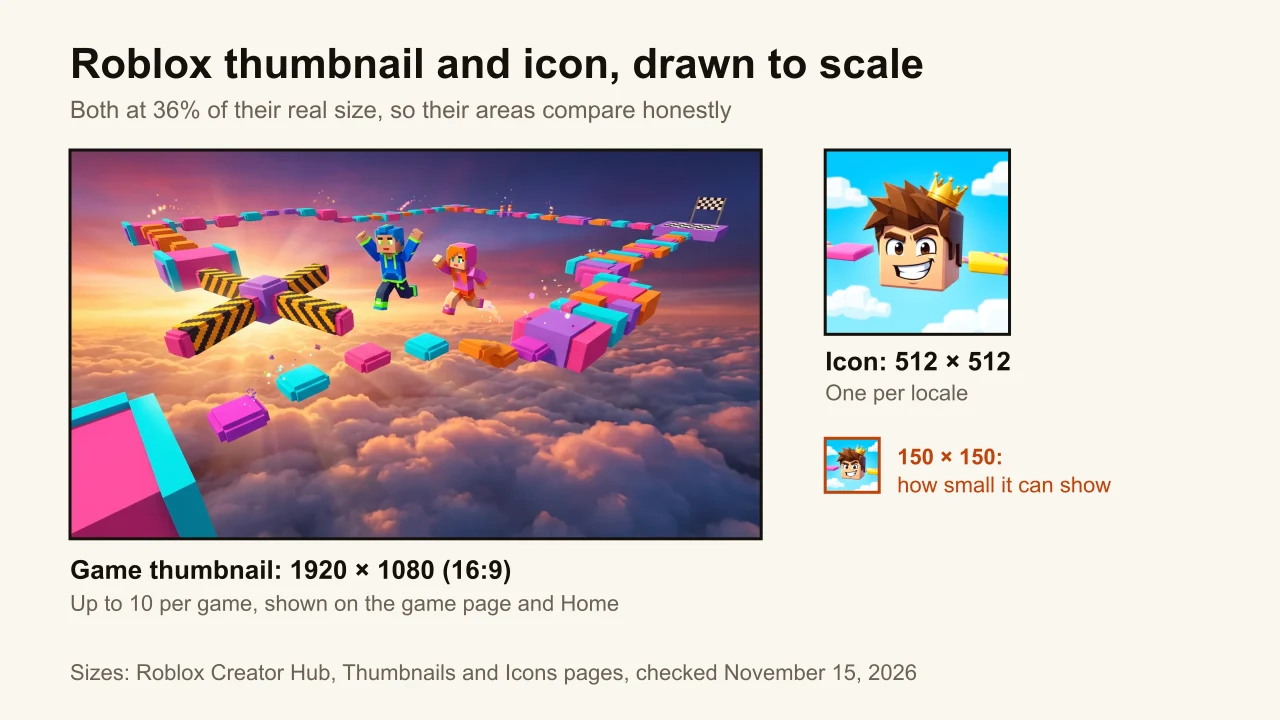
Every number Roblox documents for the two images, in one place:
| What | Size or limit | Source |
|---|---|---|
| Game thumbnail | 16:9, ideally 1920 × 1080 px | Thumbnails |
| Thumbnail formats | .jpg, .gif, .png, .tga, .bmp | Thumbnails |
| Thumbnails per game | Up to 10 images or videos | Thumbnails |
| Home page personalization | Under 3 MB and 1920 × 1080; 2 to 5 active | Thumbnails |
| Video thumbnails | Free, 3 uploads a month | Thumbnails |
| Game icon | Square, at least 512 × 512 px | Icons |
| Icon, smallest display | About 150 × 150 px | Icons |
| Icons per game | One per locale | Icons |
| Group icon | Not documented | Groups |
A thumbnail can also be a video, which Roblox shows first on the detail page once approved. Video thumbnails don't play on Xbox, PlayStation or VR headsets, so the first image still has to do the work there. Roblox also generates a thumbnail automatically from Studio's camera position at your last publish; it is free and it is rarely the shot you would have picked.
What is the Roblox game icon size?
The Roblox game icon size is 512 × 512 pixels, square. Roblox's Icons page says an icon "should be square and at least 512×512 pixels so that it always displays in high resolution and at an ideal aspect ratio across the Roblox site and app", and tells you to "use a template of 512×512 pixels". So "Roblox icon size" and "Roblox game icon size" have one answer, and 512 is a floor, not a ceiling.
The number to design for is smaller. Roblox warns that "in some places on the Roblox site and app, icons scale down to smaller sizes like 150×150 pixels", and recommends previewing the icon at that size. At 150 pixels, a face or one object reads; a sentence doesn't. A game can display only one icon per locale, while the thumbnails rotate, so the icon carries the game's identity alone.
That makes the icon and the thumbnail two different jobs. The icon is one character or one object, big and centred, with no more than a word or two. The thumbnail is where the scene goes: the obby, the tycoon, the chase.
Is a Roblox thumbnail 16:9?
Yes, a Roblox game thumbnail is 16:9, and Roblox enforces it on display. Its docs put it bluntly: "Displayed thumbnails will be stretched to 16:9 aspect ratio regardless of the upload's aspect ratio." Upload a square or a 4:3 screenshot and Roblox doesn't crop it or add bars. It pulls the image sideways until it fills the frame.
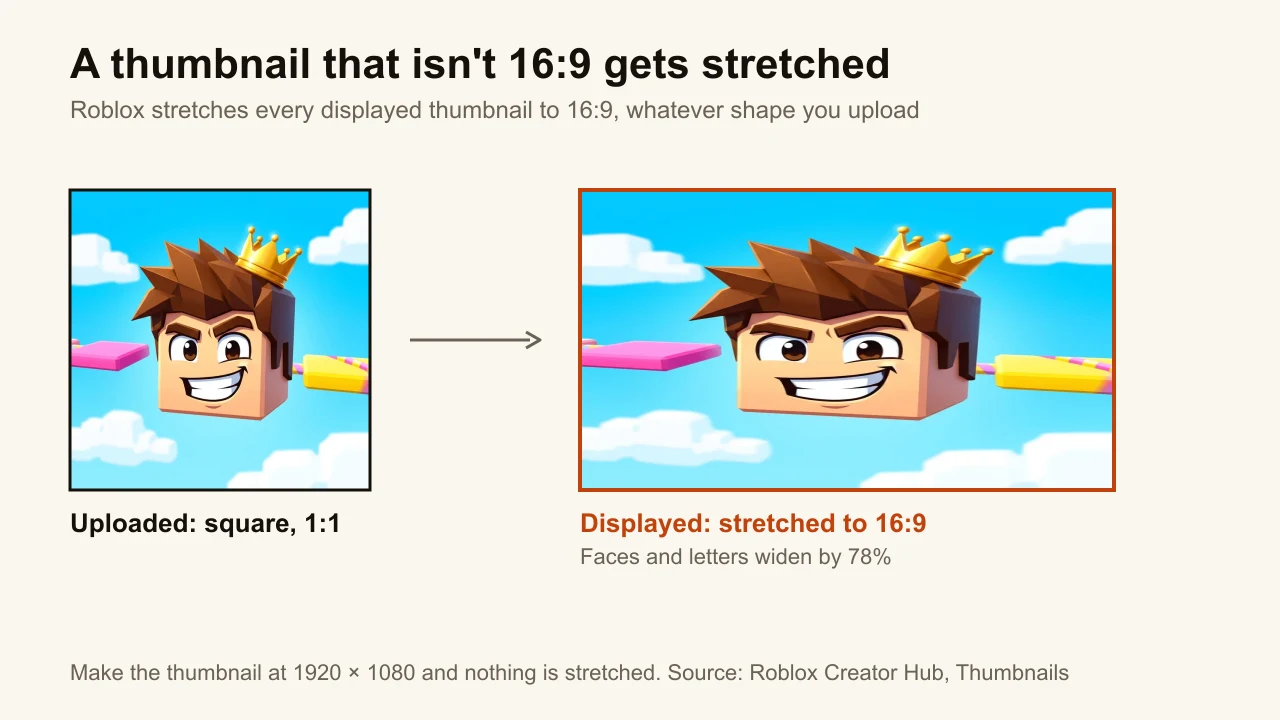
A stretched blocky character still looks blocky, which is how a stretched thumbnail can go unnoticed for weeks. Text gives it away: the letters turn short and fat. Designing at the correct size beats cropping to roughly the right shape, and here the wrong shape is never even cropped. Make the image at 1920 × 1080 and nothing gets stretched.
The icon is the opposite case: Roblox asks for a square, 1:1, so it needs its own canvas rather than a crop of the thumbnail.
Where does the player count cover a Roblox thumbnail?
At the bottom. Roblox's Thumbnails page says to "avoid placing any essential text or elements at the bottom of the thumbnail, as it may potentially be covered by metadata like the player count." It doesn't give a height for that strip, so there is no pixel safe zone to quote, only a direction.
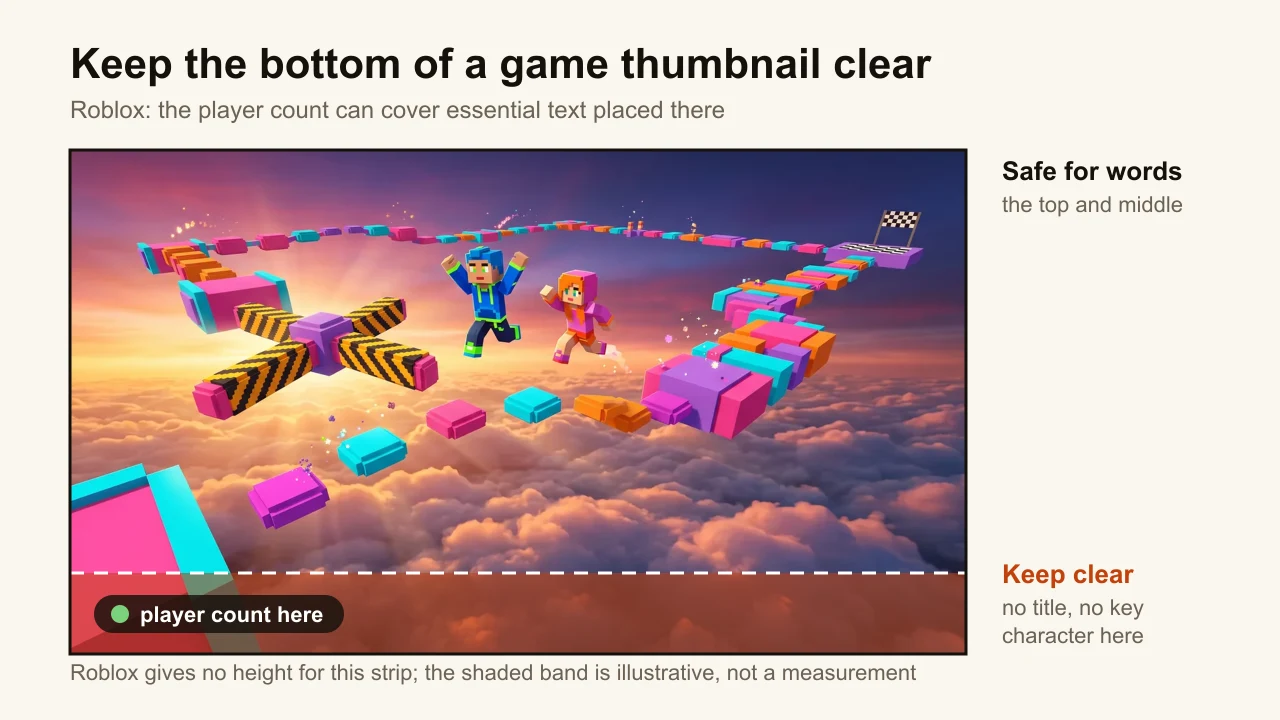
In practice: put the game's name and any words in the top two thirds, keep the main character's face above the bottom edge, and let the bottom of the frame be ground, water or clouds, something that can be covered without losing anything. YouTube has the same problem in the opposite corner, with its duration badge; on Roblox it is a strip along the whole bottom edge.
What is the size of a Roblox group logo?
Roblox doesn't publish a size for a group icon. Its Groups page says only to "upload an image for the group logo" when you create the group, which costs 100 Robux, and gives no dimensions, formats or file limit. Sites quoting a Roblox group icon size disagree with each other: 256 × 256, 420 × 420 and 512 × 512 all circulate, and Roblox's own documentation backs none of them.
What we would upload: a square image at 512 × 512, the size Roblox asks for game icons, with the mark large and centred. A square source at that size scales down cleanly wherever Roblox shows the logo. Treat it like the game icon and check it at about 150 pixels before uploading.
How do you add a thumbnail to a Roblox game?
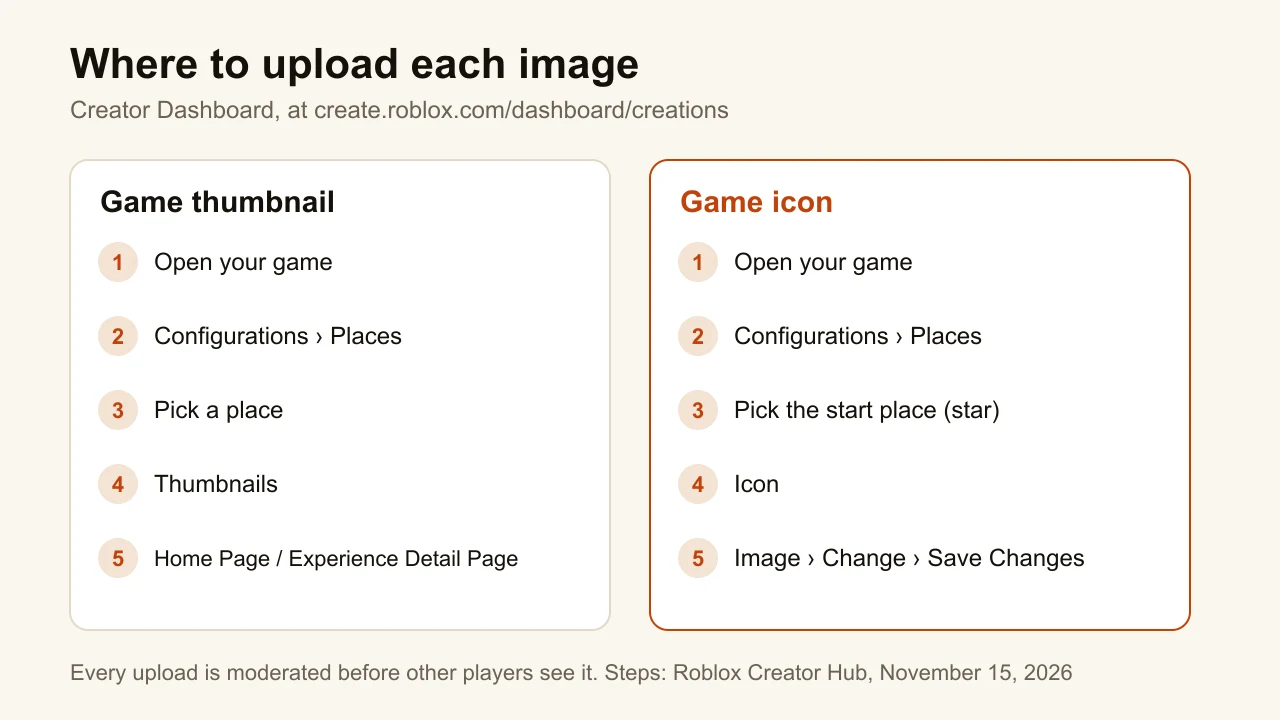
You add a thumbnail to a Roblox game in the Creator Dashboard, from the place's settings. These are the steps on Roblox's Thumbnails page, checked November 15, 2026:
- In the Creator Dashboard, select the game.
- In the left navigation, go to Configurations, then Places, and select a place.
- Click Thumbnails in the left navigation.
- Use the Home Page tab and the Experience Detail Page tab to upload and order the images for each.
- Save. The images go through moderation before other players see them.
The icon is set from the same place, per the Icons page: open the game, go to Configurations, then Places, click the start place (marked with a star), select Icon, set the media type to Image, click Change, pick the file and click Save Changes.
On the Home Page tab, Roblox can also test thumbnails for you. Click Edit active thumbnails, upload, and mark 2 to 5 of them Active; Roblox then shows each player the thumbnail most relevant to them and reports impressions and qualified plays from Home page recommendations. Personalization only starts with 2 or more active thumbnails, and those images should stay under 3 MB and 1920 × 1080. "All uploaded images and videos are moderated to make sure they adhere to the Community Rules and Terms of Use," so a crowded or edgy thumbnail can be held back.
How do you make Roblox thumbnails that get clicks?
A Roblox thumbnail gets clicked when a player can tell what the game is from one glance at a small card. Roblox's own best practices say the same thing in three parts: show what players should expect, avoid ambiguous imagery, and let colour carry the theme (bright for a comedy, dark and stormy for horror). The steps that follow from it:
- Start on a 1920 × 1080 canvas. A blank 16:9 file at that size is all a Roblox thumbnail template has to be. The square icon starts on a 512 × 512 canvas.
- Pick one moment. One focal point beats a collage: the jump over the lava, not the lava, the shop, the pets and the leaderboard at once.
- Get the shot in Studio. Roblox's free camera mode (Left Shift + P during a solo playtest) moves the camera to angles the default camera can't reach.
- Use few words, high up. Five words or fewer, in the top two thirds, clear of the player-count strip. For a quick headline on a screenshot, the free thumbnail text editor adds up to three lines in the browser and downloads a 16:9 PNG at 1280 × 720, the right shape though below Roblox's ideal size.
- Make the icon its own image. One character or object, centred, checked at 150 pixels. Don't shrink the thumbnail into a square.
- Upload 2 to 5 and let personalization compare them. Roblox reports impressions and qualified plays, which beats guessing which one works.
ThumbnailMaker makes both images from a sentence, such as "two blocky players racing across candy platforms above the clouds", or from a screenshot with your avatar in it, which you then change by instruction. It draws generic blocky characters; it never loads an avatar by username. Every 16:9 thumbnail has a "Roblox game page, 1920 × 1080" PNG download, and every square image made in the Profile picture format has a "Roblox game icon, 512 × 512" one. The game thumbnail and the icon in this post's diagrams were made with it. Roblox still moderates every upload, whatever made the image.
Is a Roblox game thumbnail the same as a YouTube thumbnail?
No. "Roblox thumbnail" means two images, and the size depends on which one you need. A game thumbnail is the 16:9 image on a Roblox game's page, ideally 1920 × 1080, uploaded in the Creator Dashboard. A YouTube thumbnail for a video about Roblox is also 16:9, at 1280 × 720 or larger, uploaded in YouTube Studio, and it competes with every other video in the feed instead of every other game on Home.
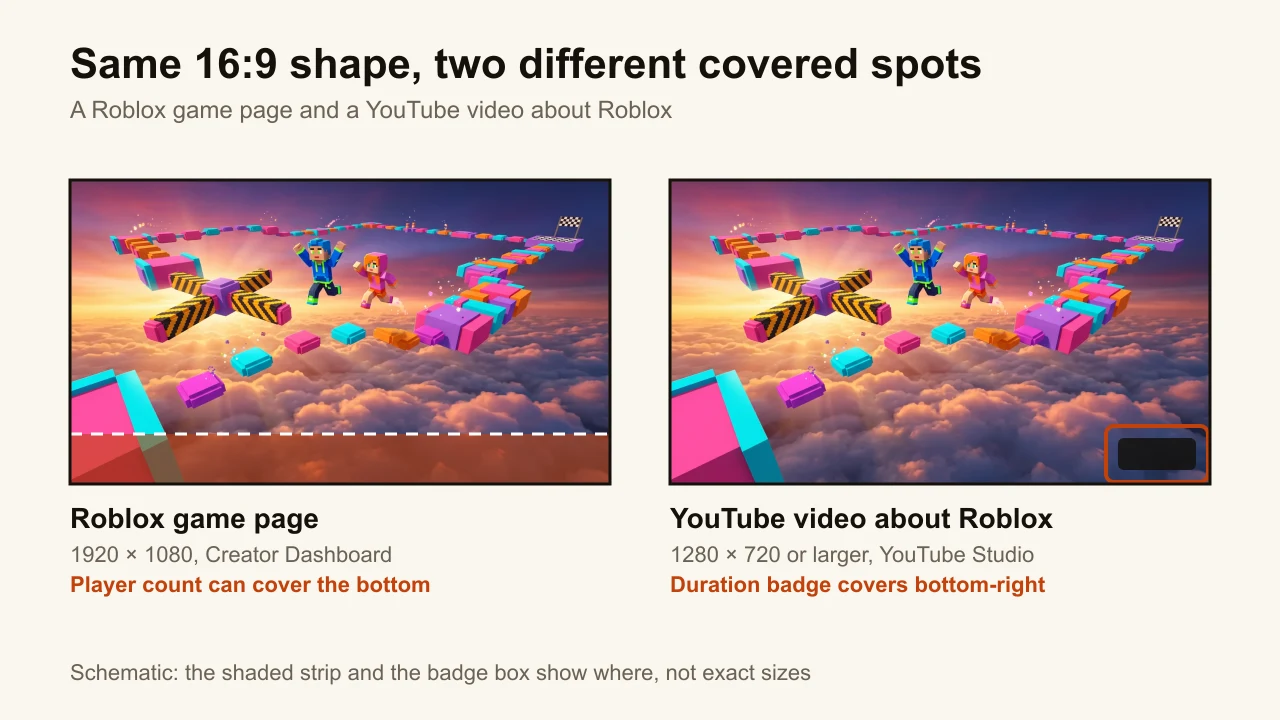
The shape is the same, so one 1920 × 1080 image can serve both. The rules around it differ: Roblox covers the bottom with the player count, YouTube covers the bottom-right corner with the duration badge. Tools tend to specialise in one of the two jobs; our list of the best Roblox thumbnail makers says which tool makes which.
Ready to make yours?
Both sizes fit on a sticky note: 1920 × 1080 for the game page, 512 × 512 for the icon, nothing important along the bottom edge. ThumbnailMaker's Roblox thumbnail maker makes the pair from one idea and downloads each at Roblox's size, and the same tool makes the 16:9 thumbnail for your Roblox YouTube videos. A new account's first 3 thumbnails are free, with no card; after those, the plans start at $12 a month.
ThumbnailMaker Team: Guides from the people building ThumbnailMaker: thumbnail design, CTR, and what happens under the hood of an AI generator. Every number is checked against YouTube's own pages and dated.