Quick answer: a ChatGPT thumbnail takes one prompt and one check. Ask ChatGPT for an image in a chat, or open Images, and write the prompt in five parts: the shape (16:9 landscape), one subject close to the camera, the exact words in quotes, the look (natural skin, real light) and an empty bottom-right corner, where YouTube prints the video's length. Pick 16:9 in the aspect ratio picker too. Then read every letter: OpenAI's own guide says its image model "can still struggle with precise text placement and clarity". Fix one thing per message, save the image, and check that the file is 16:9 and at least 1280 × 720 before you upload it in YouTube Studio. ChatGPT Images is on every plan, Free included, with limits. What ChatGPT does not do is read your video, check the spelling for you or plan around YouTube's feed, so those three jobs stay yours.
If you would rather hand those jobs over, the ChatGPT thumbnail maker adds ThumbnailMaker to ChatGPT as a connector, on the ChatGPT plans that allow custom connectors (or in Claude): you ask for a thumbnail in the chat and it comes back with the words read back and checked at feed size, on a plan from $12 a month once your first 3 free thumbnails are used.
Can ChatGPT make a YouTube thumbnail?
Yes. ChatGPT makes and edits images inside a chat, and on November 13, 2026 OpenAI's help page names the current version ChatGPT Images 2.6 and says it "is available on all tiers" (Images in ChatGPT). The same page says it can "add text" to an image and make it "in any aspect ratio", either from the aspect ratio picker or by naming the ratio in your prompt.
How many images you get depends on the plan, and OpenAI does not publish a number. Its pricing page describes the tiers in words:
| ChatGPT plan | Price | Images, in OpenAI's words |
|---|---|---|
| Free | $0 | Limited image creation |
| Go | $8 a month in the US | More image creation |
| Plus | $20 a month | More complex and accurate image creation |
| Pro | from $100 a month | Unlimited and faster image creation |
That makes ChatGPT a reasonable first try if you already pay for it. But it is a general image tool, and a thumbnail is a narrow job: a 16:9 picture that has to read at a few hundred pixels wide, next to a duration badge you do not control. For how ChatGPT compares with Gemini, Midjourney and Ideogram on text and price, see the AI image generators for YouTube thumbnails comparison.
How do you make a YouTube thumbnail in ChatGPT?
You make a YouTube thumbnail in ChatGPT in six steps, from one sentence about your video to the file you upload in YouTube Studio. The step people skip is the fourth, reading the letters, and it is the one that matters.
- Say the video in one sentence. ChatGPT has not watched your video. Tell it what happens and what the viewer gets, in your words. If the sentence has two subjects, the thumbnail will too.
- Ask for the image with a five-part prompt (the next section has one to copy). Start a chat and ask, or select More, then Images. Set the aspect ratio picker to 16:9 as well as saying it in the prompt.
- Wait. OpenAI's help page says an image "may take a few minutes" when the request is complex.
- Read every letter of the text, at full size and small. Then look at the face, if there is one.
- Fix one thing per message. Select the image to open the editor, use Select to highlight the area, and describe the change: "the text must read STUDY HACK, change nothing else". OpenAI warns that highlights "are not always precise", so check the parts you did not ask it to touch.
- Save it and check the file. Open the image and select Save to download it. Then check its shape and width before it goes anywhere near YouTube Studio.
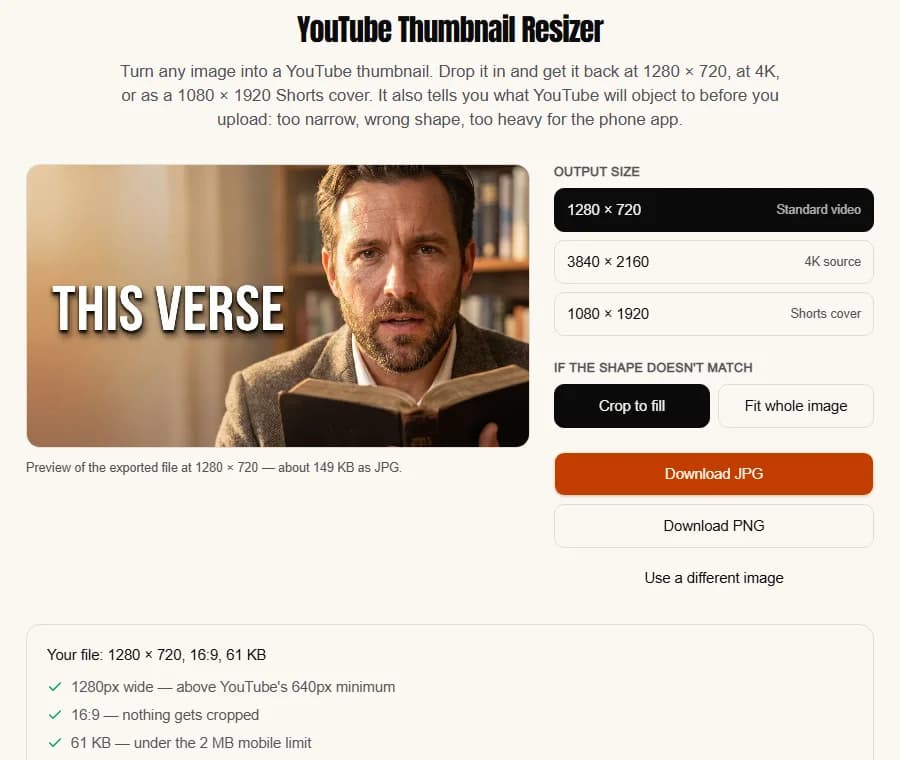
For the last step, the free YouTube thumbnail resizer takes whatever ChatGPT gave you and exports 1280 × 720, a 4K 3840 × 2160 file or a 1080 × 1920 Shorts cover. It crops to fill or fits the whole image, then checks the width, the 16:9 shape and the 2 MB limit of YouTube's phone app, all in your browser with no account.
What is the best ChatGPT prompt for a YouTube thumbnail?
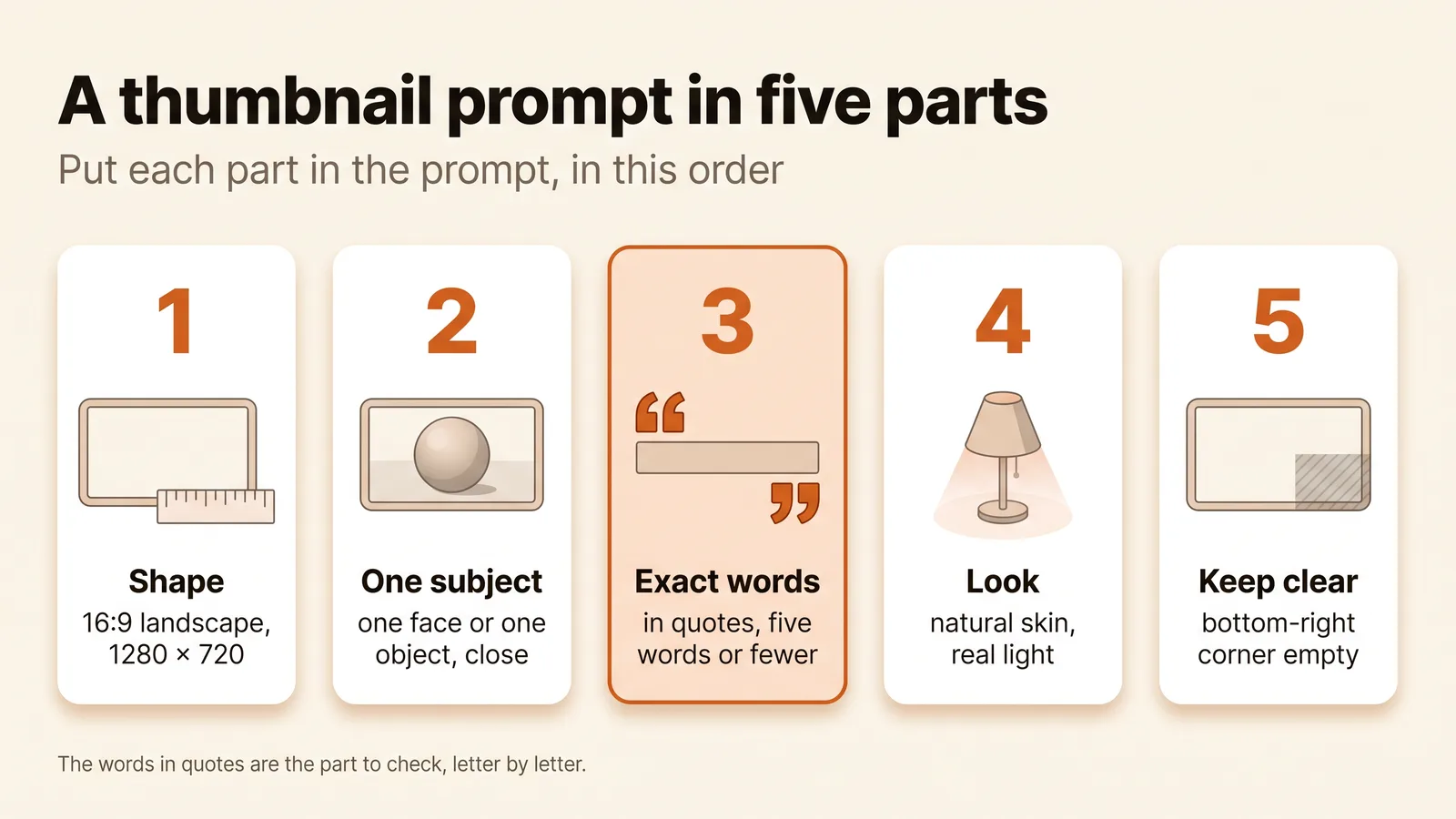
The best prompt names the shape, one subject, the exact words, the look and the empty corner, in that order. "Make me a YouTube thumbnail for my study video" gives ChatGPT nothing to work with, so it fills the gaps with its defaults: a centred subject, generic lettering, and skin that looks polished in a way skin never is. Here is a prompt that covers all five parts, for a video about one study technique:
Make a YouTube thumbnail, 16:9 landscape (1280 × 720).
Video: "The Study Hack That Saved My Exams", about one index-card technique.
Scene: a student at a desk at night holds up a single index card, eyes wide,
warm desk lamp, dark room behind. One subject, close to the camera.
Text: exactly the words "STUDY HACK", in heavy white sans-serif capitals
with a thin black outline, top left. No other text anywhere.
Look: photographic, natural skin texture, real lamp light, high contrast.
No logos, no watermark.
Keep the bottom-right corner empty: YouTube puts the video's length there.
The shape appears twice because "landscape" alone can come back as 3:2. The words sit in quotes, five or fewer, because short text is easier for the model to spell and for a viewer to read at feed size; "no other text anywhere" stops it adding a subtitle. "Natural skin texture" is there because image models default to an airbrushed look unless told otherwise, which makes that look a prompting failure, not a limit of the model.
Want your own face in it? ChatGPT can do something a thumbnail tool that refuses real people cannot: upload a photo of yourself, ask ChatGPT to save it as a reference, and call it by name with @ in later prompts, as its help page describes. Use a sharp, well-lit photo, and still check that the face reads as you.
What goes wrong with ChatGPT thumbnails?
ChatGPT thumbnails usually go wrong in five ways: misspelled words, the wrong shape, faces that look AI-made, clutter in the badge corner, and a brief that knows nothing about the video. ChatGPT was built for every kind of image, and a thumbnail has rules most images do not.
Why does ChatGPT misspell thumbnail text?
This is the most common failure, and OpenAI says so itself. Its image generation guide lists text rendering as a limitation: the model "can still struggle with precise text placement and clarity". In a thumbnail that looks like a doubled letter, a dropped one, or a word that runs off the edge of the frame. Ask for fewer words, put them in quotes, and correct only the text in a follow-up. If the same word fails twice, ask for the image with no text at all and add the words yourself in the free thumbnail text editor, which sets up to three lines on any image at 1280 × 720.
Why is a ChatGPT thumbnail the wrong shape?
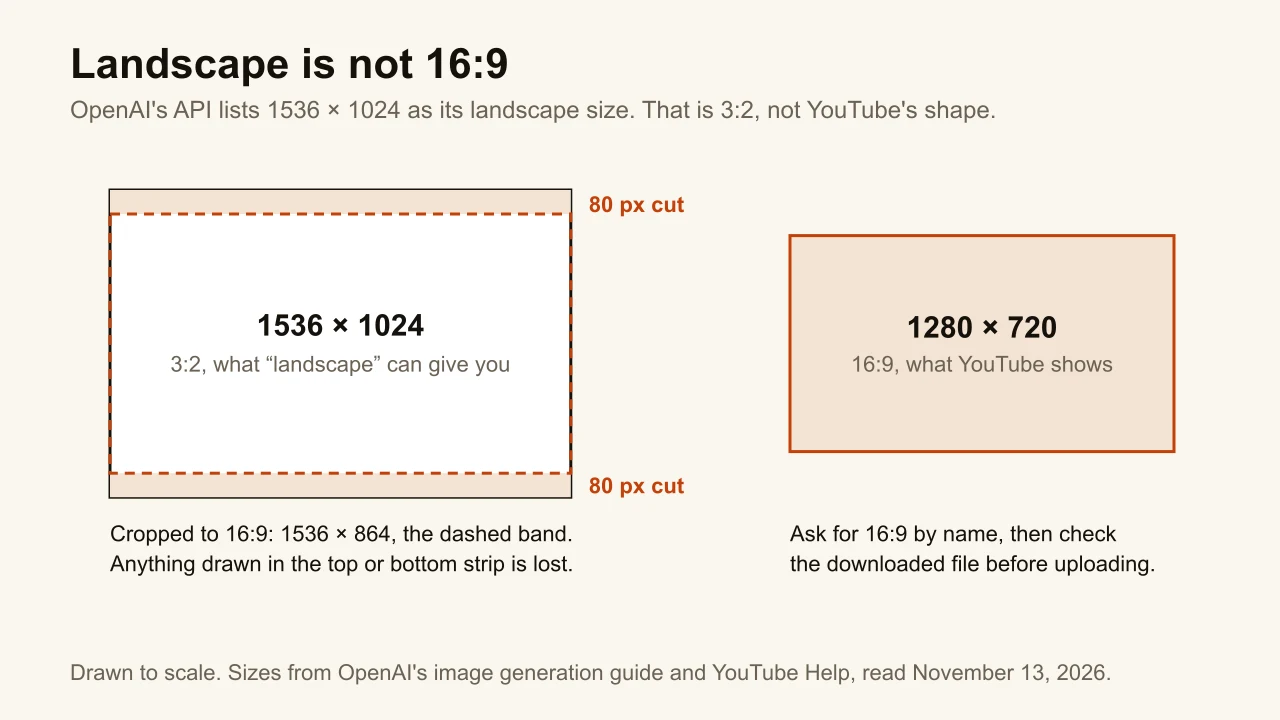
"Landscape" is not a size. OpenAI does not publish the pixel sizes ChatGPT itself returns, but its API lists 1536 × 1024 as its landscape size, which is 3:2. Cropped to 16:9 it loses 80 pixels at the top and 80 at the bottom, and that is where the headline and the top of a head usually sit. ChatGPT's help page describes an aspect ratio picker, not a pixel size, so the only way to know what you got is to check the downloaded file.
YouTube's own numbers: 16:9, at least 640 pixels wide, with 1280 × 720 accepted and 3840 × 2160 now recommended, and a file under 50 MB from a computer or 2 MB from the phone app. Our YouTube thumbnail size guide has the full table.
Why do ChatGPT faces look AI-made?
Waxy skin, a too-even glow, teeth that are all the same tooth. A face that reads as fake at a glance undermines whatever the title promises. Name the texture you want ("natural skin texture, visible pores, real lamp light") and the expression in one specific word ("surprised", not "excited and amazed and happy"). If you used your own reference photo, compare the result with the photo before you trust it.
What about clutter and the badge corner?
ChatGPT will happily draw the subject, three props, an arrow and a circle if the prompt mentions them. One focal point beats a collage, every time: the thumbnail is about 336 pixels wide in the home feed, and four objects at that size are four smudges. ChatGPT also has no idea that YouTube stamps the video's length in the bottom-right corner, so it will put a hand or a word there unless you say otherwise. Look at the result at feed size before you decide it works; the free YouTube thumbnail tester shows it in a mock home feed and on a phone.
Does ChatGPT know what your video is about?
No. Everything ChatGPT knows about the video is what you typed, so paste the title and a few lines of the description or transcript, and say which moment is the thumbnail. Fine for a one-off; slow for a weekly channel, because that brief is written from scratch each time.
Is there a faster way to make a thumbnail inside ChatGPT?
Yes, on ChatGPT accounts that can add a custom connector: add ThumbnailMaker as one and ask for the thumbnail in the same chat (which accounts qualify is just below). ChatGPT stays the place you type; ThumbnailMaker does the thumbnail part. It reads your video's link and writes the brief (one scene, the words, the style) for free, draws the words into the image, reads them back, redraws them once if a letter is wrong, and checks the result at the size YouTube's feed shows it. Before it spends anything it tells you the price and waits for your yes: one thumbnail is 10 credits, a 4K image or a second take 20. If an image fails, its credits come back on their own, and every thumbnail also lands in your Library.
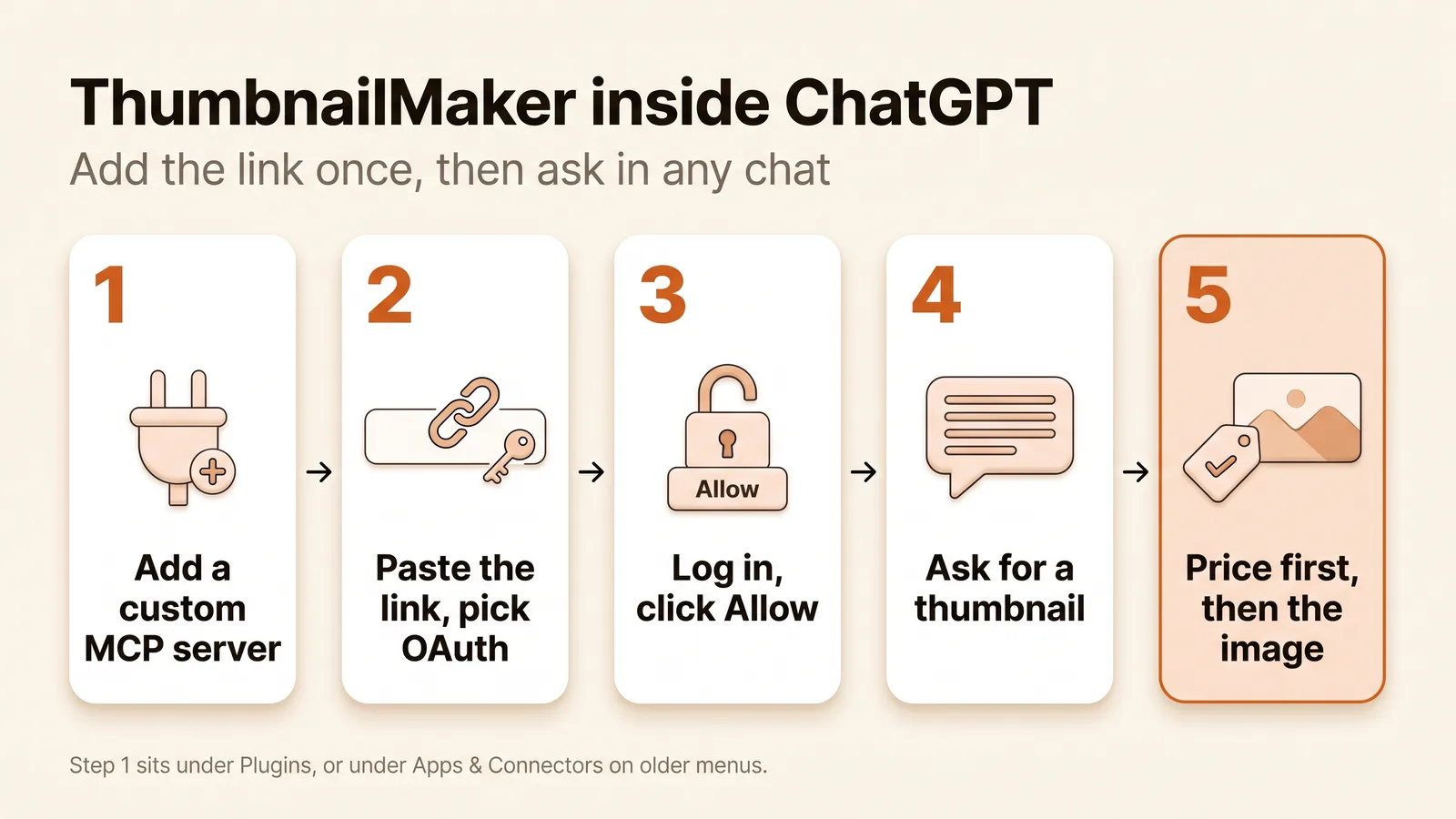
The setup, from OpenAI's custom MCP server guide, on ChatGPT on the web:
- Open Plugins, select the plus button, then Add custom MCP server. (On accounts that still show the older menus, it is Settings → Apps & Connectors → Advanced settings, turn on Developer mode, then Create.)
- Name it ThumbnailMaker and paste
https://www.thumbnailmaker.so/api/mcp, with nothing after it. - Choose OAuth for authentication, accept the risk warning, and create it.
- Log in to ThumbnailMaker and click Allow.
- In a chat, type @ and pick ThumbnailMaker, then ask: "Make a thumbnail for https://www.youtube.com/watch?v=… with the words STUDY HACK."
Which ChatGPT accounts can do this keeps moving, so here is what OpenAI's pages said on November 13, 2026. The pricing page lists Developer mode (beta) on Plus and Pro, not on Free or Go. The help article on custom MCP servers says full MCP, with actions such as making an image, is for Business and Enterprise/Edu workspaces, and that Pro accounts can connect servers "with read/fetch permissions". It also says custom servers are web only, not mobile. If ChatGPT will not add the connector, or blocks the step that makes the image, the same link works in Claude, whose connector help page lists custom connectors on every plan, Free included (one connector). The ChatGPT and Claude setup page has both, step by step.
Can you skip the prompt entirely?
Yes: ThumbnailMaker's web app writes the thumbnail prompt for you from your video's link. It is the same engine as the connector, without the chat around it. Paste your video's link and it writes the brief for you: three angles, each with a scene, the words and a style. Pick one, change any word, choose Video 16:9 or Shorts 9:16, and click Generate. Under the image, three checks say whether the text is exact, readable in the feed and clear of the badge corner. If something is off, type it under "What should we fix?" and click Correct, then Download.
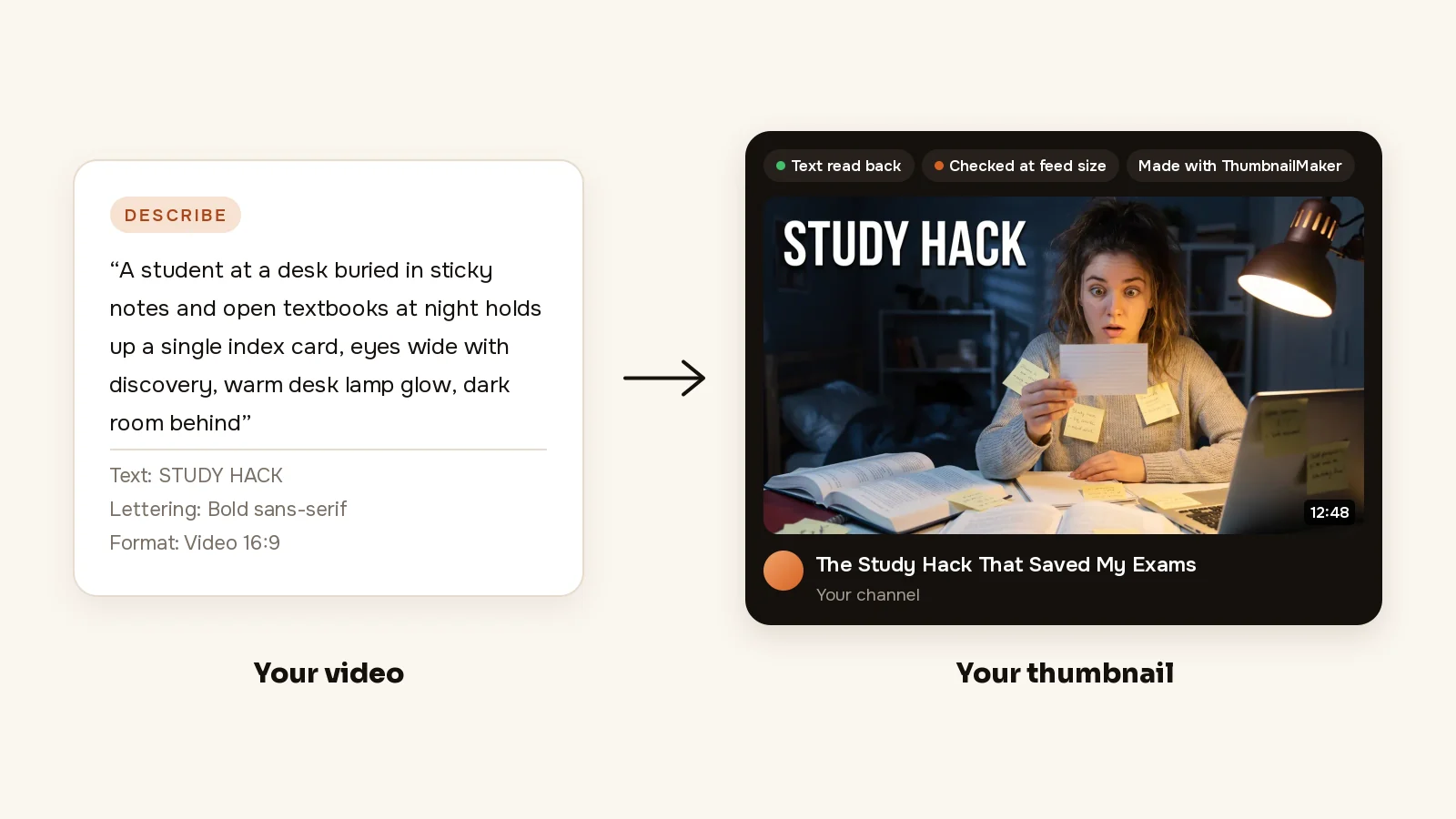
Your first 3 thumbnails are free, with no card, and writing the brief from your video's link is free too; after those, plans start at $12 a month for 40 thumbnails. The free tools above (the resizer, the text editor, the tester) need no account at all. Plan details are on the pricing page.
ChatGPT or a thumbnail tool: which should you use?
Use ChatGPT if you already pay for it, make a thumbnail now and then, and want your own face in it through a saved reference photo. Budget a few extra messages per thumbnail for the spelling, and keep the resizer open for the size.
Use a thumbnail tool if you publish every week. The time goes into the same three jobs every time: writing the brief, checking the letters and checking the feed size. A tool that does those three from the video's link saves more than any prompt template will.
Or both: with the connector, ChatGPT keeps the conversation and the script, and the thumbnail comes from a tool built for it.
If you take one thing from this guide, make it the fourth step: read the letters. And if checking them every week sounds like the part you would rather not do, make the thumbnail from your video's link and let the check run before you see the image.
Sources
ChatGPT facts were checked on OpenAI's own pages on November 13, 2026: Images in ChatGPT, ChatGPT pricing, Connecting custom MCP servers in ChatGPT, Add a custom MCP server and the image generation guide. Claude's connector plans come from Claude's help center, read the same day.
ThumbnailMaker is an independent product and is not affiliated with, sponsored by, or endorsed by OpenAI or Anthropic. ChatGPT is a trademark of OpenAI and Claude a trademark of Anthropic, named here only to describe publicly documented features.
ThumbnailMaker Team: Guides from the people building ThumbnailMaker: thumbnail design, CTR, and what happens under the hood of an AI generator. Every number is checked against YouTube's own pages and dated.